Skip to Content

Here's How Apple's New iPhone to iPhone Data Migration Feature Works in iOS 12.4

Apple this week released iOS 12.4, the newest version of iOS 12 available for iPhones and iPads. One of the new features in iOS 12.4 is an updated data migration option that uses device to device transfers rather than relying on iCloud.

Apple didn't provide much information on the new data migration feature, so we thought we'd check it out in our latest YouTube video.
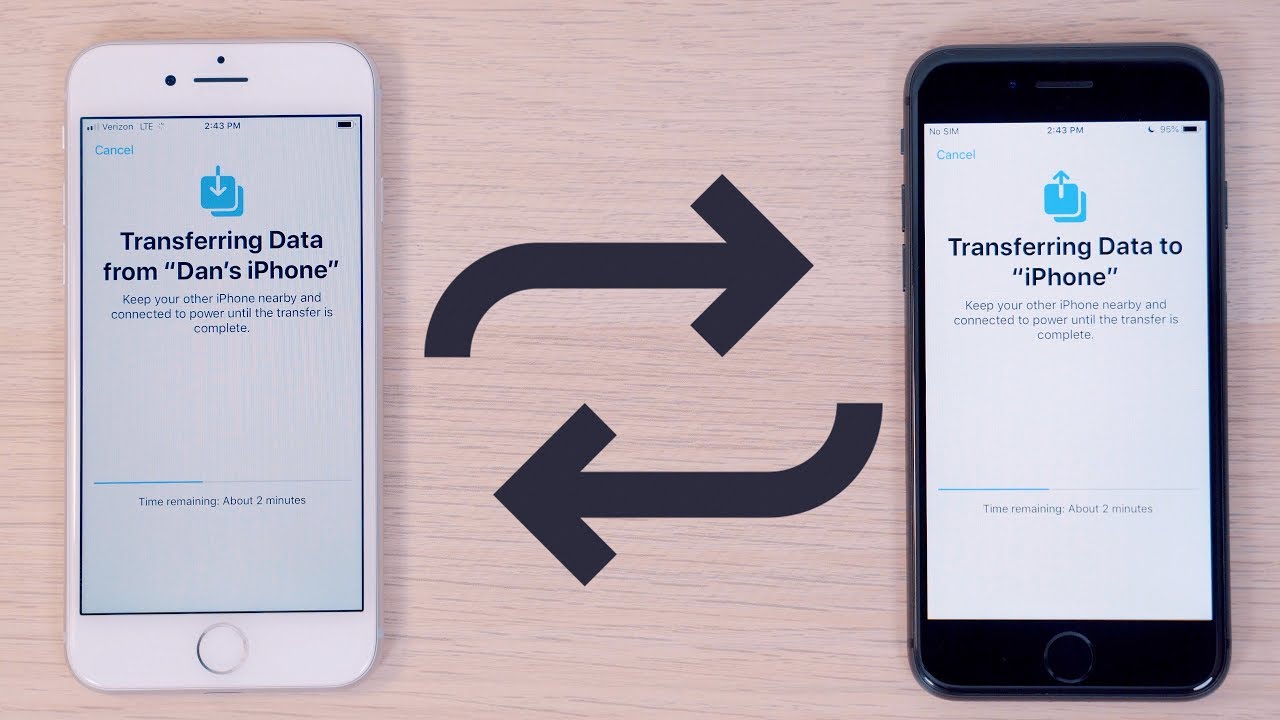

Setting up an iPhone using the new options uses the same Quick Start process that's been in place since iOS 11. When you get a new iPhone, you simply need to hold your existing iPhone nearby to initiate the setup process on the new device.

Quick Start confirms your Apple ID and then uses the camera to pair the two devices to one another by scanning an animation. After the pairing process completes (which includes the setup of Touch ID and Face ID), you'll see the new "Transfer from iPhone" option.

Transferring from iPhone, as the name suggests, bypasses ‌iCloud‌ and migrates data from one iPhone to another in a device to device capacity, which means it's done offline.

Prior to Apple's introduction of this feature, Quick Start only offered a "Download from ‌iCloud‌" option which required an ‌iCloud‌ backup.

The new iPhone to iPhone option is a useful way to transfer data for those who only have 5GB of free Apple storage, as there's not always enough room to create an ‌iCloud‌ backup. It's also useful when Wi-Fi connection speeds are limited, and it will ultimately make it quicker to get a new iPhone up and running.

It works similarly to an ‌iCloud‌ backup or an iTunes backup, transferring over information like photos, app information, device preferences and settings, and more. App data is transferred over, but as with an ‌iCloud‌ backup, apps are downloaded directly from the App Store rather than from your existing iPhone.

The amount of time that it takes to transfer data from one iPhone to another will vary based on what's on the existing iPhone, but Apple provides a data transfer estimate on the main data transfer screen.

Using this method, it's faster to get photos, music, and other media from one iPhone to another because there's no longer a need to wait for that content to download from ‌iCloud‌.

The new iPhone to iPhone data transfer process requires both devices to be running the release version of iOS 12.4 or later, and it won't work on devices running earlier versions of iOS 12.

iPhone to iPhone data transfers can be done over Wi-Fi, but there's also an option to transfer data using a wired connection by utilizing a USB3 Camera Adapter and a Lightning cable.


Related Forum: iOS 12

Popular Stories

1password deal blue

1Password Security Breach: What Was Accessed and What Wasn't

Wednesday November 25, 2026 1:09 pm PST by
Popular password management app 1Password today said it experienced a security breach earlier this month. 1Password says some customer names and email addresses were accessed, but no customer vault contents were compromised. On November 19, 1Password saw indications that an employee's GitHub account had been breached and began investigating. The company says the breached GitHub account was...
apple design award 2025

Apple Announces 2025 Design Award Winners Ahead of WWDC 2025

Tuesday June 3, 2025 10:14 am PDT by
As we wait for WWDC to kick off next Monday, Apple today announced the winners of its annual Apple Design Awards, recognizing apps and games for their innovation, ingenuity, and technical achievement. The 2025 Apple Design Award winners are listed below, with one app and one game selected per category: Delight and Fun - CapWords (App) and Balatro (Game) Innovation - Play (App) and PBJ -...
ipad pro prime

Apple Has iPads Running macOS Internally, Says Gurman

Wednesday November 25, 2026 4:55 am PST by
Apple has iPads running macOS internally and has had them "for some time," according to Bloomberg's Mark Gurman, although he says no work is currently being done to bring the Mac operating system to iPads. Speaking on his latest Power On podcast, Gurman said there is "no work being done to consumerize macOS on the iPad." Rather, Apple will continue to bring Mac features and apps like Final Cut ...

Top Rated Comments

Compile 'em all Avatar
96 months ago
So is this going to speed up that process compared to download from the Cloud?

I've alway started fresh! Clean slate to avoid cruft/unwanted random code. It can be a pain when bringing the phone back to normal use, but I feel its worth it!
What is “random code”? You a windows user by any chance? There is no “cruft”. You have iOS and then apps. Apps run in their container. There is nothing more to it. There is literally no difference between you setting up a device as new and installing and downloading your old things to it or doing a full device restore.
Score: 13 Votes (Like | Disagree)
nepalisherpa Avatar
96 months ago
This is just me, but, I always start fresh (except for contacts/calendar/notes/reminders) when I get a new phone. :)
Score: 11 Votes (Like | Disagree)
iPhonefreak79 Avatar
96 months ago
this method should have been available a decade ago!
Score: 10 Votes (Like | Disagree)
96 months ago
The only thing "new" in this process is that it no longer works with iOS 11 and has the option for connecting the devices by cable.

Used this method 3 wks ago to setup new iPP 11. The iPP came with 12.3.1 and I setup from by XR with had 13 b2. The pairing notifications said that both devices need iOS 11 or later. Setup was all wireless.
[doublepost=1563921447][/doublepost]
You are absolutely correct. It is much more sophisticated than a QR code.

If I understand it correctly the method used with iOS 11 and later is called Quick Start but requires an iCloud backup. This new method seems to be a variation on Quick Start that doesn’t need an iCloud backup. It transfers the data directly between the devices. So, it is completely new.
Score: 8 Votes (Like | Disagree)
Crowbot Avatar
96 months ago
QR codes lol. Apple fail.
"the two devices to one another by scanning an animation" It doesn't use QR codes. It's quite more complicated than a QR. Like when an :apple:watch pairs with a phone. Kind of a sparkly thing. Very complex.
Score: 8 Votes (Like | Disagree)
zorinlynx Avatar
96 months ago
This is just me, but, I always start fresh (except for contacts/calendar/notes/reminders) when I get a new phone. :)
I may do that with my next phone, just to get rid of the cruft built up over time.

I've been restoring backups to upgrade my phone since my first iPhone (4) in 2010. Nine years of cruft! What's amazing is that everything still works smoothly.
Score: 7 Votes (Like | Disagree)
Latest Stories
The 50+ Best Apple Black Friday Deals on AirPods, iPads, MacBooks, and More
58 minutes ago
The Best Black Friday Deals on Apple Home Products
15 minutes ago
The Best Black Friday iPhone Deals
28 minutes ago
The Best Black Friday iPad Deals
32 minutes ago
The Best Black Friday Apple Watch Deals
38 minutes ago
The Best Black Friday AirTag Deals
42 minutes ago
The Best Black Friday Mac Deals
47 minutes ago
The Best Black Friday AirPods Deals
54 minutes ago
iPhone Share of US Smartphone Market Hits 57% as Rivals Slip
2 hours ago
iPhone 20 Pro Rumored to Feature 3D-Printed Titanium Frame
3 hours ago
Apple's Official 2026 Black Friday Offer Starts Rolling Out
21 hours ago
Halide Adds Fill Light Feature for iPhone Duo
21 hours ago
MacBook Air Black Friday Deals Now Live With Massive $399 Savings
22 hours ago
Amazon Discounts All MacBook Neo Models by $99 for Black Friday
22 hours ago
Kodak Launches Unique AirTag Rival With E-Ink Display
23 hours ago
Here's Why the Apple Store is Going Down
1 day ago
Apple Still Working on Giant Foldable iPad That Could Cost $5,000
1 day ago
iPhones Dominate China's Weak Singles' Day Smartphone Sales
1 day ago
iPhone 20 Pro Could Feature Ceramic in Limited-Edition Model
1 day ago
Apple Faces Korean Regulator Review Over iPhone 16 AI Advertising
1 day ago
Apple Watch Ultra 4 Hits New Best-Ever Price of $649.99 for Black Friday
1 day ago
New Apple Store Opening in India, Download the Special Wallpaper Now
1 day ago
Redesigned OLED MacBook Air Could Launch in 2027 or 2028
2 days ago
AirPods Pro 3 for $149 is One of The Best Black Friday Deals This Year
2 days ago
1Password Security Breach: What Was Accessed and What Wasn't
2 days ago
WhatsApp Finally Adds Scheduled Messages
2 days ago
Get Apple's Cheapest iPad for $379 During Amazon's Black Friday Sale
2 days ago
Rumor: iOS 28 to Revamp Notifications
2 days ago
iPhone 18 Pro Max Battery Exhausts a Toy Cyclops in New Apple Ad
2 days ago
$799 Smart Glasses Promise Vision Pro-Style Controls in a 45g Frame
2 days ago
Related Apple News: Buyers Guide | Health | Opinion | Iphone | Iphone