Skip to Content

Seven Useful Tips Every Apple Watch Owner Should Know

There are lots of hidden shortcuts and features that have gone under the radar in watchOS, the operating system that runs on the Apple Watch.

In our latest video over on YouTube, we've rounded up some Apple Watch tips and tricks that every Apple Watch owner should know. You may already be aware of some of these tips, but there's likely to be a few new things here for MacRumors readers.

  • Get to Control Center/Notifications Quickly - Swiping down on the Apple Watch's screen opens Notifications while swiping up opens up the Control Center, which everyone knows. But you can also quickly get to Control Center or your Notifications when using an app by pressing at the edge of the screen, holding for a second, and then dragging upwards or downwards.
  • Locate a Missing iPhone - In the Control Center, if you press on the icon that looks like an iPhone, it will cause your iPhone to play a sound so you can find it if it's gone missing. If you long press on the button, it will also light up the flash, making it even easier to find a misplaced iPhone.
  • Use Apple Watch as a TV Remote - If you've lost your Apple TV Remote, no worries. The Apple Watch works as a replacement if you download the Apple TV Remote app on your iPhone. It's easier than using an iPhone because the watch is always right on your wrist.
  • Change Your App Layout - App grids look pretty on the Apple Watch, but can make it difficult when you just want to get to an app quickly. If you long press on the Apple Watch Home screen with the grid view open, you can swap over to a list view that lists all of the apps on your Apple Watch in alphabetical order. Scroll through them with a swipe or with the Digital Crown to find what you're seeking.
  • Unlock Your Mac With Apple Watch - If you have a mid-2013 or newer Mac you can set your Apple Watch to unlock it automatically, which means you don't need to enter your password. It's super handy and can be enabled in your Mac's settings under Security & Privacy. The Apple Watch needs to be unlocked for this to work and Wi-Fi and Bluetooth need to be enabled, as does two-factor authentication. Apple has a full list of requirements.
  • Scribble Predictive Text - The Scribble feature in Messages lets you spell out words on your Apple Watch, but it can be a hassle to write out long messages. If you spell out a few letters of a word, though, you can turn the Digital Crown to get some text predictions to speed things up.
  • Turn Off Audio Controls - When you play audio on your iPhone, your Apple Watch defaults to offering up music controls front and center, which can be annoying if you want to do other things on your Apple Watch. You can turn off this feature in the Settings app by going to General > Wake Screen > and disabling "Auto-Launch Audio Apps."

Know of other useful Apple Watch tips that we didn't share in today's article? Let us know in the comments and we might include them in future tips and tricks coverage.

Related Roundup: Apple Watch 12
Buyer's Guide: Apple Watch (Buy Now)
Related Forum: Apple Watch

Popular Stories

apple watch series 3 design

Apple Offers Steps to Fix Daylight Saving Time Bug on Apple Watch

Sunday November 1, 2026 3:34 am PST by
Apple has published a support document describing what to do if your Apple Watch continues to show time that's off by one hour after daylight savings time changes. "This incorrect time appears only on the Always On display when your wrist is down," says Apple. "When you activate the display by tapping it or raising your wrist, the time changes to the correct hour." To fix the issue, Apple says ...

muse apple watch app

Meta's Muse AI Agent Comes to Apple Watch

Monday November 9, 2026 1:55 pm PST by
Meta today updated the Muse app for iOS to add Apple Watch support, which means Muse users can access the proactive AI agent from the watch. The app adds the Muse character to the watch with an option to text it, dictate text to it, or call it. There's also a Muse complication for quick access. Muse is Meta's personal AI agent that can complete tasks for users. It is available as a...

siri recap live rewind

watchOS 27.3 Brings Live Rewind and Siri Recap to Apple Watch

Tuesday November 3, 2026 10:35 am PST by
With the first beta of watchOS 27.3, Apple is introducing new Audio Intelligence features it previewed for the Apple Watch Series 12 and Ultra 4 earlier this year. Powered by the S11 chip, Audio Intelligence includes Live Rewind, Siri Recap, Sound Recognition, and Shazam Music Recognition. Sound Recognition and Shazam are already on the watch, but Live Rewind and Siri Recap are now available ...

Top Rated Comments

100 months ago
My favorite tip not listed there is that you can use your nose to interact with your watch when your hands are full/messy.
Score: 25 Votes (Like | Disagree)
Cmd-Z Avatar
100 months ago
My favorite, 'Flashlight' from Control Center has come in handy on more than one occasion when trying to unlock a door in a dark area.

2nd favorite is using the Camera remote while slipping the iPhone camera into a hard to reach area, allowing you to view things you couldn't otherwise see.
Score: 15 Votes (Like | Disagree)
Abazigal Avatar
99 months ago
Thanks MR, I really dislike the honeycomb mode. The list mode is much better.
Here’s how I arrange the apps on my Apple Watch. Takes a bit of time, but I found it worth it for me.

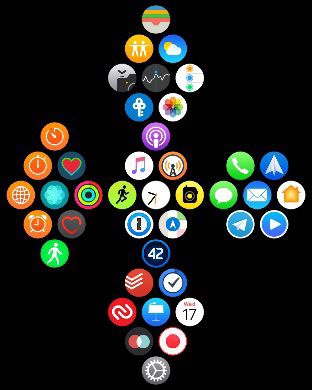
Basically, my 6 most commonly used apps in the middle. Communication apps on the right, exercise / fitness apps on the left, social apps on the top, and productivity apps on the bottom.
Score: 8 Votes (Like | Disagree)
Unity451 Avatar
100 months ago
My favorite tip not listed there is that you can use your nose to interact with your watch when your hands are full/messy.
Truth. #powerusertip
Score: 6 Votes (Like | Disagree)
otozuz Avatar
100 months ago
Nice article and video. I wasn't aware of 2-3 tips!
Score: 5 Votes (Like | Disagree)
Swimrlad Avatar
100 months ago
Is the feature to access control center in an app exclusive to watchos 5 and up? Can’t do it on my series 0
Score: 4 Votes (Like | Disagree)
Latest Stories
The 50+ Best Apple Black Friday Deals Still Available on AirPods, iPads, and More
13 minutes ago
HomePod Mini 2 in (RED) Seemingly Spotted Ahead of Announcement
10 hours ago
Apple's M6 and PROLED MacBook Pro Reach New Low Prices for Black Friday
20 hours ago
The MacRumors Show: iPhone Air 2 and iPhone 18 Are Coming
21 hours ago
Apple Store in Brisbane Reopening Next Month With New Design
21 hours ago
The 60+ Best Black Friday Accessory Deals on iPhone Chargers, TVs, Headphones, and More
22 hours ago
GTA VI Now (Barely) Running on Apple Silicon Macs
22 hours ago
The Best Black Friday Streaming Deals on Apple TV, Disney+, and More
23 hours ago
Apple TV's 'Carême' Wins International Emmy for Best Drama
23 hours ago
iPhone 18 Production Delay Leaves Apple Little Time Before Launch
1 day ago
The Best Black Friday AirPods Deals Still Available
16 hours ago
The Best Black Friday Deals on Apple Home Products
1 day ago
The Best Black Friday iPhone Deals Still Available
16 hours ago
The Best Black Friday iPad Deals Still Available
16 hours ago
The Best Black Friday Apple Watch Deals Still Available


16 hours ago
The Best Black Friday AirTag Deals Still Available
16 hours ago
The Best Black Friday Mac Deals Still Available
16 hours ago
iPhone Share of US Smartphone Market Hits 57% as Rivals Slip
1 day ago
iPhone 20 Pro Rumored to Feature 3D-Printed Titanium Frame
1 day ago
Apple's Official 2026 Black Friday Offer Starts Rolling Out
2 days ago
Halide Adds Fill Light Feature for iPhone Duo
2 days ago
MacBook Air Black Friday Deals Now Live With Massive $399 Savings
2 days ago
Amazon Discounts All MacBook Neo Models by $99 for Black Friday
2 days ago
Kodak Launches Unique AirTag Rival With E-Ink Display
2 days ago
Here's Why the Apple Store is Going Down
2 days ago
Apple Still Working on Giant Foldable iPad That Could Cost $5,000
2 days ago
iPhones Dominate China's Weak Singles' Day Smartphone Sales
2 days ago
iPhone 20 Pro Could Feature Ceramic in Limited-Edition Model
2 days ago
Apple Faces Korean Regulator Review Over iPhone 16 AI Advertising
2 days ago
Apple Watch Ultra 4 Hits New Best-Ever Price of $649.99 for Black Friday


2 days ago
Related Apple News: South Africa | Ipad | Culture | Mac | Reviews