Skip to Content

Apple TV Remote App Gains Support for New Screen Sizes, Password AutoFill

Apple today updated its Apple TV Remote app for iOS devices to introduce several new features for the 2018 iPhone lineup and the iOS 12 update, which was released this morning.

The app now supports new screen sizes, making it compatible with the upcoming 6.5-inch iPhone XS Max and the upcoming 6.1-inch iPhone XR. The iPhone XS Max will be available starting this Friday, while the iPhone XR is coming in October.
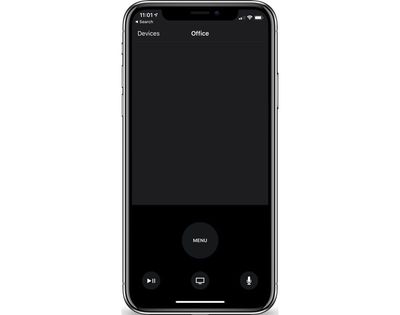
appletvremoteapp
Today's Apple TV Remote update also brings support for AutoFill Passwords, a feature that is designed to let you fill saved passwords securely from an iOS device to the Apple TV, alleviating the need to type in a full username and password.

Apple TV Remote is also automatically being added to Control Center as a default option, providing quick access to controls for the fourth and fifth-generation Apple TV. Apple TV Remote access has been available in Control Center since iOS 11, but until now, it was not one of the default Control Center icons.

Apple TV Remote can be downloaded from the App Store for free. [Direct Link]

Related Roundup: Apple TV
Buyer's Guide: Apple TV (Buy Now)

Popular Stories

Apple Event Logo

Apple Releasing Yet Another Two New Products Next Week

Friday November 6, 2026 7:36 am PST by
Apple's massive wave of product launches will finally end next week, with its all-new HomeView smart home hub and the fourth-generation Apple TV 4K set to be released on Friday, November 13 and no other major hardware releases expected for the remainder of the year. Since late August, Apple has announced more than 25 new devices and accessories in one of its busiest stretches...
Apple TV 4K 4th Generation Top View5

New Apple TV 4K and iPad Mini: RAM Amounts Revealed

Thursday October 29, 2026 5:50 pm PDT by
Apple today released Xcode 27.2, and it reveals how much RAM is in the new fourth-generation Apple TV 4K and the new iPad mini with an OLED display. As expected, the new Apple TV 4K with the A19 chip is equipped with 8GB of RAM, while the new iPad mini with the A20 Pro chip has 12GB of RAM. For good measure, Xcode shows the iPhone Duo is equipped with 12GB of RAM. None of these RAM...
Apple TV Silo

Apple TV Reportedly Planning 'Silo' Spinoff

Wednesday November 4, 2026 8:56 am PST by
Apple TV is developing a "Silo" spinoff tied to Hugh Howey's upcoming Silo book trilogy, according to Apple TV commentator and podcaster Sigmund Judge. He said pre-production will begin later this year, with the books expected next summer. Hiring has apparently begun and some sets remain standing after season four wrapped in March. The reported project would follow the show's fourth and final...

Top Rated Comments

107 months ago
Volume control???
It's there, just use the volume buttons on your phone.
Score: 5 Votes (Like | Disagree)
107 months ago
Other than what I posted how would I find that out? As best I know it’s set to auto. Either way that’s the remote itself curious why the ios remote ATv app would try to use an IR setting when the iPhone has never had an IR emitter
For my setup I had my ATV4 learn the control for my A/V remote. It can’t turn it on but it can control the volume. I have and older A/V setup, no Bluetooth or Wifi.

Did you have to do the same?

What I’m getting at is in order for the iPhone to communicate with your setup, there has to be some method for it to talk to your TV, A/V etc..

I’m not an A/V expert so perhaps someone else who has a working volume control and more knowledge can jump in.

If you could take a pic of your Settings - Remotes and Devices - Volume Control screen it may shed some light.

Edit: I found this on Apple site:

Looking for the app's onscreen keyboard or volume controls?


* A keyboard appears in the Apple TV Remote app when you select a text field on your Apple TV.
* Want to change the volume using your iOS device? Receivers with HDMI-CEC volume support let you adjust volume with the volume buttons on the side of your iOS device. You just need to plug your Apple TV directly into your receiver and not into your television. Get help with HDMI-CEC ('https://support.apple.com/kb/ht205225').

[doublepost=1537235796][/doublepost]After playing around with two different setups and reviewing your original comment, it appears your TV is setup to “Auto via IR (TV)”.

If that is the case it appears you are not using HDMI-CEC which is what is required according to what I posted earlier.
Score: 2 Votes (Like | Disagree)
107 months ago
Nope. Doesn’t work from iPhone 8/256GB on iOS 11. I tried before and after TVOS update (11, now 12). My ATV4 is connected directly to my TV using HDMI. Only the TV remote or the ATV4 remote will control volume.

Settings, Remotes & Devices:
Volume Control is ser to “Auto” yet displays “Auto via IR (TV)”. Only TV via IR, Off, or Learn New Device are my options.

Maybe you think it’s my HDMI Cable?
Question. Is your ATV4 remote using the IR sesnsor to control sound?
Score: 2 Votes (Like | Disagree)
107 months ago
@sinsin07 , the early post as stated above was to my situation and since I have no receiver the ATV is using IR to control myTV volume which sucks I’ve noticed the icon for volume change to sho the TVs on screen display vs the ATV volume display. So bummed out but it works so not too bad.

Well...you could look at it this way...this is an excuse to get an a/v receiver that supports hdmi-cec. Maybe one of those "theater in a box" setups has the feature. I'm not sure. It will enhance your movie watching/music listening experience a lot. Or, build your own system...
There are tv's that have hdmi-cec, too. But, that won't sound as good.
Score: 1 Votes (Like | Disagree)
107 months ago
FALSE
Not clear why you insist the remote app on the iphone cannot control volume.
Yes the iphone does not have an IR Transmitter.
It can control volume throudh HDMI-CEC as specified earlier.
It may not help DeepIn2u but your conclusion is incorrect, there is a method.

If you have any links that show Apple is in error, please post for the benefit of all, otherwise stop posting false information.
I was responding to someone’s post. In their case, they do not have an hdmi-cec tv. They won’t be able to control tv volume with their iPhone. They were asking why they could with the ATV remote, but not with the phone.
I was responding to ONE person. NOT making a general comment. Simma down na.
Geeez...o_O
Score: 1 Votes (Like | Disagree)
107 months ago
[doublepost=1537361174][/doublepost]
I don’t have a receiver of any kind.

TV plugged into wall, HDMI input direct from ATV4. ATV4 has WiFi connection to Cable Módem/Router.

TV has its own remote to control volume. ATV remote can control volume. Yet the iOS Remote app on iPhone doesn’t control the TV or shows volume being sent by the ATV. ATV settings for Audio is Auto and no I’m not using SPDIF either.
tv OR receiver. o_O Doesn’t matter. Either way. I was just saying...
Anyway...the iPhone doesn’t have an IR transmitter. It can’t control the volume on your tv. The  TV remote has an IR transmitter, so, it can.
[doublepost=1537362188][/doublepost]
Your comment contradicts Apple’s help site.

* Want to change the volume using your iOS device? Receivers with HDMI-CEC volume support let you adjust volume with the volume buttons on the side of your iOS device. You just need to plug your Apple TV directly into your receiver and not into your television. Get help with HDMI-CEC ('https://support.apple.com/kb/ht205225').

Are you saying the above is incorrect?

Control your TV or receiver with your Siri Remote or Apple TV Remote ('https://support.apple.com/en-us/HT205225')
[SIZE=3]Use the Apple TV Remote app ('https://support.apple.com/en-us/HT204989')[/SIZE]
Nope
Score: 1 Votes (Like | Disagree)
Latest Stories
The 50+ Best Apple Black Friday Deals Still Available on AirPods, iPads, and More
37 minutes ago
HomePod Mini 2 in (RED) Seemingly Spotted Ahead of Announcement
10 hours ago
Apple's M6 and PROLED MacBook Pro Reach New Low Prices for Black Friday
21 hours ago
The MacRumors Show: iPhone Air 2 and iPhone 18 Are Coming
21 hours ago
Apple Store in Brisbane Reopening Next Month With New Design
21 hours ago
The 60+ Best Black Friday Accessory Deals on iPhone Chargers, TVs, Headphones, and More
22 hours ago
GTA VI Now (Barely) Running on Apple Silicon Macs
23 hours ago
The Best Black Friday Streaming Deals on Apple TV, Disney+, and More
23 hours ago
Apple TV's 'Carême' Wins International Emmy for Best Drama
1 day ago
iPhone 18 Production Delay Leaves Apple Little Time Before Launch
1 day ago
The Best Black Friday AirPods Deals Still Available
17 hours ago
The Best Black Friday Deals on Apple Home Products
1 day ago
The Best Black Friday iPhone Deals Still Available
17 hours ago
The Best Black Friday iPad Deals Still Available
17 hours ago
The Best Black Friday Apple Watch Deals Still Available
17 hours ago
The Best Black Friday AirTag Deals Still Available
17 hours ago
The Best Black Friday Mac Deals Still Available
17 hours ago
iPhone Share of US Smartphone Market Hits 57% as Rivals Slip
1 day ago
iPhone 20 Pro Rumored to Feature 3D-Printed Titanium Frame
1 day ago
Apple's Official 2026 Black Friday Offer Starts Rolling Out
2 days ago
Halide Adds Fill Light Feature for iPhone Duo
2 days ago
MacBook Air Black Friday Deals Now Live With Massive $399 Savings
2 days ago
Amazon Discounts All MacBook Neo Models by $99 for Black Friday
2 days ago
Kodak Launches Unique AirTag Rival With E-Ink Display
2 days ago
Here's Why the Apple Store is Going Down
2 days ago
Apple Still Working on Giant Foldable iPad That Could Cost $5,000
2 days ago
iPhones Dominate China's Weak Singles' Day Smartphone Sales
2 days ago
iPhone 20 Pro Could Feature Ceramic in Limited-Edition Model
2 days ago
Apple Faces Korean Regulator Review Over iPhone 16 AI Advertising
2 days ago
Apple Watch Ultra 4 Hits New Best-Ever Price of $649.99 for Black Friday
2 days ago
Related Apple News: Reviews | Opinion | Travel | Iphone | Technology