Skip to Content

Astropad Standard and Studio Apps Updated With Support for Luna Display Adapter, Which is Now Available for Pre-Order

by

Astropad today introduced new updates for both its Astropad Studio and Astropad Standard apps, bringing support for the Luna Display adapter, which is also now available for pre-order.

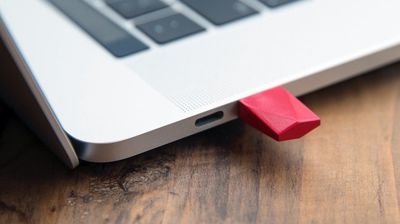
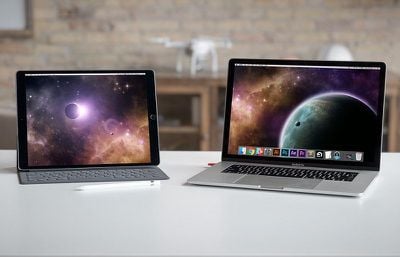
Introduced as a Kickstarter project last year, the Luna Display is designed to turn any iPad into a wireless second display for the Mac.
astropadluna
Astropad alone mirrors the Mac display, but Luna Display is designed to extend the Mac display rather than simply mirror it.

The Luna Display adapter plugs into a Mac using Mini DisplayPort or USB-C, and then after downloading the app, the Luna Display serves as an extension of the Mac, letting Mac content be accessed directly from an iPad.

Both of the Astropad apps now support Luna Display, and the Luna Display itself can be pre-ordered from the Luna Display website for $69.99.
astropadluna2
Astropad also announced today that it is discontinuing all support for third-party styluses. The company says that third-party styluses deliver poor performance compared to Apple Pencil and create engineering complexities.

Astropad no longer recommends third-party styluses for artists. Support will cease at the end of 2018 to allow Astropad to focus on optimizing its apps for the Apple Pencil.

Astropad Standard can be downloaded from the App Store for $29.99. [Direct Link]

Astropad Studio, which costs $11.99 per month for syncing and monthly feature updates, is free to download initially. [Direct Link]


Top Rated Comments

Cindori Avatar
109 months ago
Other apps have allowed wireless display transmission, but at less than optimal frame rates and resolution using WiFi. Is this like some sort of lower-latency USB 3.0 thing with a built-in H.265 encoder or something? It can't be too proprietary considering that the iPad only has Bluetooth, LTE and WiFi to communicate and I don't see a dongle on the iPad end.
The dongle is simply a display emulator. A chip tricking the OS that "hey a display was connected". By doing this you can then capture the "fake" display and stream it as video to the iPad (over WiFi). There is no real magic behind the Luna dongle except it being USB-C. There's tons of this type of dongle available in HDMI-format for cheap:

https://www.headlessghost.com/

https://www.amazon.com/CompuLab-fit-Headless-Display-Emulator/dp/B00FLZXGJ6

Price is 90% less than what Astropad is charging for their dongle.
Score: 3 Votes (Like | Disagree)
ipedro Avatar
109 months ago
Nice ad.
How much do you pay MacRumors to read their site?

...oh, you don’t? Breaking news: advertising pays the bills so you don’t have to.
Score: 2 Votes (Like | Disagree)
aevan Avatar
109 months ago
Am I understanding this right -- could you take an image you're working on and drag it over to the iPad Pro display and draw on it with the Apple Pencil? (I mean, assuming the app supports that?)
Just with the app, the iPad mirrors your Mac’s screen and, yes, you can draw on it great. Works really well.

Luna is a smart hardware hack that “tricks” macOS that there is a second monitor present and then the iPad image is “mirrored” from that virtual monitor - esentially creating a separate display on the iPad. You can draw on this too, of course.

So, Astropad - mirrored Mac screen you can draw on, Astropad + Luna - separate Mac screen you can draw on :)
[doublepost=1531323299][/doublepost]
Other apps have allowed wireless display transmission, but at less than optimal frame rates and resolution using WiFi. Is this like some sort of lower-latency USB 3.0 thing with a built-in H.265 encoder or something? It can't be too proprietary considering that the iPad only has Bluetooth, LTE and WiFi to communicate and I don't see a dongle on the iPad end.
It uses wifi or a lightning cable to connect (latency is better with the cable).

The adapter on the Mac is Luna Display, a little dongle that makes your Mac think there is a separate display which it can mirror on the iPad with Astropad. It’s the only way you can get a separate (non-mirrored) image with Astropad.

Please note I’m not affiliated with Astropad in any way - I’m just a user :)
Score: 2 Votes (Like | Disagree)
aevan Avatar
109 months ago
What’s the difference between Standard and Studio?

I used to use Astropad but the pixelation sucked and Duet was better. Then Duet started requiring a subscription to use the Pencil so I stopped using mirroring apps like these alltogether and went with using native apps for Mac and iOS that could open each other’s files (I.e. Lightroom for Mac and iOS).

I’d consider going back to Astropad if it works with Apple Pencil and has solved the pixelation problem. I already paid for Astropad, I’m not going to pay for a subscription too.
Duet can’t really compare with Astropad when it comes to drawing. Not even close. Yes, there used to be pixelation in Astropad before, but that was because the app was art-focused, putting low lag before picture quality. But now even that is fixed. If you want a second screen, Duet is fine, but for actual art, Astropad is the only choice.

As for Standard and Studio - Studio has some nice gestures, shortcuts and pressure curve settings. Standard has the same performance and the most important features. If you plan on using a keyboard instead of gesture shortcuts, Standard is perfectly fine.
Score: 1 Votes (Like | Disagree)
cocoua Avatar
109 months ago
What’s the difference between Standard and Studio?

I used to use Astropad but the pixelation sucked and Duet was better. Then Duet started requiring a subscription to use the Pencil so I stopped using mirroring apps like these alltogether and went with using native apps for Mac and iOS that could open each other’s files (I.e. Lightroom for Mac and iOS).

I’d consider going back to Astropad if it works with Apple Pencil and has solved the pixelation problem. I already paid for Astropad, I’m not going to pay for a subscription too.
Subscription is way too expensive...
Score: 1 Votes (Like | Disagree)
aevan Avatar
109 months ago
How good is it for drawing when it comes to latency etc?
Very good - you can definitely do professional work on it with ease. This is coming from someone who used various Cintiqs and Intuoses. Please note that I use a lightning cable for best results.
Score: 1 Votes (Like | Disagree)

Popular Stories

1password deal blue

1Password Security Breach: What Was Accessed and What Wasn't

Wednesday November 25, 2026 1:09 pm PST by
Popular password management app 1Password today said it experienced a security breach earlier this month. 1Password says some customer names and email addresses were accessed, but no customer vault contents were compromised. On November 19, 1Password saw indications that an employee's GitHub account had been breached and began investigating. The company says the breached GitHub account was...
apple design award 2025

Apple Announces 2025 Design Award Winners Ahead of WWDC 2025

Tuesday June 3, 2025 10:14 am PDT by
As we wait for WWDC to kick off next Monday, Apple today announced the winners of its annual Apple Design Awards, recognizing apps and games for their innovation, ingenuity, and technical achievement. The 2025 Apple Design Award winners are listed below, with one app and one game selected per category: Delight and Fun - CapWords (App) and Balatro (Game) Innovation - Play (App) and PBJ -...
ipad pro prime

Apple Has iPads Running macOS Internally, Says Gurman

Wednesday November 25, 2026 4:55 am PST by
Apple has iPads running macOS internally and has had them "for some time," according to Bloomberg's Mark Gurman, although he says no work is currently being done to bring the Mac operating system to iPads. Speaking on his latest Power On podcast, Gurman said there is "no work being done to consumerize macOS on the iPad." Rather, Apple will continue to bring Mac features and apps like Final Cut ...
Latest Stories
The 50+ Best Apple Black Friday Deals on AirPods, iPads, MacBooks, and More
2 hours ago
iPhone 18 Production Delay Leaves Apple Little Time Before Launch
18 minutes ago
The Best Black Friday AirPods Deals
51 minutes ago
The Best Black Friday Deals on Apple Home Products
55 minutes ago
The Best Black Friday iPhone Deals
1 hour ago
The Best Black Friday iPad Deals
1 hour ago
The Best Black Friday Apple Watch Deals
1 hour ago
The Best Black Friday AirTag Deals
1 hour ago
The Best Black Friday Mac Deals
1 hour ago
iPhone Share of US Smartphone Market Hits 57% as Rivals Slip
2 hours ago
iPhone 20 Pro Rumored to Feature 3D-Printed Titanium Frame
4 hours ago
Apple's Official 2026 Black Friday Offer Starts Rolling Out
21 hours ago
Halide Adds Fill Light Feature for iPhone Duo
22 hours ago
MacBook Air Black Friday Deals Now Live With Massive $399 Savings
23 hours ago
Amazon Discounts All MacBook Neo Models by $99 for Black Friday
23 hours ago
Kodak Launches Unique AirTag Rival With E-Ink Display
1 day ago
Here's Why the Apple Store is Going Down
1 day ago
Apple Still Working on Giant Foldable iPad That Could Cost $5,000
1 day ago
iPhones Dominate China's Weak Singles' Day Smartphone Sales
1 day ago
iPhone 20 Pro Could Feature Ceramic in Limited-Edition Model
1 day ago
Apple Faces Korean Regulator Review Over iPhone 16 AI Advertising
1 day ago
Apple Watch Ultra 4 Hits New Best-Ever Price of $649.99 for Black Friday
1 day ago
New Apple Store Opening in India, Download the Special Wallpaper Now
1 day ago
Redesigned OLED MacBook Air Could Launch in 2027 or 2028
2 days ago
AirPods Pro 3 for $149 is One of The Best Black Friday Deals This Year
2 days ago
1Password Security Breach: What Was Accessed and What Wasn't
2 days ago
WhatsApp Finally Adds Scheduled Messages
2 days ago
Get Apple's Cheapest iPad for $379 During Amazon's Black Friday Sale
2 days ago
Rumor: iOS 28 to Revamp Notifications
2 days ago
iPhone 18 Pro Max Battery Exhausts a Toy Cyclops in New Apple Ad
2 days ago
Related Apple News: Mac | World News | Education | Culture | News