Skip to Content

Darkroom 3.5 Update Adds Depth Editing Features, Depth-Aware Filters, and More

by

Popular photo editing app Darkroom reached version 3.5 today, introducing the ability to edit Depth shots taken on supporting iPhone cameras, along with several other notable new features.

After updating to v3.5, Darkroom will automatically load the depth map for Portrait photos encountered in the library and recreate applied blur from scratch, handing control of its strength and location back to the user. Thanks to a new depth range selector, it's now possible to define exactly where the foreground and the background are.
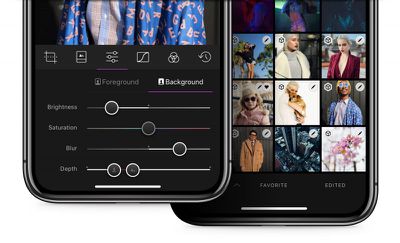
Darkroom 3 5 depth
Meanwhile, in what the developers are calling an industry first, Darkroom 3.5 now features Depth-Aware filters. These come premium Portrait Filter pack to be depth-aware. Each filter will automatically adjust foreground and background settings to optimize the focal point of the image on the face, not on the background. User-created filters with depth settings also now carry over those settings to the filter itself.

Additionally in this release, Darkroom's RAW engine has been rebuilt to take full advantage of the Extended-Range color space of Raw files, which should enable photographers to dramatically improve the amount of detail that's recoverable from shadows and highlights. Similarly, the brightness, contrast, highlights and shadows sliders have been rebuilt to operate in the extended space, offering finer-grain tone control.
35 halide
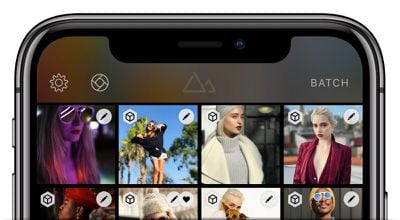
Elsewhere, the developers have undertaken app-wide performance refinements in an effort to make photo editing in Darkroom as fast as photo browsing. There's also now a dedicated button at the top of the library view for accessing popular third-party camera app Halide, ready for when the announced Darkroom X Halide integration goes live.

Darkroom is a free download from the App Store and includes in-app purchases for some tools. [Direct Link].

Top Rated Comments

113 months ago
I enjoy using this app. But one thing I’ve struggled with is the best use off all the options in the app. Individually they make sense: contrast, highlights, shadows, plus the curves you can drag. But put them all together and it’s a challenge to know when you should adjust one feature vs another. Every picture is different and there’s always going to be some trial and error, but I’d love to get pointers on a holistic approach to editing my pictures that takes advantage of the features without the overkill of trying to use every option.
Great point. We're going to be releasing educational material inside the app and our blog later this year. Just need to fine the time somewhere....
[doublepost=1522347311][/doublepost]
Cool! I've never heard of Darkroom before today, but as soon as my phone and iPad finish updating to 11.3 I'll be giving it a spin :)

I currently use Lightroom for most iOS photo editing since I like its raw capture support, its basic functionality as compared to the desktop version, and the great jpeg exporting. But (afaik) it can't natively work with the iOS camera effects, so that sounds like fun!
Lightroom is a fantastic app, but it's locked within the Adobe CC ecosystem. What you'll find different (and we hope, amazing) in Darkroom, is how tightly integrated we are to the native photo library. We call it Library Sync: No import, all actions are automatically mapped back to the photo library (except export, that's an explicit step).
Score: 5 Votes (Like | Disagree)
113 months ago
first time user for the app...(i had previously downloaded it but never opened)
-Is the app OK for JPEG or more for iPhone RAW 'images' (I just have a iP6...but will upgrade later this year)
-Does the $7.99 in-app purchase knock everything...there are quite a few in-app purchase options and a bit confusing to me.


Thanks
Yes, the $7.99 purchase unlocks everything in the app :)

Darkroom handles most kinds of images you send its way: JPEG, RAW, Portrait, Live, etc. Try it with your DSLR photos as well!
Score: 4 Votes (Like | Disagree)
113 months ago
Then answer the question above your post....;)
Haha fair.

From a capture perspective, Apple calls depth-capture "Portrait Mode" because it's ideally suited for capturing portraits of people (We can't guess what they're potentially doing under the hood as far as ML-backed detection and manipulation of depth data). The native camera app enforces this by setting distance limits and light-limits to ensure the quality of the depth map is high. When you use portrait mode in non-portrait contexts, you may very well have an excellent depth map, but often you end up with artifacts.

From an editing perspective, the use of depth-editing is much more obvious and the benefit you get from it as a photographer is much more prevalent when used to add contrast between foreground and background, in portrait settings.

tl;dr- It's a better context for explaining the feature and why it's useful, though it can certainly be used in other contexts.
[doublepost=1522339872][/doublepost]
Is denoise something you guys are working on? I'd much rather do my editing in one app than have to bounce out to Light Room to denoise my .raw files.

The notes specifically mention "the face" when talking about depth. What's that mean for those of us who use portrait mode on things other than people?
Denoise is currently not high on our priority list. We're a two-man company, so we're resource limited on what we can do at one time, but it's on our radar. Just have to get through some of the very high priority items first.
Score: 4 Votes (Like | Disagree)
113 months ago
Hello all, I'm the co-founder of Darkroom, happy to answer any questions you may have!
Score: 4 Votes (Like | Disagree)
113 months ago
No questions, just to say “thank you”. Love the app. A lot of attention to detail here, from the design to the haptics when you move sliders around. Personally, I like using curves the most.

I rarely use photo editing apps outside built in ones, but Darkroom is the exception. The only thing missing, I guess, is some kind of context-aware fix brush (to remove smudges and blemishes), but even without it, it’s worth the IAP price. Thanks.
Thank you very much for the kind words, it's very much appreciated
Score: 2 Votes (Like | Disagree)
aevan Avatar
113 months ago
Hello all, I'm the co-founder of Darkroom, happy to answer any questions you may have!
No questions, just to say “thank you”. Love the app. A lot of attention to detail here, from the design to the haptics when you move sliders around. Personally, I like using curves the most.

I rarely use photo editing apps outside built in ones, but Darkroom is the exception. The only thing missing, I guess, is some kind of context-aware fix brush (to remove smudges and blemishes), but even without it, it’s worth the IAP price. Thanks.
Score: 2 Votes (Like | Disagree)

Popular Stories

halide iphone duo

Halide Adds Fill Light Feature for iPhone Duo

Thursday November 26, 2026 8:17 am PST by
Halide 3.4 can use the iPhone Duo's outer display to light subjects when the device is unfolded. The feature offers softer lighting than the dedicated flash, with maximum screen brightness recommended. Users can also show subjects a camera preview on the outer display. The update adds a larger inner-screen viewfinder and brings back the shutter timer and color and luminance histograms on other...
apple design award 2025

Apple Announces 2025 Design Award Winners Ahead of WWDC 2025

Tuesday June 3, 2025 10:14 am PDT by
As we wait for WWDC to kick off next Monday, Apple today announced the winners of its annual Apple Design Awards, recognizing apps and games for their innovation, ingenuity, and technical achievement. The 2025 Apple Design Award winners are listed below, with one app and one game selected per category: Delight and Fun - CapWords (App) and Balatro (Game) Innovation - Play (App) and PBJ -...
1password deal blue

1Password Security Breach: What Was Accessed and What Wasn't

Wednesday November 25, 2026 1:09 pm PST by
Popular password management app 1Password today said it experienced a security breach earlier this month. 1Password says some customer names and email addresses were accessed, but no customer vault contents were compromised. On November 19, 1Password saw indications that an employee's GitHub account had been breached and began investigating. The company says the breached GitHub account was...
Latest Stories
The 50+ Best Apple Black Friday Deals Still Available on AirPods, iPads, and More
2 hours ago
Apple's M6 and PROLED MacBook Pro Reach New Low Prices for Black Friday
9 hours ago
The MacRumors Show: iPhone Air 2 and iPhone 18 Are Coming
9 hours ago
Apple Store in Brisbane Reopening Next Month With New Design
10 hours ago
The 60+ Best Black Friday Accessory Deals on iPhone Chargers, TVs, Headphones, and More
10 hours ago
GTA VI Now (Barely) Running on Apple Silicon Macs
11 hours ago
The Best Black Friday Streaming Deals on Apple TV, Disney+, and More
11 hours ago
Apple TV's 'Carême' Wins International Emmy for Best Drama
12 hours ago
iPhone 18 Production Delay Leaves Apple Little Time Before Launch
13 hours ago
The Best Black Friday AirPods Deals Still Available
5 hours ago
The Best Black Friday Deals on Apple Home Products
13 hours ago
The Best Black Friday iPhone Deals Still Available
5 hours ago
The Best Black Friday iPad Deals Still Available
5 hours ago
The Best Black Friday Apple Watch Deals Still Available
5 hours ago
The Best Black Friday AirTag Deals Still Available
5 hours ago
The Best Black Friday Mac Deals Still Available
5 hours ago
iPhone Share of US Smartphone Market Hits 57% as Rivals Slip
15 hours ago
iPhone 20 Pro Rumored to Feature 3D-Printed Titanium Frame
16 hours ago
Apple's Official 2026 Black Friday Offer Starts Rolling Out
1 day ago
Halide Adds Fill Light Feature for iPhone Duo
1 day ago
MacBook Air Black Friday Deals Now Live With Massive $399 Savings
1 day ago
Amazon Discounts All MacBook Neo Models by $99 for Black Friday
1 day ago
Kodak Launches Unique AirTag Rival With E-Ink Display
2 days ago
Here's Why the Apple Store is Going Down
2 days ago
Apple Still Working on Giant Foldable iPad That Could Cost $5,000
2 days ago
iPhones Dominate China's Weak Singles' Day Smartphone Sales
2 days ago
iPhone 20 Pro Could Feature Ceramic in Limited-Edition Model
2 days ago
Apple Faces Korean Regulator Review Over iPhone 16 AI Advertising
2 days ago
Apple Watch Ultra 4 Hits New Best-Ever Price of $649.99 for Black Friday
2 days ago
New Apple Store Opening in India, Download the Special Wallpaper Now
2 days ago
Related Apple News: Travel | Culture | Iphone | Entertainment | Business






























