Skip to Content

HomeKit-Enabled D-Link Omna Camera Gains New Features in App Update

by

D-Link's HomeKit-enabled Omna 180 Cam HD home security camera today gained new functionality through a major app update that brings important new features to the device.

The user interface of the app has been improved and it's no longer quite as slow when you open it up, which is a major plus.

There's a new pinch-to-zoom feature that allows you to zoom in on the video feed from the camera, a new toggle lets the night vision feature to be turned off if desired, and there's now support for event notifications when motion is detected. It's also possible to turn off the LED indicator light on the camera following the update.
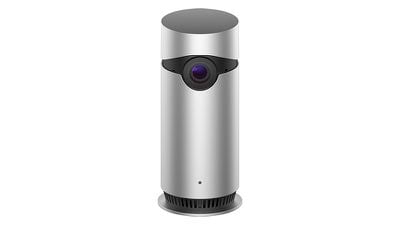
d link omna camera
Both video clips and snapshots taken with the camera can be saved to a local album from the microSD card from the playback menu, and for users who don't have an Apple TV or an iPad to enable remote viewing, there's now a built-in remote live streaming feature.

Customers who own the Omna 180 Cam HD can download the new update in the iOS App Store. Following the update, new firmware will need to be downloaded to the camera through the Settings section of the Omna app. Along with today's iOS update, D-Link released a new app for Android, enabling Android compatibility.

The Omna, one of the first cameras to support HomeKit, is an in-home security camera with a wide-angle lens, night vision support, and a two-way microphone, among other features. It records all data to a microSD card and does not offer a cloud upload feature.

We reviewed the Omna when it first launched earlier this year and some of the features that were implemented today were among our chief complaints with the device.

D-Link recently lowered the price of the Omna, and it is now available for purchase from the Apple Store for $149.95.


Top Rated Comments

116 months ago
Schmidt65, it’s been a few months on from this comment, what is your long term view of the Omna versus the Circle 2?

Im also curious as to which device is easier/better at accessing footage say a few hours old? Say if there has been an incident of damage in the night of my car and I need to retrieve footage. Same with notifications, if my car is being damaged does one appear better/faster at sending movement notifications? Final question, does cloud or local storage matter in daily use?

I’m torn between both devices, Spec wise they seem extremely similar!
They both have their pro's/cons.

For homekit integration, the OMNA wins hands down. The video feeds load instantly, nightvision mode is instant, and the motion sensor zones (and motion-notification delay periods) carry over from the OMNA app straight into the Home app. However the SD card has never worked for me so I can't view older recordings. This is on both cameras.

The Circle 2 cameras however are much better cameras, and the Logitech Circle app is really good. They are waterproof, have free 24 cloud access of all motion alerts, and can be positioned in virtually any angle. However although they do appear in the home app, they are slow to load, nightvision takes 15-20 seconds each time to refocus each time you click to view the feed, and there are no motion zones or wait-period settings that carry over from the Logitech app.

I've set mine up with 2 OMNA's inside for baby/toddler monitors as I can set the exact motion zones I want to be alerted about (not the whole room, just the cots), and nightvision is instant when I click the video (which is essential as I mainly sue them at night!).

I use the 3 circle cameras outside as security cameras as they are waterproof and are positioned exactly as I want them. I just have to set the notifications to only alert me when I am not at home, as otherwise I get bombarded every time anything happens (as I am unable to set a motion sensor-zone or time-delay between each notification that carries over to the Home app), and you have to pay in Logitech app. I also only use the Logitech app at night as the Home-app takes forever to re-focus nightvision, but the circle app is instant. Additionally I get 24 hours of free cloud storage for motion alerts, which is great for outside security cameras.

Both the OMNA and Circle work perfectly with HomeKit automations - I have the circle cameras set to turn on Hue lights in certain rooms if they detect motion at night.
[doublepost=1515585277][/doublepost]
Schmidt65, it’s been a few months on from this comment, what is your long term view of the Omna versus the Circle 2?

Im also curious as to which device is easier/better at accessing footage say a few hours old? Say if there has been an incident of damage in the night of my car and I need to retrieve footage. Same with notifications, if my car is being damaged does one appear better/faster at sending movement notifications? Final question, does cloud or local storage matter in daily use?

I’m torn between both devices, Spec wise they seem extremely similar!
For your scenario, I would definitely say the Circle 2 wired cameras. I have mine set over the driveway and they are great and providing instant notifications if they sense any motion. They are also waterproof, can be positioned exactly as you want them, and provide free 24 hours of motion footage.

It's just if you want to view the video feed at night, use the Logitech app and not the Home app.

OMNA cameras are really only good inside.
Score: 3 Votes (Like | Disagree)
Smeaton1724 Avatar
116 months ago
They both have their pro's/cons.

For homekit integration, the OMNA wins hands down. The video feeds load instantly, nightvision mode is instant, and the motion sensor zones (and motion-notification delay periods) carry over from the OMNA app straight into the Home app. However the SD card has never worked for me so I can't view older recordings. This is on both cameras.

The Circle 2 cameras however are much better cameras, and the Logitech Circle app is really good. They are waterproof, have free 24 cloud access of all motion alerts, and can be positioned in virtually any angle. However although they do appear in the home app, they are slow to load, nightvision takes 15-20 seconds each time to refocus each time you click to view the feed, and there are no motion zones or wait-period settings that carry over from the Logitech app.

I've set mine up with 2 OMNA's inside for baby/toddler monitors as I can set the exact motion zones I want to be alerted about (not the whole room, just the cots), and nightvision is instant when I click the video (which is essential as I mainly sue them at night!).

I use the 3 circle cameras outside as security cameras as they are waterproof and are positioned exactly as I want them. I just have to set the notifications to only alert me when I am not at home, as otherwise I get bombarded every time anything happens (as I am unable to set a motion sensor-zone or time-delay between each notification that carries over to the Home app), and you have to pay in Logitech app. I also only use the Logitech app at night as the Home-app takes forever to re-focus nightvision, but the circle app is instant. Additionally I get 24 hours of free cloud storage for motion alerts, which is great for outside security cameras.

Both the OMNA and Circle work perfectly with HomeKit automations - I have the circle cameras set to turn on Hue lights in certain rooms if they detect motion at night.
[doublepost=1515585277][/doublepost]
For your scenario, I would definitely say the Circle 2 wired cameras. I have mine set over the driveway and they are great and providing instant notifications if they sense any motion. They are also waterproof, can be positioned exactly as you want them, and provide free 24 hours of motion footage.

It's just if you want to view the video feed at night, use the Logitech app and not the Home app.

OMNA cameras are really only good inside.
Thank you for taking the time to reply. A lot to consider, the indoor vs outdoor discussion is something for me to consider. I had been thinking the Omna could be placed on the window ledge facing the drive. I think I'll go for the Omna first, use it indoors, then maybe expand to the garden/garage with Circle 2's in the summer. Looking at both systems they actually complement each other really well.
Score: 1 Votes (Like | Disagree)
Smeaton1724 Avatar
116 months ago
I’ve got 2 of these as indoor baby/toddler cameras, and 3 of the new HomeKit Logitech Circle 2 cameras outside as security cameras.

The Omna’s are much better at night vision and far more granular at motion detection - you can mark zones on them for HomeKit notifications.

The circle 2’s only allow zone marking for notifications within its own app - which aren’t anywhere near as good.

Overall both are pretty good though

Schmidt65, it’s been a few months on from this comment, what is your long term view of the Omna versus the Circle 2?

Im also curious as to which device is easier/better at accessing footage say a few hours old? Say if there has been an incident of damage in the night of my car and I need to retrieve footage. Same with notifications, if my car is being damaged does one appear better/faster at sending movement notifications? Final question, does cloud or local storage matter in daily use?

I’m torn between both devices, Spec wise they seem extremely similar!
Score: 1 Votes (Like | Disagree)
120 months ago
Hi Schmidt,

I am also thinking about the omna as a baby-monitor. What's your setup!? I am planing on using the apple watch for my wife with hearing problems. The Watch will use the taptic engine to allert her during the night. Do you think this will work!?

How about the setting of the camera!? the circle or even the home from Nokia are easier to be placed and adjusted. The Omna looks like "it is as it is" and it can not be tilted or altered...

Thanks and have a great day!
Daniel
Hi,

Yes the motion alerts tap on the watch pretty well with a small image of the motion captures, works really well with our 2 year old.

It is annoying that the omna can’t be tilted, but has a 180 degree angle so captures everything really well, and you can set the zones you want to be alerted to movement on which ties into the home app.
Score: 1 Votes (Like | Disagree)
Mizio Avatar
120 months ago
Can anyone with an Omna tell me if you can turn *off* the camera from the Home app?
Not that I am aware of. I am using a iDevice switch to turn it on/off via Geofence. I was hopeful this feature was added to the recent update but no such luck. Disappointing as this is a must have for a HomeKit enabled device!
Score: 1 Votes (Like | Disagree)
120 months ago
I’ve got 2 of these as indoor baby/toddler cameras, and 3 of the new HomeKit Logitech Circle 2 cameras outside as security cameras.

The Omna’s are much better at night vision and far more granular at motion detection - you can mark zones on them for HomeKit notifications.

The circle 2’s only allow zone marking for notifications within its own app - which aren’t anywhere near as good.

Overall both are pretty good though
Score: 1 Votes (Like | Disagree)

Popular Stories

1password deal blue

1Password Security Breach: What Was Accessed and What Wasn't

Wednesday November 25, 2026 1:09 pm PST by
Popular password management app 1Password today said it experienced a security breach earlier this month. 1Password says some customer names and email addresses were accessed, but no customer vault contents were compromised. On November 19, 1Password saw indications that an employee's GitHub account had been breached and began investigating. The company says the breached GitHub account was...
apple design award 2025

Apple Announces 2025 Design Award Winners Ahead of WWDC 2025

Tuesday June 3, 2025 10:14 am PDT by
As we wait for WWDC to kick off next Monday, Apple today announced the winners of its annual Apple Design Awards, recognizing apps and games for their innovation, ingenuity, and technical achievement. The 2025 Apple Design Award winners are listed below, with one app and one game selected per category: Delight and Fun - CapWords (App) and Balatro (Game) Innovation - Play (App) and PBJ -...
ipad pro prime

Apple Has iPads Running macOS Internally, Says Gurman

Wednesday November 25, 2026 4:55 am PST by
Apple has iPads running macOS internally and has had them "for some time," according to Bloomberg's Mark Gurman, although he says no work is currently being done to bring the Mac operating system to iPads. Speaking on his latest Power On podcast, Gurman said there is "no work being done to consumerize macOS on the iPad." Rather, Apple will continue to bring Mac features and apps like Final Cut ...
Latest Stories
The 50+ Best Apple Black Friday Deals on AirPods, iPads, MacBooks, and More
2 hours ago
Apple TV's 'Carême' Wins International Emmy for Best Drama
9 minutes ago
iPhone 18 Production Delay Leaves Apple Little Time Before Launch
52 minutes ago
The Best Black Friday AirPods Deals
1 hour ago
The Best Black Friday Deals on Apple Home Products
1 hour ago
The Best Black Friday iPhone Deals
2 hours ago
The Best Black Friday iPad Deals
2 hours ago
The Best Black Friday Apple Watch Deals
2 hours ago
The Best Black Friday AirTag Deals
2 hours ago
The Best Black Friday Mac Deals
2 hours ago
iPhone Share of US Smartphone Market Hits 57% as Rivals Slip
3 hours ago
iPhone 20 Pro Rumored to Feature 3D-Printed Titanium Frame
4 hours ago
Apple's Official 2026 Black Friday Offer Starts Rolling Out
22 hours ago
Halide Adds Fill Light Feature for iPhone Duo
22 hours ago
MacBook Air Black Friday Deals Now Live With Massive $399 Savings
23 hours ago
Amazon Discounts All MacBook Neo Models by $99 for Black Friday
1 day ago
Kodak Launches Unique AirTag Rival With E-Ink Display
1 day ago
Here's Why the Apple Store is Going Down
1 day ago
Apple Still Working on Giant Foldable iPad That Could Cost $5,000
1 day ago
iPhones Dominate China's Weak Singles' Day Smartphone Sales
1 day ago
iPhone 20 Pro Could Feature Ceramic in Limited-Edition Model
1 day ago
Apple Faces Korean Regulator Review Over iPhone 16 AI Advertising
1 day ago
Apple Watch Ultra 4 Hits New Best-Ever Price of $649.99 for Black Friday
1 day ago
New Apple Store Opening in India, Download the Special Wallpaper Now
1 day ago
Redesigned OLED MacBook Air Could Launch in 2027 or 2028
2 days ago
AirPods Pro 3 for $149 is One of The Best Black Friday Deals This Year
2 days ago
1Password Security Breach: What Was Accessed and What Wasn't
2 days ago
WhatsApp Finally Adds Scheduled Messages
2 days ago
Get Apple's Cheapest iPad for $379 During Amazon's Black Friday Sale
2 days ago
Rumor: iOS 28 to Revamp Notifications
2 days ago
Related Apple News: Sport | World News | South Africa | Mac | Local News






























