Skip to Content

Workflow for iOS Updated With Improved Gallery That Makes it Easier Than Ever to Automate Tasks

by

Popular automation app Workflow is being updated today with a new design, a much-improved Gallery experience, and a streamlined on-boarding process, all of which help to make the app more powerful and easier to use.

For those unfamiliar with Workflow, it's an automation app that can essentially do anything. It lets you create workflows to accomplish a wide variety of tasks like creating GIFs from a series of photos, grabbing images from a web page, translating an article, calculating a tip, posting photos to multiple social networks at once, and much, much more.
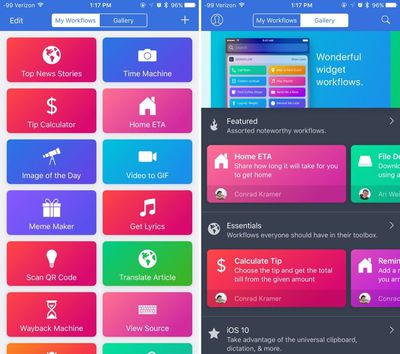
workflowforios
When you first open the Workflow app after updating, there's a new on-boarding process that walks you through how the app works and all of the different things you can do with it. After a short tutorial, you're asked to choose a few workflows that sound useful, like a teeth brushing timer or directions to the nearest coffee shop. The new on-boarding process makes it easier for new users to get started because the app no longer opens to a blank slate.

Workflow's Gallery, which is what's used to download new workflows, has been overhauled to make it simpler to find new ways to use the Workflow app. The Gallery is organized into several different curated sections that you can scroll through, like Essentials, iOS 10, Quick Shortcuts, Morning Routine, Around the House, Stay Healthy, Collaborate Better, Photography, and more.

Category names are more descriptive than they were previously, and there's more content right at your fingertips. With a new search function, it's easy to find exactly what you're looking for, and there's also an option to submit your own Workflows to the Gallery so other users can download them.

When adding workflows, there's now an Import Questions option that simplifies customization, and some existing workflows have been updated to add more context for an improved experience. You'll also notice that Workflow has seen some slight design changes, brightening up the look of the app.

Workflow can be downloaded from the App Store for $2.99. [Direct Link]

Top Rated Comments

Jessica Lares Avatar
131 months ago
I actually use Workflow as the starting point to doing some things on my Mac because you otherwise have to learn python/AppleScript/whatever, or you have to learn to deal with the Automator limitations. When the iTunes Artwork Finder recently went down the other week, I was like "Hmm, I could do this in Workflow couldn't I?" and so I looked at the backend of that and took the five minutes to put it together there and send the files to Dropbox/iCloud.

Agree that the Gallery examples aren't that great. But I think this is what the update is starting to tackle.
Score: 3 Votes (Like | Disagree)
terrapinjess Avatar
131 months ago
Hi... Can you share some examples of how you use it?

Thanks.
Hi... Can you share some examples of how you use it?

Thanks.
Certainly!
I have mine set to quickly input my weight, caffeine, and water intake into Health from Widget screen. I use it to do the same for when I go for a run: I have one set up so I tap the button on the widget and all within the widget window, it asks me how far I ran, how long it took, and how many calories I burned (according to my Pebble) and it puts it all into Health for me and also a Google Calendar I have set up. I have one to copy the currently playing song's album artwork in Music to the clipboard so I can paste it into a text message. One to tweet the current song that's playing with the album artwork. I have one to make a .gif and select the amount of time each picture displays...

Really the uses are endless. It's set up like a GUI programming app of sorts... you drag pieces of the programming puzzle together and they run step by step. It's probably the best app I've ever purchased. It really streamlines things for me..
Score: 1 Votes (Like | Disagree)
131 months ago
For people wanting to get into Workflow, the latest two episodes of the Canvas Podcast with (Federico Vittici of Macstories.net and Fraser Speirs) are dedicated to getting going with the app.
https://www.relay.fm/canvas
Thanks Mike.
Score: 1 Votes (Like | Disagree)
Donka Avatar
131 months ago
I use this app and it had proven very handy for me. I have three main workflows I created but I know there are a few others I could create that could save me a little time.

I use it for:

I have a weekly message I send out to the same recipients to organise a game of football. I have this saved as a workflow which is run from my notification centre app launcher. I simply tap this icon and it opens up messages with the predefined text already in place and all 18 recipients already populated. I just need to tap send. A whole lot quicker than opening up messages, typing or pasting in the text and then manually adding each recipient.

I don't have any shared calendars with my wife so I have a workflow that will generate an email with a list of all upcoming calendar entries for my work for the next 7 days and her email address already populated. Again, I just need to tap send and she has my availability to hand so we can organise kids things around our schedules.

I often have a need to format images for posting online at a given size. While I can use a single app to do that such as Photogene, that app appears to be abandoned. With Photos and it's extension support, I just maintain all my images in there and when I need to batch export some images to a given size, I have created a workflow that lets you select which images you want, what the longest side dimension should be and will then resize them all, ready for posting online. This saves me having to use third party apps and also offers a form of batch processing instead of resizing each image individually.
Score: 1 Votes (Like | Disagree)
ErikGrim Avatar
131 months ago
You know they are struggling to come up with real world use cases when the top featured and essentials is replicating a standard map feature and a tip calculator.
Score: 1 Votes (Like | Disagree)
gwhizkids Avatar
131 months ago
I still struggle to find some useful workflows. Workflow surely is a nice app, but many apps I use lack "openess" (URL scheme) so I can't use them in a workflow.
I'm with you. I've tried it a number of times, but, to a non-developer, trying to create custom workflows has been a bit difficult. Plus the included recipes tend to favor lifestyles of the 20s and 30s. I really don't want to post all my selfies (zero) to some app I've never heard of.
Score: 1 Votes (Like | Disagree)

Popular Stories

apple design award 2025

Apple Announces 2025 Design Award Winners Ahead of WWDC 2025

Tuesday June 3, 2025 10:14 am PDT by
As we wait for WWDC to kick off next Monday, Apple today announced the winners of its annual Apple Design Awards, recognizing apps and games for their innovation, ingenuity, and technical achievement. The 2025 Apple Design Award winners are listed below, with one app and one game selected per category: Delight and Fun - CapWords (App) and Balatro (Game) Innovation - Play (App) and PBJ -...
1password deal blue

1Password Security Breach: What Was Accessed and What Wasn't

Wednesday November 25, 2026 1:09 pm PST by
Popular password management app 1Password today said it experienced a security breach earlier this month. 1Password says some customer names and email addresses were accessed, but no customer vault contents were compromised. On November 19, 1Password saw indications that an employee's GitHub account had been breached and began investigating. The company says the breached GitHub account was...
apple store down feature

Here's Why the Apple Store is Going Down

Thursday November 26, 2026 5:49 am PST by
Apple's online store is going down for a few hours on a rolling country-by-country basis right now, but do not get your hopes up for new products. Apple takes its online store down for a few hours ahead of Black Friday every year to tease its annual gift card offer with the purchase of select products. The store is down in Australia, New Zealand, and Thailand, right now, and it will...
Latest Stories
The 50+ Best Apple Black Friday Deals Still Available on AirPods, iPads, and More
2 hours ago
Apple's M6 and PROLED MacBook Pro Reach New Low Prices for Black Friday
10 hours ago
The MacRumors Show: iPhone Air 2 and iPhone 18 Are Coming
10 hours ago
Apple Store in Brisbane Reopening Next Month With New Design
11 hours ago
The 60+ Best Black Friday Accessory Deals on iPhone Chargers, TVs, Headphones, and More
11 hours ago
GTA VI Now (Barely) Running on Apple Silicon Macs
12 hours ago
The Best Black Friday Streaming Deals on Apple TV, Disney+, and More
12 hours ago
Apple TV's 'Carême' Wins International Emmy for Best Drama
13 hours ago
iPhone 18 Production Delay Leaves Apple Little Time Before Launch
14 hours ago
The Best Black Friday AirPods Deals Still Available
6 hours ago
The Best Black Friday Deals on Apple Home Products
14 hours ago
The Best Black Friday iPhone Deals Still Available
6 hours ago
The Best Black Friday iPad Deals Still Available
6 hours ago
The Best Black Friday Apple Watch Deals Still Available
6 hours ago
The Best Black Friday AirTag Deals Still Available
6 hours ago
The Best Black Friday Mac Deals Still Available
6 hours ago
iPhone Share of US Smartphone Market Hits 57% as Rivals Slip
16 hours ago
iPhone 20 Pro Rumored to Feature 3D-Printed Titanium Frame
17 hours ago
Apple's Official 2026 Black Friday Offer Starts Rolling Out
1 day ago
Halide Adds Fill Light Feature for iPhone Duo
1 day ago
MacBook Air Black Friday Deals Now Live With Massive $399 Savings
2 days ago
Amazon Discounts All MacBook Neo Models by $99 for Black Friday
2 days ago
Kodak Launches Unique AirTag Rival With E-Ink Display
2 days ago
Here's Why the Apple Store is Going Down
2 days ago
Apple Still Working on Giant Foldable iPad That Could Cost $5,000
2 days ago
iPhones Dominate China's Weak Singles' Day Smartphone Sales
2 days ago
iPhone 20 Pro Could Feature Ceramic in Limited-Edition Model
2 days ago
Apple Faces Korean Regulator Review Over iPhone 16 AI Advertising
2 days ago
Apple Watch Ultra 4 Hits New Best-Ever Price of $649.99 for Black Friday
2 days ago
New Apple Store Opening in India, Download the Special Wallpaper Now
2 days ago
Related Apple News: Reviews | Lifestyle | South Africa | Culture | Iphone































