Skip to Content

Twitter Introduces QR Codes for Sharing and Following Accounts

by

Twitter today introduced Snapchat-style QR codes, which are designed to make it easier to find and follow friends on the social network. Each Twitter QR code is unique to an individual Twitter user, so when scanned, it'll bring up the person's account.

To access your Twitter QR code, you'll need the official Twitter app for iOS. In the app, go to your profile, tap on the gear icon, and select the "QR Code" option to generate your own personal QR code or scan someone else's code.
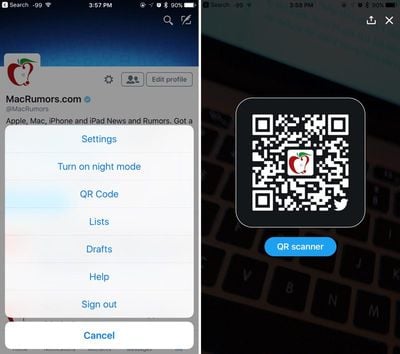
twitterqrcode
Scanning a QR code is as simple as using the iPhone's camera to either scan from a secondary screen or an image you've saved to the camera roll. You can follow MacRumors on Twitter by scanning the below code with your iPhone and the Twitter app.

macrumorsqrcode
QR codes were first made popular by Snapchat as a quick way to find your friends without having to search for them, but they may not be as popular on Twitter because the QR code settings are buried so deeply within the app.

Twitter's QR codes are currently rolling out to users and may not be immediately available for everyone.

Twitter for iOS can be downloaded from the App Store for free. [Direct Link]

Tag: Twitter

Top Rated Comments

Slix Avatar
131 months ago
Because sending an @ handle or a link is too difficult these days. *eye roll*
Score: 4 Votes (Like | Disagree)
vjl323 Avatar
131 months ago
Because sending an @ handle or a link is too difficult these days. *eye roll*
There's one very good use of QR codes that do make this useful - "IRL" use. Eg: Follow Us on (insert social media name and URL here). Having a sign with a Facebook/Instagram/Pinterest/Twitter/etc links - people with smart phones will look at it, and maybe they will stop to type the URL out. But if they see a QR code, they can simply snap a shot of it and later use the social media app to load that QR code in and 'friend' or 'follow' the business.

Yes, they could take a pic of the URL, but then you have the whole "look at the URL, type part of it in a browser, visit the photo again to make sure i didn't make typos, etc" and that's a bit of a pain when you're trying to do something quickly.

For online - yeah, QR codes are harder, but if you've got a business and have cards or signs up, that's a very quick way to send people your profile info w/o having to make them type a URL.

Bonus points for making the QR codes slightly different if using it to send a customer to one's own website - you can have the URL embedded in the QR code lead to a different URL (which redirects to the home page) and analyze the logs later to see which QR codes people are scanning when in a store/business (each sign with the QR code would be tracked, so if a customer scans it on the front door sign, you'd know vs the sign in a different part of the building - same with printing it on a biz card - this way you can track an "offline referer" of sorts - so you know the person used a biz card, or a front door sign to discover your website).
Score: 3 Votes (Like | Disagree)
macduke Avatar
131 months ago
We did some research when I was studying marketing in college in early 2012 (I minored in that and photography in addition to my design degree) and not many people actually use QR codes. We found the same thing when I got a job at another university on the marketing and communications team. Students weren't engaging with them IRL and our survey showed only a fraction knew how to use them. I also think they're ugly, have poor UX, and as there is no native support for them on iOS, I recommended that we stop using them and my boss agreed. They were a trendy marketing thing that was popular for a while because it made you seem tech-savvy to your middle aged boss who doesn't understand digital marketing, and somehow it still hasn't completely died off.

It kind of works for Snapchat because they invented their own system in the iconic shape of their app icon and the ability to scan is built into the app itself. This is yet another example of Twitter throwing everything at the wall to see what sticks because nobody wants to buy them. At least they could have made them more unique to their own the brand rather than just sticking a tiny avatar in the center and a small bird in one corner.
Score: 2 Votes (Like | Disagree)
vjl323 Avatar
131 months ago
Random question about QR codes in general (not about Twitter):

When you see QR codes printed on a poster or something in the real world... what are you supposed to scan them with? Does it need a special app? How is this not built into the OS ?

If I have this question... will the average person know what to do with them?
Good question; Apple embraced QR codes with iOS 7, but has kept them limited to the Wallet app; many 3rd party camera apps, however, recognize QR codes automatically and will open up a browser when viewing the code. But you're correct in that most folks who just use the native camera app and don't use the Wallet app, will not know what they need to download to use it.

I do see a lot [a lot!] of Android folks using their phone to scan QR codes on items in stores - I have never looked close enough to see what kind of app they were using, but Android too lacks native QR scanning for this kind of purpose.

You can see how quick Apple's QR reading is by scanning a QR code with Wallet [add a Pass to get to the QR reading screen].

That said, paper business cards that have my QR code are used daily . Granted, those who have my biz card tend to be more into technology for technology's sake, so my experience with that is a bit skewed.
Score: 2 Votes (Like | Disagree)
Michael Scrip Avatar
131 months ago
Random question about QR codes in general (not about Twitter):

When you see QR codes printed on a poster or something in the real world... what are you supposed to scan them with? Does it need a special app? How is this not built into the OS ?

If I have this question... will the average person know what to do with them?
Score: 2 Votes (Like | Disagree)
vjl323 Avatar
131 months ago
The first time I used it I was blown away. Full transaction literally took less than a second. The teller had no idea what had just happened lol.
Similar experience here, as well! Kinda reminds me of TouchID on the 6s when it first came out - almost "too" fast. Definitely not complaining, but I think the first wave of people who have used it [and the clerks behind the register] all took a bit to make sure the transaction actually happened, as Apple Pay isn't a natural progression of speed from the usual check-out time - it's a giant leap!
Score: 1 Votes (Like | Disagree)

Popular Stories

1password deal blue

1Password Security Breach: What Was Accessed and What Wasn't

Wednesday November 25, 2026 1:09 pm PST by
Popular password management app 1Password today said it experienced a security breach earlier this month. 1Password says some customer names and email addresses were accessed, but no customer vault contents were compromised. On November 19, 1Password saw indications that an employee's GitHub account had been breached and began investigating. The company says the breached GitHub account was...
apple design award 2025

Apple Announces 2025 Design Award Winners Ahead of WWDC 2025

Tuesday June 3, 2025 10:14 am PDT by
As we wait for WWDC to kick off next Monday, Apple today announced the winners of its annual Apple Design Awards, recognizing apps and games for their innovation, ingenuity, and technical achievement. The 2025 Apple Design Award winners are listed below, with one app and one game selected per category: Delight and Fun - CapWords (App) and Balatro (Game) Innovation - Play (App) and PBJ -...
ipad pro prime

Apple Has iPads Running macOS Internally, Says Gurman

Wednesday November 25, 2026 4:55 am PST by
Apple has iPads running macOS internally and has had them "for some time," according to Bloomberg's Mark Gurman, although he says no work is currently being done to bring the Mac operating system to iPads. Speaking on his latest Power On podcast, Gurman said there is "no work being done to consumerize macOS on the iPad." Rather, Apple will continue to bring Mac features and apps like Final Cut ...
Latest Stories
The 50+ Best Apple Black Friday Deals on AirPods, iPads, MacBooks, and More
3 hours ago
The Best Black Friday Streaming Deals on Apple TV, Disney+, and More
7 minutes ago
Apple TV's 'Carême' Wins International Emmy for Best Drama
43 minutes ago
iPhone 18 Production Delay Leaves Apple Little Time Before Launch
1 hour ago
The Best Black Friday AirPods Deals
2 hours ago
The Best Black Friday Deals on Apple Home Products
2 hours ago
The Best Black Friday iPhone Deals
2 hours ago
The Best Black Friday iPad Deals
2 hours ago
The Best Black Friday Apple Watch Deals
2 hours ago
The Best Black Friday AirTag Deals
3 hours ago
The Best Black Friday Mac Deals
3 hours ago
iPhone Share of US Smartphone Market Hits 57% as Rivals Slip
3 hours ago
iPhone 20 Pro Rumored to Feature 3D-Printed Titanium Frame
5 hours ago
Apple's Official 2026 Black Friday Offer Starts Rolling Out
23 hours ago
Halide Adds Fill Light Feature for iPhone Duo
23 hours ago
MacBook Air Black Friday Deals Now Live With Massive $399 Savings
1 day ago
Amazon Discounts All MacBook Neo Models by $99 for Black Friday
1 day ago
Kodak Launches Unique AirTag Rival With E-Ink Display
1 day ago
Here's Why the Apple Store is Going Down
1 day ago
Apple Still Working on Giant Foldable iPad That Could Cost $5,000
1 day ago
iPhones Dominate China's Weak Singles' Day Smartphone Sales
1 day ago
iPhone 20 Pro Could Feature Ceramic in Limited-Edition Model
1 day ago
Apple Faces Korean Regulator Review Over iPhone 16 AI Advertising
1 day ago
Apple Watch Ultra 4 Hits New Best-Ever Price of $649.99 for Black Friday
1 day ago
New Apple Store Opening in India, Download the Special Wallpaper Now
1 day ago
Redesigned OLED MacBook Air Could Launch in 2027 or 2028
2 days ago
AirPods Pro 3 for $149 is One of The Best Black Friday Deals This Year
2 days ago
1Password Security Breach: What Was Accessed and What Wasn't
2 days ago
WhatsApp Finally Adds Scheduled Messages
2 days ago
Get Apple's Cheapest iPad for $379 During Amazon's Black Friday Sale
2 days ago
Related Apple News: Iphone 18 Pro Record Time Lapse Video 4k | Birdy Feeders And Bird Bath | Iphone | Find My Network Accessory Program | Is It Worth Buying A Titanium Apple Watch































