Skip to Content

macOS Sierra: iCloud Drive Syncs Desktop Files and Documents Across Devices

by

With macOS Sierra, Apple is aiming to make it easier to access all of your content across multiple devices, expanding iCloud Drive to encompass the desktop and documents folder of every Mac.

This feature puts all of the files stored either on the desktop or in the documents folder in iCloud, making them available on iOS devices, Macs, and iCloud.com for easy access to your most recent files wherever you are.
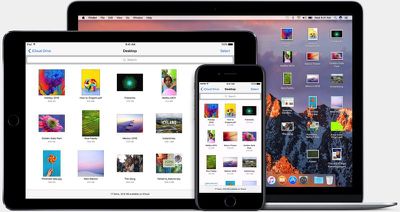
iclouddrivemacosierra
Turning on the new iCloud feature is done when setting up macOS Sierra. When you install the new operating system, Apple will ask if you want to enable iCloud storage for the desktop and documents folder and will let you know how much iCloud storage space it will take up.

If you have a lot of files on your desktop or in the documents folder, it can take up a significant amount of space, so you might need to do some file cleanup before enabling it.

If you want to enable the feature later or turn it off at some point, you can do so by going to System Preferences --> iCloud --> iCloud Drive --> Options ---> and checking or unchecking "Desktop & Documents Folders" in the list of apps allowed to upload data to iCloud Drive.
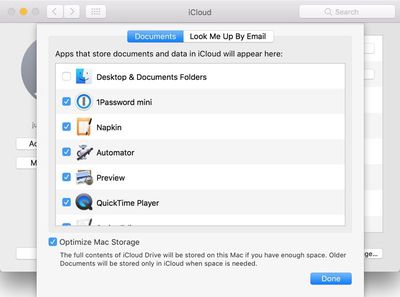
icloudoptions
On Macs and iOS devices, the contents of the desktop and documents folder can be accessed through the iCloud Drive app. On iCloud.com, the files can be accessed through the iCloud Drive folder that's available once you're signed in. If you have a Windows machine, your Mac files will be able to be downloaded through the iCloud for Windows app.
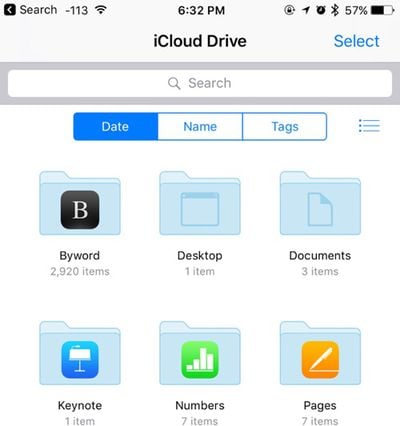
iclouddrive
The new iCloud storage options in Sierra bring Macs more in line with iOS devices, which use iCloud Drive for all file storage purposes. macOS Sierra is available for free starting today.


Related Forum: macOS Sierra

Top Rated Comments

zorinlynx Avatar
133 months ago
I strongly suggest NOT using the optimize storage feature! Not only will this remove the files from your Mac, but it'll keep the files from being backed up with Time Machine.

You will literally be trusting iCloud *completely* to store your important files. Definitely NOT a good idea!

Keep Optimize Storage off. Back up your data. It's only a matter of time before someone gets bitten by this.
Score: 14 Votes (Like | Disagree)
CamiMR Avatar
133 months ago
How about an option to sync Desktop only, and not Documents, does that exist?
Score: 4 Votes (Like | Disagree)
133 months ago
i find it incredibly pushy on apple's part to have Optimization turned on by default (see original post screen shot bottom).
installing macOS Sierra has this on by default.
Score: 3 Votes (Like | Disagree)
133 months ago
Need more macOS articles
Score: 3 Votes (Like | Disagree)
rGiskard Avatar
133 months ago
Sigh. I wish Apple would just create a way to copy files directly to my iPad. Say I have a directory of PDFs, txts, and epubs, and I want to read them on my iPad. I will be on my iPad away from wifi. So I want them ALL on my iPad. Not off on a server in a desert somewhere, but on my iPad, you know, that thing Apple sold me that is supposedly owned by me?

This is a trivial thing to do on my Nexus 7. Why must it require so much extra effort on my iPad? Just stop holding my hand and include a Finder in iOS already!
Score: 2 Votes (Like | Disagree)
Traverse Avatar
133 months ago
I strongly suggest NOT using the optimize storage feature! Not only will this remove the files from your Mac, but it'll keep the files from being backed up with Time Machine.

You will literally be trusting iCloud *completely* to store your important files. Definitely NOT a good idea!

Keep Optimize Storage off. Back up your data. It's only a matter of time before someone gets bitten by this.
I wouldn't even trust Dropbox with this kind of feature, let alone Apple with their less than stellar record. The idea behind this is great, but not realistic. The casual user with only 128GB of storage may benefit, but someone like me who likes to have at least 2 local copies and a cloud copy will not be satisfied with it.

I don't even like that it's baked into the OS. I just hope they never enable it by default without somehow informing the user. I like iCloud and Dropbox confined to syncing some app data and specific files that i manually place in their folder.
[doublepost=1474416973][/doublepost]
Untrue. Files are downloaded, then backed up, then optimized.
After they're optimized, they're not affect by your local time machine backups because they're not on your computer, they're in iCloud. Your computer only has a few kb placeholder.
Score: 2 Votes (Like | Disagree)

Popular Stories

1password deal blue

1Password Security Breach: What Was Accessed and What Wasn't

Wednesday November 25, 2026 1:09 pm PST by
Popular password management app 1Password today said it experienced a security breach earlier this month. 1Password says some customer names and email addresses were accessed, but no customer vault contents were compromised. On November 19, 1Password saw indications that an employee's GitHub account had been breached and began investigating. The company says the breached GitHub account was...
apple design award 2025

Apple Announces 2025 Design Award Winners Ahead of WWDC 2025

Tuesday June 3, 2025 10:14 am PDT by
As we wait for WWDC to kick off next Monday, Apple today announced the winners of its annual Apple Design Awards, recognizing apps and games for their innovation, ingenuity, and technical achievement. The 2025 Apple Design Award winners are listed below, with one app and one game selected per category: Delight and Fun - CapWords (App) and Balatro (Game) Innovation - Play (App) and PBJ -...
ipad pro prime

Apple Has iPads Running macOS Internally, Says Gurman

Wednesday November 25, 2026 4:55 am PST by
Apple has iPads running macOS internally and has had them "for some time," according to Bloomberg's Mark Gurman, although he says no work is currently being done to bring the Mac operating system to iPads. Speaking on his latest Power On podcast, Gurman said there is "no work being done to consumerize macOS on the iPad." Rather, Apple will continue to bring Mac features and apps like Final Cut ...
Latest Stories
The 50+ Best Apple Black Friday Deals on AirPods, iPads, MacBooks, and More
3 hours ago
The Best Black Friday Streaming Deals on Apple TV, Disney+, and More
13 minutes ago
Apple TV's 'Carême' Wins International Emmy for Best Drama
49 minutes ago
iPhone 18 Production Delay Leaves Apple Little Time Before Launch
2 hours ago
The Best Black Friday AirPods Deals
2 hours ago
The Best Black Friday Deals on Apple Home Products
2 hours ago
The Best Black Friday iPhone Deals
2 hours ago
The Best Black Friday iPad Deals
2 hours ago
The Best Black Friday Apple Watch Deals
3 hours ago
The Best Black Friday AirTag Deals
3 hours ago
The Best Black Friday Mac Deals
3 hours ago
iPhone Share of US Smartphone Market Hits 57% as Rivals Slip
3 hours ago
iPhone 20 Pro Rumored to Feature 3D-Printed Titanium Frame
5 hours ago
Apple's Official 2026 Black Friday Offer Starts Rolling Out
23 hours ago
Halide Adds Fill Light Feature for iPhone Duo
23 hours ago
MacBook Air Black Friday Deals Now Live With Massive $399 Savings
1 day ago
Amazon Discounts All MacBook Neo Models by $99 for Black Friday
1 day ago
Kodak Launches Unique AirTag Rival With E-Ink Display
1 day ago
Here's Why the Apple Store is Going Down
1 day ago
Apple Still Working on Giant Foldable iPad That Could Cost $5,000
1 day ago
iPhones Dominate China's Weak Singles' Day Smartphone Sales
1 day ago
iPhone 20 Pro Could Feature Ceramic in Limited-Edition Model
1 day ago
Apple Faces Korean Regulator Review Over iPhone 16 AI Advertising
1 day ago
Apple Watch Ultra 4 Hits New Best-Ever Price of $649.99 for Black Friday
1 day ago
New Apple Store Opening in India, Download the Special Wallpaper Now
1 day ago
Redesigned OLED MacBook Air Could Launch in 2027 or 2028
2 days ago
AirPods Pro 3 for $149 is One of The Best Black Friday Deals This Year
2 days ago
1Password Security Breach: What Was Accessed and What Wasn't
2 days ago
WhatsApp Finally Adds Scheduled Messages
2 days ago
Get Apple's Cheapest iPad for $379 During Amazon's Black Friday Sale
2 days ago
Related Apple News: Iphone | Lifestyle | Travel | Culture | Health






























