Skip to Content

Dropbox Responds to Mac 'Security Risk' Accusations [Updated]

by

Dropbox has said it needs to do a "better job" of communicating its OS X integration, after claims emerged online that its Mac app was phishing for user passwords and even "hacks" the operating system on installation.

Developers of the cloud storage service were forced to reply to accusations which appeared on Hacker News that the client app was a security risk and "couldn't be trusted", because of the way it takes control of system features without asking for permission to do so.
dropbox-privacy

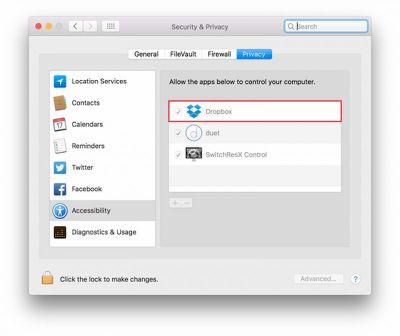
Dropbox gains access to Accessibility features without requesting access.

Concerns were raised after it was demonstrated that Dropbox appears in the Security & Privacy tab for Accessibility, despite the fact that users are never prompted to grant access to the features.

Let’s assume for the sake of argument that Dropbox never does any evil on your computer. It remains the fact that the Dropbox process has that ability. And that means, if Dropbox itself has a bug in it, it’s possible an attacker could take control of your computer by hijacking flaws in Dropbox’s code. Of course, that’s entirely theoretical, but all security risks are until someone exploits them. The essence of good computer security and indeed the very reason why OSX has these kinds of safeguards in place to begin with is that apps should not have permissions greater than those that they need to do their job.

Responding to the accusations, Dropbox said it only asks for the permissions it needs and uses the Accessibility features for certain app integrations like Office, although the permissions aren't as "granular" as the company would like.

Dropbox, like other apps, requires additional permissions to enable certain features and integrations. The operating system on a user's device may ask them to input their password to confirm. Dropbox never sees or receives these passwords. Reports of Dropbox spoofing interfaces, or capturing system passwords are absolutely false. We realize that we can do a better job communicating how these permissions are used, and we're working on improving this.

Dropbox said it was working with Apple to reduce its dependence on elevated access in macOS Sierra, and will respect when people disable Dropbox's Accessibility permissions. In the meantime, Hacker News wants the firm to more explicitly outline why it needs the permissions it does.

The latest news comes at a sensitive time for the cloud storage outfit. Two weeks ago, it was revealed that over 68 million Dropbox accounts were implicated in a hack that took place in 2012.

Due to a password hack connected to other websites, hackers were able to sign in to "a small number" of Dropbox accounts, said the company, including an employee's who had access to a document listing an array of user email addresses. But when Dropbox announced a preventative password reset measure, it made no mention of the extent of the users touched by the four-year-old hack.

Earlier this year, Dropbox was also forced to defend a feature called Project Infinite, which allows users to access all of the content in their account as if it is stored on their own machine, regardless of how small their hard disk is. The feature requires kernel-level access to computers in order to function, which critics suggested could leave it open to serious vulnerabilities.

Update: Dropbox has contacted MacRumors to reiterate that it "categorically denies" its Mac client phishes for user passwords or "hacks" the operating system on installation, but agreed that "we need to do more to be more transparent and make it clearer why we need access permission to a Mac OS". The company also added that the account information stolen in 2012 was hashed and salted, meaning it is unlikely hackers were able to obtain many of the users' actual passwords.


Tag: Dropbox

Top Rated Comments

Cindori Avatar
133 months ago
Except, if you read the blog, it's inherently clear that Dropbox spoofed the Apple password dialogue box. So they're still not owning up to it. They say it's an Apple OSX box thing, and while it's probably true that Dropbox doesn't see or capture the password you enter, it remains clear that the dialogue box is not really an Apple one.

This is the first big misunderstanding in this whole affair.
That dialogue is 100% genuine (called from Apple API's). You can customize the text that appears ("blabla for Dropbox to work correctly") using older C-API's that are still fully allowed. It is not a "custom Dropbox popup that can see your password".

This has been called out numerous times but unfortunately news articles can't keep up and that blog doesn't seem to want to edit the post (I'm guessing they're getting peak traffic from this story).

--------------------------------

EDIT: Here is the actual API's to achieve this: https://developer.apple.com/library/mac/documentation/Security/Reference/authorization_ref/#//apple_ref/c/func/AuthorizationCopyRights

Parameter: environment
"Data used when authorizing or preauthorizing rights. Not used in OS X v10.2 and earlier. In OS X v10.3 and later, you can pass icon or prompt data to be used in the authentication dialog box"
Score: 16 Votes (Like | Disagree)
133 months ago
Dropbox engineer's response is total ********!
Take a look at the attached images.
[doublepost=1473677349][/doublepost]
Fundementally, this whole kerfuffle comes from users not understanding what 'Allow the apps below to control your computer' in System Preferences actually means. Granted, that's a lot to do with Apple's poor wording, but it doesn't literally mean that at any time an application can take mouse & keyboard control or grant unauthorised remote access.

Due to how locked down the newer OSs are, it's not unusual for apps to need this enabled just to access features that were readily available on earlier OS X iterations.
No dude, there's no confusion here.
The problems are as follows:

1. Dropbox spoofs OSX's permissions dialog.
2. Dropbox enables special permissions on behalf of the user instead of letting OSX enabling permissions on behalf of its user (lol, see first point to understand why).
3. In order to be able to do point 2, Dropbox uses hacking tactics like modifying a system's database to force the OS to enable permissions (sudo, anyone? Point 1 again)
4. If an user tries to disable the unknowingly self-given permissions, magic happens! the agent re-enables itself!

That's PURE EVIL coming from Dropbox!

LE:
About UI Spoofing on OSX: http://www.symantec.com/connect/blogs/mac-os-x-dialog-box-spoofing-believe-me-i-m-system-preferences

LE2:
For people trying to prove that Dropbox isn't spoofing the permissions dialog, there's one more thing that might not be so obvious: how come Dropbox is able to insert its identifier in the Privacy Database?

As far as I know, this is only possible if it has the same access privileges as an Administrator or Super User.

So what I'm saying is that in my opinion, Dropbox really does cache the password and uses it to gain access to root and this thing goes all the way back to number one: in order to cache the password, they must have access to it right? So in order to get the password they spoof the permissions dialog.

Attachment Image

Attachment Image

Attachment Image

Attachment Image
Score: 14 Votes (Like | Disagree)
133 months ago
Reports of Dropbox spoofing interfaces, [...] are absolutely false.
Except, if you read the blog, it's inherently clear that Dropbox spoofed the Apple password dialogue box. So they're still not owning up to it. They say it's an Apple OSX box thing, and while it's probably true that Dropbox doesn't see or capture the password you enter, it remains clear that the dialogue box is not really an Apple one.

Score: 13 Votes (Like | Disagree)
Cindori Avatar
133 months ago
But are they?
I think it's pretty obvious that they are. Why would they not? The API allows it.

The only confusion here stems from people without knowledge of these API's drawing conclusions like "they are using fake popups because the message is not like the standard popup!11!" in their efforts to find more "incriminating stuff" about Dropbox's practices.

As for their practices in general I personally think they are designed from a UX perspective - enter password once and be done with setup and not the "conspiracy-steal-password-control-your-computer-malware" FUD that is being spread right now.
Score: 8 Votes (Like | Disagree)
Cindori Avatar
133 months ago
Could you please post a link to some documentation backing up what you're saying?
Found it: https://developer.apple.com/library/mac/documentation/Security/Reference/authorization_ref/#//apple_ref/c/func/AuthorizationCopyRights

This is straight from the documentation:

Parameter: environment
Data used when authorizing or preauthorizing rights. Not used in OS X v10.2 and earlier. In OS X v10.3 and later, you can pass icon or prompt data to be used in the authentication dialog box.

This is what Dropbox is using.
Score: 6 Votes (Like | Disagree)
133 months ago
Either you trust them or you don't. If you don't, you shouldn't give them any of your files anyway. ;)
Score: 6 Votes (Like | Disagree)

Popular Stories

apple design award 2025

Apple Announces 2025 Design Award Winners Ahead of WWDC 2025

Tuesday June 3, 2025 10:14 am PDT by
As we wait for WWDC to kick off next Monday, Apple today announced the winners of its annual Apple Design Awards, recognizing apps and games for their innovation, ingenuity, and technical achievement. The 2025 Apple Design Award winners are listed below, with one app and one game selected per category: Delight and Fun - CapWords (App) and Balatro (Game) Innovation - Play (App) and PBJ -...
1password deal blue

1Password Security Breach: What Was Accessed and What Wasn't

Wednesday November 25, 2026 1:09 pm PST by
Popular password management app 1Password today said it experienced a security breach earlier this month. 1Password says some customer names and email addresses were accessed, but no customer vault contents were compromised. On November 19, 1Password saw indications that an employee's GitHub account had been breached and began investigating. The company says the breached GitHub account was...
apple store down feature

Here's Why the Apple Store is Going Down

Thursday November 26, 2026 5:49 am PST by
Apple's online store is going down for a few hours on a rolling country-by-country basis right now, but do not get your hopes up for new products. Apple takes its online store down for a few hours ahead of Black Friday every year to tease its annual gift card offer with the purchase of select products. The store is down in Australia, New Zealand, and Thailand, right now, and it will...
Latest Stories
The 50+ Best Apple Black Friday Deals Still Available on AirPods, iPads, and More
3 hours ago
Apple's M6 and PROLED MacBook Pro Reach New Low Prices for Black Friday
10 hours ago
The MacRumors Show: iPhone Air 2 and iPhone 18 Are Coming
10 hours ago
Apple Store in Brisbane Reopening Next Month With New Design
11 hours ago
The 60+ Best Black Friday Accessory Deals on iPhone Chargers, TVs, Headphones, and More
11 hours ago
GTA VI Now (Barely) Running on Apple Silicon Macs
12 hours ago
The Best Black Friday Streaming Deals on Apple TV, Disney+, and More
12 hours ago
Apple TV's 'Carême' Wins International Emmy for Best Drama
13 hours ago
iPhone 18 Production Delay Leaves Apple Little Time Before Launch
14 hours ago
The Best Black Friday AirPods Deals Still Available
6 hours ago
The Best Black Friday Deals on Apple Home Products
14 hours ago
The Best Black Friday iPhone Deals Still Available
6 hours ago
The Best Black Friday iPad Deals Still Available
6 hours ago
The Best Black Friday Apple Watch Deals Still Available
6 hours ago
The Best Black Friday AirTag Deals Still Available
6 hours ago
The Best Black Friday Mac Deals Still Available
6 hours ago
iPhone Share of US Smartphone Market Hits 57% as Rivals Slip
16 hours ago
iPhone 20 Pro Rumored to Feature 3D-Printed Titanium Frame
17 hours ago
Apple's Official 2026 Black Friday Offer Starts Rolling Out
1 day ago
Halide Adds Fill Light Feature for iPhone Duo
1 day ago
MacBook Air Black Friday Deals Now Live With Massive $399 Savings
2 days ago
Amazon Discounts All MacBook Neo Models by $99 for Black Friday
2 days ago
Kodak Launches Unique AirTag Rival With E-Ink Display
2 days ago
Here's Why the Apple Store is Going Down
2 days ago
Apple Still Working on Giant Foldable iPad That Could Cost $5,000
2 days ago
iPhones Dominate China's Weak Singles' Day Smartphone Sales
2 days ago
iPhone 20 Pro Could Feature Ceramic in Limited-Edition Model
2 days ago
Apple Faces Korean Regulator Review Over iPhone 16 AI Advertising
2 days ago
Apple Watch Ultra 4 Hits New Best-Ever Price of $649.99 for Black Friday
2 days ago
New Apple Store Opening in India, Download the Special Wallpaper Now
2 days ago
Related Apple News: Ipad | News | Politics | Motoring | Technology






























