Skip to Content

macOS Sierra Tidbits: Apple File System, RAID Support, and More

Apple yesterday announced macOS Sierra, the latest version of its Mac software platform and renamed successor to OS X El Capitan. The first beta was released to developers following yesterday's keynote, providing early adopters with a closer look at what's new.

Apple File System

Apple File System, or APFS, is a next-generation file system for Apple products based upon the iOS, macOS, tvOS, and watchOS software platforms, ranging from the Apple Watch to a Mac Pro.
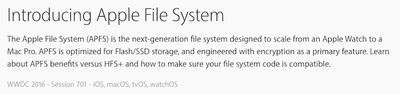
macOS-Sierra-Apple-File-System
APFS, which supports nearly all of the features of HFS+, is optimized for Flash/SSD storage and features strong encryption, copy-on-write metadata, space sharing, cloning for files and directories, snapshots, fast directory sizing, atomic safe-save primitives, and improved file system fundamentals.

Apple has posted an Apple File System Guide on its Developer Portal with technical details and other documentation.

The file system is available in pre-release beta for Apple developers on macOS Sierra and is scheduled to ship in 2017.

RAID Support
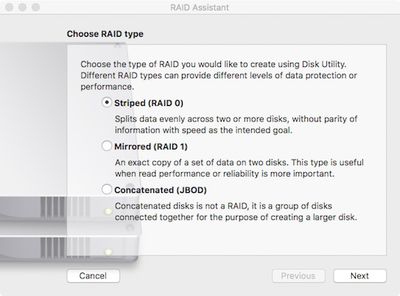
RAID-Assistant-macOS-Sierra
Apple has reintroduced the ability to create and manage RAID volumes in Disk Utility on macOS Sierra, pleasing a number of Mac users who were left disappointed when the functionality disappeared in OS X El Capitan.

"Anywhere" Dropped From Gatekeeper

Apple has removed the Gatekeeper option to allow apps to be downloaded from "anywhere" by default in System Preferences > Security & Privacy, resulting in a warning dialog when you attempt to open an app from an unidentified developer. "Mac App Store" and "Mac App Store and identified developers" remain selectable.

Apps from unidentified developers can normally be opened by clicking the "Open Anyway" button in System Preferences > Security & Privacy, but the macOS Sierra release notes indicate that this button does not work in the first beta. A workaround solution is to hold down the Control key, click on an application, and choose "open."

Default Text Size in Notes

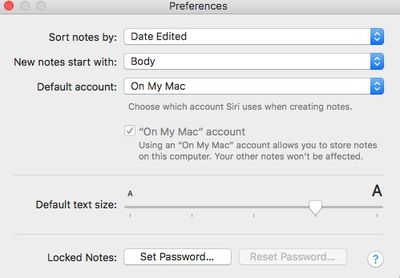
Notes-Default-Text-Size
Optimized Storage

macOS Sierra has a new optimized storage function that frees disk space on your Mac by automatically storing rarely used files in the cloud and keeping them available on demand. It can also help you find and remove old files you no longer use.

During its WWDC 2016 keynote, Apple briefly showed slides that indicate which types of files are stored or deleted.
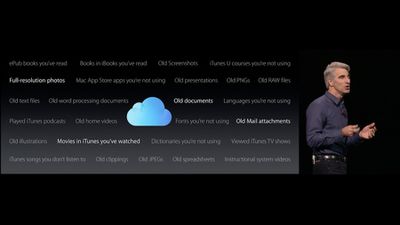
iCloud-1
Old files that are backed up to iCloud include ePub books you've read, books in iBooks you've read, old screenshots, iTunes U courses you're not using, full-resolution photos, Mac App Store apps you're not using, old presentations, old PNGs and JPEGs, old RAW files, old text files, old word processing documents, old documents, languages you're not using, played iTunes podcasts, old home videos, fonts you're not using, old Mail attachments, old illustrations, movies in iTunes you've watched, dictionaries you're not using, viewed iTunes TV shows, iTunes songs you don't listen to, old clippings, old spreadsheets, and instructional system videos.
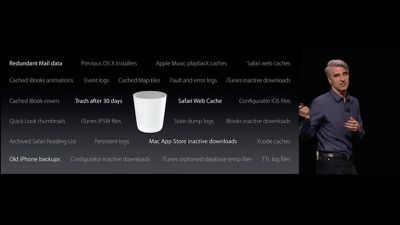
iCloud-2
Old files that can be found and removed include redundant Mail data, previous OS X installers, Apple Music playback caches, Safari web caches, cached iBooks animations, event logs, cached Map tiles, fault and error logs, iTunes inactive downloads, cached iBooks covers, trash after 30 days, Safari Web Cache, Configurator iOS files, Quick Look thumbnails, iTunes IPSW files, state dump logs, iBooks inactive downloads, archived Safari Reading List, persistent logs, Mac App Store inactive downloads, Xcode caches, old iPhone backups, Configurator inactive downloads, iTunes orphaned database temporary files, and TTL log files.

Siri Preferences
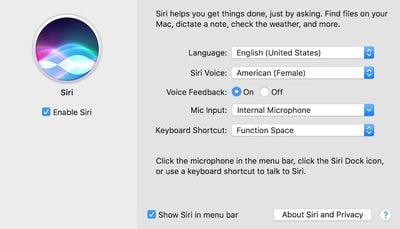
Siri
Share your own tidbits in our macOS Sierra: All The Little Things discussion thread.

Related Forum: macOS Sierra

Popular Stories

1password deal blue

1Password Security Breach: What Was Accessed and What Wasn't

Wednesday November 25, 2026 1:09 pm PST by
Popular password management app 1Password today said it experienced a security breach earlier this month. 1Password says some customer names and email addresses were accessed, but no customer vault contents were compromised. On November 19, 1Password saw indications that an employee's GitHub account had been breached and began investigating. The company says the breached GitHub account was...
apple design award 2025

Apple Announces 2025 Design Award Winners Ahead of WWDC 2025

Tuesday June 3, 2025 10:14 am PDT by
As we wait for WWDC to kick off next Monday, Apple today announced the winners of its annual Apple Design Awards, recognizing apps and games for their innovation, ingenuity, and technical achievement. The 2025 Apple Design Award winners are listed below, with one app and one game selected per category: Delight and Fun - CapWords (App) and Balatro (Game) Innovation - Play (App) and PBJ -...
ipad pro prime

Apple Has iPads Running macOS Internally, Says Gurman

Wednesday November 25, 2026 4:55 am PST by
Apple has iPads running macOS internally and has had them "for some time," according to Bloomberg's Mark Gurman, although he says no work is currently being done to bring the Mac operating system to iPads. Speaking on his latest Power On podcast, Gurman said there is "no work being done to consumerize macOS on the iPad." Rather, Apple will continue to bring Mac features and apps like Final Cut ...

Top Rated Comments

SeaFox Avatar
136 months ago
Hmmm, I assume there will be an easy way to disable these "optimized storage" functions. I don't want stuff being uploaded to the cloud and removed from local copy on the OS's whims really.

Also, regarding that new synchronized Documents, etc folders, not sure if that's gonna work without Apple beefing up the free iCloud storage -- and I mean at least four fold.
Score: 40 Votes (Like | Disagree)
Markoth Avatar
136 months ago
Is it strange that the most exciting thing for me up there is Apple File System? This is seriously going to help fix a ton of the more... questionable parts of OS X erm... excuse me: macOS. Time Machine should benefit tremendously from filesystem-provided snapshots. Exciting times. :)
Score: 36 Votes (Like | Disagree)
Markoth Avatar
136 months ago
Can someone tell an average person like me the advantages of the new file system?? Thanks
Well, for one thing, your data should be a lot safer with this new filesystem. Also, the ability to clone files and directories will let you instantaneously make copies of files. Those copies will appear to be completely separate files, but thanks to this new filesystem, the copy won't take up any additional space until you actually make edits, and even then, the space taken should be roughly equal to the space of the edits you made, and not the entire file. This is a huge win for many workflows.

Snapshots will allow for time machine to operate much more efficiently. Assuming the snapshots work as they do on other filesystems, it will allow Time Machine to basically tell the filesystem to "remember the data as it is now", without taking any additional space until data is added or modified. This will be a much better way to implement snapshots than the current method..

Fast directory sizing will allow OS X to compute the size of the data in a folder MUCH faster! As many of us know, large folders can take OS X awhile to compute... Always been a pet peeve of mine. :)

There are other great additions, but these are the ones I thought I could explain simply. Hope I did a decent job... :)
Score: 32 Votes (Like | Disagree)
136 months ago
Euhm.. could you like, not touch my files and move them elsewhere? Okay? Thanks.
Score: 31 Votes (Like | Disagree)
Markoth Avatar
136 months ago
Time machine backups not supported.

Incompatible with fusion drives.

Incompatible with startup disks.

Files cannot be used with FileVault.

Case-sensitive only file names.

But wait! Nano-second time stamping, and it works with your Apple Watch!

Remember if you synced your iPhone to a Windows device, you'd have to erase everything to format for PC use? Is this what will happen with files created under APFS?

"Send over that session!"

"Sorry, Patrick. You have to buy a new Mac to open it!"
They're not allowing it to do a whole lot, simply due to the fact that this is a very early version, and the filesystem is a very fundamental part of an OS. Beta filesystems are never fun to use (especially as a boot partition), and I'm betting this is no exception. Apple is smart playing it safe, especially given the wave of users coming in July to the beta.
Score: 23 Votes (Like | Disagree)
136 months ago
.
Score: 17 Votes (Like | Disagree)
Latest Stories
The 50+ Best Apple Black Friday Deals on AirPods, iPads, MacBooks, and More
3 hours ago
The Best Black Friday Streaming Deals on Apple TV, Disney+, and More
23 minutes ago
Apple TV's 'Carême' Wins International Emmy for Best Drama
59 minutes ago
iPhone 18 Production Delay Leaves Apple Little Time Before Launch
2 hours ago
The Best Black Friday AirPods Deals
2 hours ago
The Best Black Friday Deals on Apple Home Products
2 hours ago
The Best Black Friday iPhone Deals
3 hours ago
The Best Black Friday iPad Deals
3 hours ago
The Best Black Friday Apple Watch Deals
3 hours ago
The Best Black Friday AirTag Deals
3 hours ago
The Best Black Friday Mac Deals
3 hours ago
iPhone Share of US Smartphone Market Hits 57% as Rivals Slip
4 hours ago
iPhone 20 Pro Rumored to Feature 3D-Printed Titanium Frame
5 hours ago
Apple's Official 2026 Black Friday Offer Starts Rolling Out
23 hours ago
Halide Adds Fill Light Feature for iPhone Duo
23 hours ago
MacBook Air Black Friday Deals Now Live With Massive $399 Savings
1 day ago
Amazon Discounts All MacBook Neo Models by $99 for Black Friday
1 day ago
Kodak Launches Unique AirTag Rival With E-Ink Display
1 day ago
Here's Why the Apple Store is Going Down
1 day ago
Apple Still Working on Giant Foldable iPad That Could Cost $5,000
1 day ago
iPhones Dominate China's Weak Singles' Day Smartphone Sales
1 day ago
iPhone 20 Pro Could Feature Ceramic in Limited-Edition Model
1 day ago
Apple Faces Korean Regulator Review Over iPhone 16 AI Advertising
1 day ago
Apple Watch Ultra 4 Hits New Best-Ever Price of $649.99 for Black Friday
1 day ago
New Apple Store Opening in India, Download the Special Wallpaper Now
1 day ago
Redesigned OLED MacBook Air Could Launch in 2027 or 2028
2 days ago
AirPods Pro 3 for $149 is One of The Best Black Friday Deals This Year
2 days ago
1Password Security Breach: What Was Accessed and What Wasn't
2 days ago
WhatsApp Finally Adds Scheduled Messages
2 days ago
Get Apple's Cheapest iPad for $379 During Amazon's Black Friday Sale
2 days ago
Related Apple News: Reviews | News | Buyers Guide | Motoring | South Africa