Skip to Content

New Apple TV: Tips, Tricks, Siri Remote Shortcuts and Useful Settings

The new Apple TV launched on Friday in several countries around the world, giving early adopters a chance to try out the fourth-generation device for a few days now. The consensus opinion is that the new Apple TV is a worthwhile upgrade, particularly because of new features such as the App Store, Siri, and tvOS user interface, with lots of potential to get even better in the months and years ahead.

Apple-TV-App-Switcher

Press the Home button twice to bring up the new Apple TV's app switcher

To complement our coverage of the new Apple TV, which includes a trio of hands-on videos, an Apple TV apps roundup, several tidbits, and a reviews roundup, we have created the following list of tips, tricks, and shortcuts for the new streaming device, some of which are outlined in the Apple TV user guide. The tips are centered upon useful Siri Remote shortcuts and Apple TV settings.

Siri Remote shortcuts
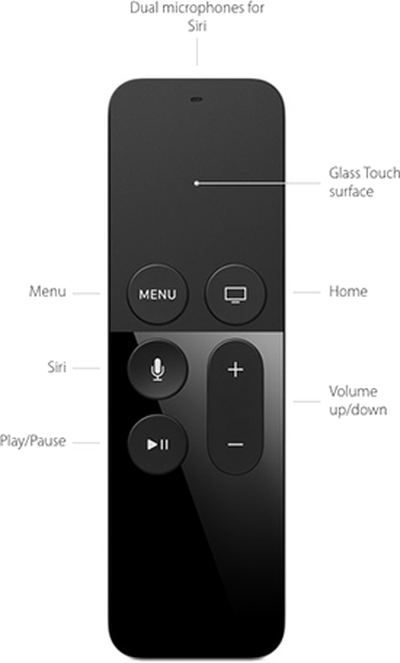
Siri-Remote-LabeledTouch Surface
- To rearrange an app, hover over it and hold down the touch surface until the icon starts to jiggle. Then, swipe left, right, up or down to move the app, and press the touch surface once to finish.
- The touch surface has accelerated swiping, meaning that a faster swipe results in faster on-screen scrolling.
- Hover over any letter on the keyboard and hold down the touch surface to bring up a contextual menu, which includes uppercase letters, accents and a backspace key.
- Hover over a song and hold down the touch surface to bring up a contextual menu, which includes various Apple Music options.

Menu Button
- Press the Menu button once to go back.
- Press the Menu button twice quickly from the Home screen to start the screensaver.
- Press and hold the Menu and Home buttons simultaneously to restart the Apple TV.

Home Button
- Press the Home button once to return to the Home screen from anywhere.
- Press the Home button twice quickly to bring up the App Switcher, which displays all apps open. Swipe up on the Siri Remote's touch surface to force close an app.
- Press the Home button three times quickly to access VoiceOver.
- Hold down the Home button to place the Apple TV in Sleep mode.

Siri Button
- Hold down the Siri button to use Siri.
- Press the Siri button once and wait to view a list of commands you can ask Siri.

Play/Pause Button
- Press the Play/Pause button once to change the keyboard between uppercase and lowercase.
- Press the Play/Pause button once to delete an app in wiggle mode, which requires hovering over an app and holding down the touch surface until the icon starts to jiggle.
- Hold down the Play/Pause button for 5-7 seconds to return to the Apple Music app.
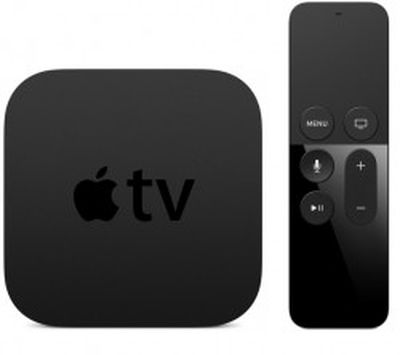
apple-tv-4th-gen

Apple TV settings

General
- Apple TV can be renamed in Settings under AirPlay > Apple TV Name.
- Apple TV network strength is displayed in Settings under General > About.
- Universal remotes can learn the new Apple TV in Settings under Remotes and Devices > Learn Remote. Follow the on-screen instructions.

Siri Remote
- The sensitivity of the Siri Remote's touch surface can be adjusted in the Settings app under Remotes and Devices > Touch Surface Tracking.
- The triple-press Home button accessibility shortcut can be changed in the Settings app under General > Accessibility > Accessibility Shortcut.
- The Siri Remote's battery level is listed in Settings > Remotes and Devices > Bluetooth.
- The Siri Remote can power on/off or adjust the volume of your TV and speakers over HDMI-CEC or IR. In some cases, this pairing process is automatic after setup, or manually configurable in Settings > Remotes and Devices > Home Theater Control under the "Turn On Your TV with Your Remote" and "Volume Control" menus.

Related Roundup: Apple TV
Buyer's Guide: Apple TV (Buy Now)

Popular Stories

Apple Event Logo

Apple Releasing Yet Another Two New Products Next Week

Friday November 6, 2026 7:36 am PST by
Apple's massive wave of product launches will finally end next week, with its all-new HomeView smart home hub and the fourth-generation Apple TV 4K set to be released on Friday, November 13 and no other major hardware releases expected for the remainder of the year. Since late August, Apple has announced more than 25 new devices and accessories in one of its busiest stretches...
Apple TV 4K 4th Generation Top View5

New Apple TV 4K and iPad Mini: RAM Amounts Revealed

Thursday October 29, 2026 5:50 pm PDT by
Apple today released Xcode 27.2, and it reveals how much RAM is in the new fourth-generation Apple TV 4K and the new iPad mini with an OLED display. As expected, the new Apple TV 4K with the A19 chip is equipped with 8GB of RAM, while the new iPad mini with the A20 Pro chip has 12GB of RAM. For good measure, Xcode shows the iPhone Duo is equipped with 12GB of RAM. None of these RAM...
Apple TV Silo

Apple TV Reportedly Planning 'Silo' Spinoff

Wednesday November 4, 2026 8:56 am PST by
Apple TV is developing a "Silo" spinoff tied to Hugh Howey's upcoming Silo book trilogy, according to Apple TV commentator and podcaster Sigmund Judge. He said pre-production will begin later this year, with the books expected next summer. Hiring has apparently begun and some sets remain standing after season four wrapped in March. The reported project would follow the show's fourth and final...

Top Rated Comments

145 months ago
I suppose it's just better to BUY one and learn to use it for yourself, instead of reading a list of bullet points ;)
As I read this article, I asked myself how anyone could possibly complain about an article that nicely summarizes the buttons and the various ways to use them, most of which aren't intuitive, and is very helpful to me, and I have the atv 4.

Then I remembered some of the people who post here, and my fantasy evaporated. And sure enough, the first poster found a way to complain about the article. Part of me wants really express myself which will get me kicked off this board. So I'll just stop here. Very sad, but completely expected.
Score: 24 Votes (Like | Disagree)
haruhiko Avatar
145 months ago
Please make a tutorial of:

"How to type faster using the Siri remote with a horizontal line of alphabets"


:(
Score: 16 Votes (Like | Disagree)
adampk17 Avatar
145 months ago
Over all I'd say I'm underwhelmed. The lack of Siri search for local or Apple music and the fact that the Remote app hasn't been updated to work with the ATV 4 at launch are baffling.
Score: 10 Votes (Like | Disagree)
scarecrowmac Avatar
145 months ago
This is great! Learnt some really cool time saving features from this article!! Makes me love my new Apple TV that little bit more :) All it needs now is the Plex app and I’m all set
Score: 9 Votes (Like | Disagree)
Fortimir Avatar
145 months ago
I picked mine up on Friday at launch, and I really like it. It certainly has a more complex layout that the earlier versions.

My main gripe is that I can constantly picking up the remote upside down. It's too symmetrical and the flat/gloss differentiation doesn't really tell the functionality apart.
Score: 8 Votes (Like | Disagree)
dearfriendx Avatar
145 months ago
Thank you author, for putting this together. Really helps! I love my new Apple TV
Score: 8 Votes (Like | Disagree)
Latest Stories
The 50+ Best Apple Black Friday Deals Still Available on AirPods, iPads, and More
2 hours ago
Here Are the Best Apple Black Friday Leftover Deals You Can Get Today
1 hour ago
HomePod Mini 2 in (RED) Seemingly Spotted Ahead of Announcement
12 hours ago
Apple's M6 and PROLED MacBook Pro Reach New Low Prices for Black Friday
23 hours ago
The MacRumors Show: iPhone Air 2 and iPhone 18 Are Coming
23 hours ago
Apple Store in Brisbane Reopening Next Month With New Design
23 hours ago
The 60+ Best Black Friday Accessory Deals on iPhone Chargers, TVs, Headphones, and More
56 minutes ago
GTA VI Now (Barely) Running on Apple Silicon Macs
1 day ago
The Best Black Friday Streaming Deals on Apple TV, Disney+, and More
1 day ago
Apple TV's 'Carême' Wins International Emmy for Best Drama
1 day ago
iPhone 18 Production Delay Leaves Apple Little Time Before Launch
1 day ago
The Best Black Friday AirPods Deals Still Available
18 hours ago
The Best Black Friday Deals on Apple Home Products
1 day ago
The Best Black Friday iPhone Deals Still Available
18 hours ago
The Best Black Friday iPad Deals Still Available
18 hours ago
The Best Black Friday Apple Watch Deals Still Available
18 hours ago
The Best Black Friday AirTag Deals Still Available
18 hours ago
The Best Black Friday Mac Deals Still Available
18 hours ago
iPhone Share of US Smartphone Market Hits 57% as Rivals Slip
1 day ago
iPhone 20 Pro Rumored to Feature 3D-Printed Titanium Frame
1 day ago
Apple's Official 2026 Black Friday Offer Starts Rolling Out
2 days ago
Halide Adds Fill Light Feature for iPhone Duo
2 days ago
MacBook Air Black Friday Deals Now Live With Massive $399 Savings
2 days ago
Amazon Discounts All MacBook Neo Models by $99 for Black Friday
2 days ago
Kodak Launches Unique AirTag Rival With E-Ink Display
2 days ago
Here's Why the Apple Store is Going Down
2 days ago
Apple Still Working on Giant Foldable iPad That Could Cost $5,000
2 days ago
iPhones Dominate China's Weak Singles' Day Smartphone Sales
2 days ago
iPhone 20 Pro Could Feature Ceramic in Limited-Edition Model
2 days ago
Apple Faces Korean Regulator Review Over iPhone 16 AI Advertising
2 days ago
Related Apple News: Iphone 18 Pro Record Time Lapse Video 4k | Iphone | Ipad | Access App Switcher Apple Watch | Is It Worth Buying A Titanium Apple Watch