Skip to Content

Inside iOS 9: Split-Screen Multitasking for the iPad

by

iOS 9 brings a long-awaited Split-Screen multitasking feature to the iPad for the first time, letting users operate two apps simultaneously and bolstering the productivity capabilities of Apple's tablet lineup. There are three different multitasking features that are available on various iPad models: Slide Over, Split View, and Picture in Picture.
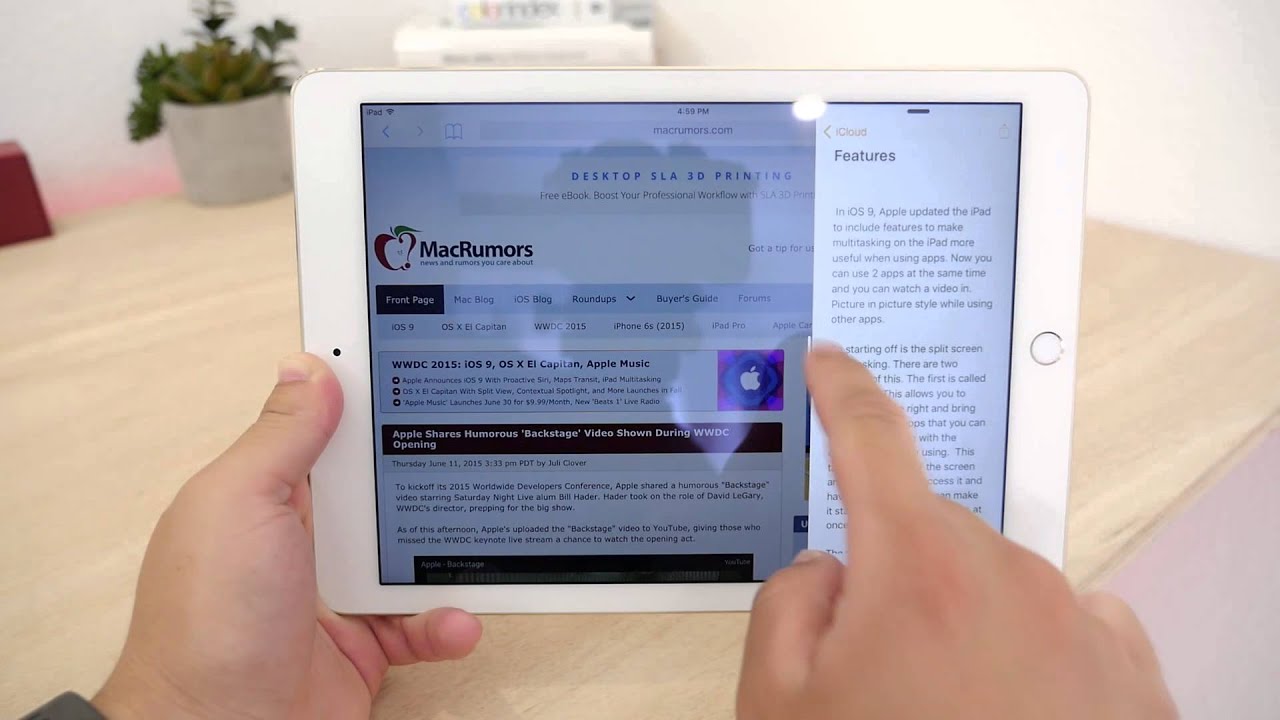

Slide Over can be activated within any app by swiping left from the right side of the iPad to bring up a small side pane that displays a secondary app alongside the first app. Slide Over takes up 1/3 of the space, and any app that has built-in multitasking support will appear in the side pane. Swiping downwards on the Slide Over window from the top of the iPad screen will allow you to switch between apps.
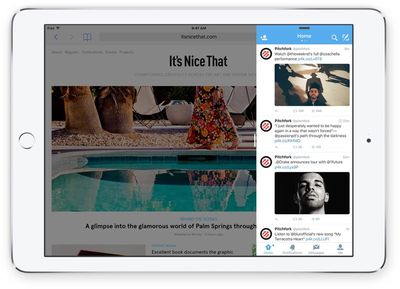
ipadmultitaskingslideview
Slide Over is not a full multitasking experience because both apps are not active at once. When the side pane is open, the app that's taking up most of the screen is paused and relegated to the background. Slide Over can be used in portrait or landscape mode and is useful for answering a quick message or looking something up in Safari while using another app.

Pulling the Slide Over window further towards the middle of the screen in landscape mode on an iPad Air 2 or an iPad mini 4 will activate Split View. Split View displays two apps side-by-side, with each app taking up half of the screen. With Split View, both apps can be used at the same time and controlled independently, so you can do things like copy and paste content from one app to another while both are open on the screen.
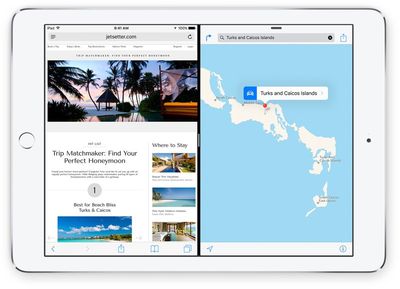
ipadmultitaskingsplitscreen
Picture in Picture, the third multitasking feature, lets you watch videos or participate in FaceTime video calls while using other apps. When on a FaceTime call or when watching a movie, tapping on the Home button sends the video to a corner of the iPad's display. From there, you're able to use other apps while you watch the movie or carry on with the FaceTime conversation.
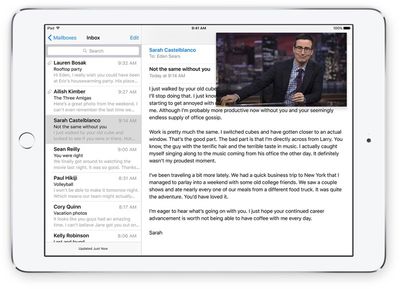
pictureinpicture
If you have an iPad Air 2 or an iPad mini 4, you can use all three of the different multi-tasking features. Both the iPad Air 2 and iPad mini 4 have A8 or better processors and 2GB RAM to support full multitasking. The upcoming iPad Pro will also support all three multitasking features.

If you have an iPad Air, iPad mini 2, or iPad mini 3, you can use Slide Over and Picture in Picture, but you can't use Split View because those older iPad models are not powerful enough to reliably support two apps at once. If you have an older iPad, like an iPad 2, an older Retina model, or an original iPad mini, none of the multitasking features will be available.

Apple's built-in apps support the new multitasking features, but third-party developers need to build multitasking support into their apps. We'll be seeing the first crop of iOS 9 apps with multitasking beginning today, but it may take some time for all apps to be updated with the APIs required to work with Slide Over, Picture in Picture, and Split View.


Related Forum: iOS 9

Top Rated Comments

dweezle3 Avatar
146 months ago
I'd like to have a stern talk with whoever it is at Apple that decided that an iPhone 6 Plus wasn't big enough for this feature :mad:
Score: 8 Votes (Like | Disagree)
Glassed Silver Avatar
146 months ago
Hmm, I'd love to hide certain apps from that app drawer and also manually sort them maybe.

I don't need the Find my iPhone app to sit in there. Maybe relegate these "hidden" apps to a "more" folder or something.
So I can still access them, but they don't clog up my day-to-day user experience.

Glassed Silver:mac
Score: 4 Votes (Like | Disagree)
macduke Avatar
146 months ago
Hmm, I'd love to hide certain apps from that app drawer and also manually sort them maybe.

I don't need the Find my iPhone to sit in there. Maybe relegate these "hidden" apps to a "more" folder or something.
So I can still access them, but they don't clog up my day-to-day user experience.

Glassed Silver:mac
As someone who has been using this all summer, this definitely needs to be a thing. It's only going to get worse as more third party apps are updated. On the one hand I'm really excited to finally have some third party apps to do split view with, but on the other hand it's going to make my launcher really cumbersome. For me that's the clunky part of the whole deal. What about when nearly every app gets updated? You'll have to scroll through a huge list that has no organization. I know PCalc is in my office folder. But where will it fall in this huge list? It sorts them by last used, which helps, but still.

A more elegant solution might be to show your home screens in a way that makes it obvious you aren't actually on your home screen (so it doesn't confuse users) and have all of your app icons in their places. Apps that don't support multitasking will be very translucent and disabled, making the available apps stand out. Perhaps this sidebar thing will work for now but over time it could get clunky. Or perhaps so few apps will actually update for multitasking (because why would you need to multitask games, certain utilities, etc.) that this won't ever become a problem. After all, we MacRumors readers are in the minority when it comes to how many apps we use.

Ninja edit: Just thought of another solution that might really help: Folders for this sidebar switcher. That would bring some much-needed organization, and any apps you don't use would be put in a folder at the top that doesn't ever get used, so doesn't stay near the bottom of the recently used list. Done!
Score: 3 Votes (Like | Disagree)
Radeon85 Avatar
146 months ago
On my iPad Air, Picture in Picture doesn't works, and it wouldn't be some reason for it. Maybe one of the first problems with IOS9
Lack of ram would be the cause. 1GB RAM is just not enough.
Score: 2 Votes (Like | Disagree)
69Mustang Avatar
146 months ago
won't work in portrait mode. all apps so far have been tested against a minimum of 320 points width. width of iPhone 6 plus is 414 points. doing split screen means apps would look weird at 207 points width because it's never been tested before.
Couldn't it work in a vertical stack?
Score: 2 Votes (Like | Disagree)
flur Avatar
146 months ago
We need the ability to exclude apps from the app switcher in the sidebar. My entire "Crapple" folder is in there.
Score: 1 Votes (Like | Disagree)

Popular Stories

1password deal blue

1Password Security Breach: What Was Accessed and What Wasn't

Wednesday November 25, 2026 1:09 pm PST by
Popular password management app 1Password today said it experienced a security breach earlier this month. 1Password says some customer names and email addresses were accessed, but no customer vault contents were compromised. On November 19, 1Password saw indications that an employee's GitHub account had been breached and began investigating. The company says the breached GitHub account was...
apple design award 2025

Apple Announces 2025 Design Award Winners Ahead of WWDC 2025

Tuesday June 3, 2025 10:14 am PDT by
As we wait for WWDC to kick off next Monday, Apple today announced the winners of its annual Apple Design Awards, recognizing apps and games for their innovation, ingenuity, and technical achievement. The 2025 Apple Design Award winners are listed below, with one app and one game selected per category: Delight and Fun - CapWords (App) and Balatro (Game) Innovation - Play (App) and PBJ -...
ipad pro prime

Apple Has iPads Running macOS Internally, Says Gurman

Wednesday November 25, 2026 4:55 am PST by
Apple has iPads running macOS internally and has had them "for some time," according to Bloomberg's Mark Gurman, although he says no work is currently being done to bring the Mac operating system to iPads. Speaking on his latest Power On podcast, Gurman said there is "no work being done to consumerize macOS on the iPad." Rather, Apple will continue to bring Mac features and apps like Final Cut ...
Latest Stories
The 50+ Best Apple Black Friday Deals on AirPods, iPads, MacBooks, and More
3 hours ago
GTA VI Now (Barely) Running on Apple Silicon Macs
8 minutes ago
The Best Black Friday Streaming Deals on Apple TV, Disney+, and More
47 minutes ago
Apple TV's 'Carême' Wins International Emmy for Best Drama
1 hour ago
iPhone 18 Production Delay Leaves Apple Little Time Before Launch
2 hours ago
The Best Black Friday AirPods Deals
3 hours ago
The Best Black Friday Deals on Apple Home Products
3 hours ago
The Best Black Friday iPhone Deals
3 hours ago
The Best Black Friday iPad Deals
3 hours ago
The Best Black Friday Apple Watch Deals
3 hours ago
The Best Black Friday AirTag Deals
3 hours ago
The Best Black Friday Mac Deals
3 hours ago
iPhone Share of US Smartphone Market Hits 57% as Rivals Slip
4 hours ago
iPhone 20 Pro Rumored to Feature 3D-Printed Titanium Frame
6 hours ago
Apple's Official 2026 Black Friday Offer Starts Rolling Out
23 hours ago
Halide Adds Fill Light Feature for iPhone Duo
1 day ago
MacBook Air Black Friday Deals Now Live With Massive $399 Savings
1 day ago
Amazon Discounts All MacBook Neo Models by $99 for Black Friday
1 day ago
Kodak Launches Unique AirTag Rival With E-Ink Display
1 day ago
Here's Why the Apple Store is Going Down
1 day ago
Apple Still Working on Giant Foldable iPad That Could Cost $5,000
1 day ago
iPhones Dominate China's Weak Singles' Day Smartphone Sales
1 day ago
iPhone 20 Pro Could Feature Ceramic in Limited-Edition Model
1 day ago
Apple Faces Korean Regulator Review Over iPhone 16 AI Advertising
1 day ago
Apple Watch Ultra 4 Hits New Best-Ever Price of $649.99 for Black Friday
1 day ago
New Apple Store Opening in India, Download the Special Wallpaper Now
2 days ago
Redesigned OLED MacBook Air Could Launch in 2027 or 2028
2 days ago
AirPods Pro 3 for $149 is One of The Best Black Friday Deals This Year
2 days ago
1Password Security Breach: What Was Accessed and What Wasn't
2 days ago
WhatsApp Finally Adds Scheduled Messages
2 days ago
Related Apple News: Mac | World News | Travel | Politics | News






























