Skip to Content

OS X El Capitan Review Roundup: Not Hugely Different From Yosemite, but Adds New Conveniences

At its Worldwide Developer's Conference last week, Apple introduced OS X 10.11 El Capitan, the newest version of its Mac-based operating system. At the time, Apple provided the software both to registered developers and to members of the media. Media reviews are hitting the web, giving us our first in-depth opinions on OS X El Capitan.

We've rounded up details from some of the best reviews in order to give MacRumors readers a look at OS X El Capitan from the perspective of people who have used it extensively over the course of the last week. Each of the reviews is worth reading in full to get a feel for how OS X El Capitan builds upon the features introduced with OS X Yosemite.

os_x_el_capitan_roundup
Lauren Goode, Re/code:

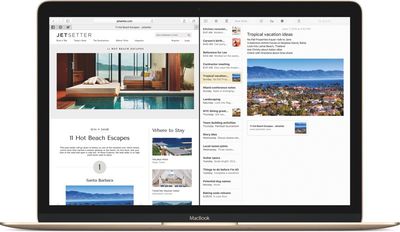
The most notable I've-seen-this-before feature in OS X El Capitan is Split View: Now, two apps can run in split view on a full screen. Finally! Mail and TweetDeck side by side throughout the day, on a full screen, without having to manually drag windows into place. Of course, Microsoft Windows has had this "snap" feature for years.

Jim Dalrymple, The Loop:

I use Mail a lot. Unfortunately, I've had some trouble lately with Mail on Yosemite getting stuck while checking IMAP connections, especially after I wake the computer from sleep. All I ask for in El Capitan is for that to be fixed.

elcapitansplitview
The good news is that it seems much better in this beta version of the operating system. Apple said Mail in El Capitan delivers an improved IMAP engine, so I'm very hopeful. I haven't had Mail stop working yet and I'm a week into using it--that's a damn good sign.
Lance Ulanoff, Mashable:

The differences between Apple OS X Yosemite and El Capitan are so subtle that it often feels like one of those puzzles where you have to spot 11 differences between two photos. Considering Yosemite was a lauded OS overhaul, this isn't a bad thing, but the best way to sum up Apple's OS update is this: If you like Yosemite, you'll like El Capitan, too. [...]

Apple tweaked system performance to improve mail load times and application launches, but it was hard for me to tell the difference. Did it seem fast? Yes. Does Yosemite also seem fast? Yes. I did notice one very beta glitch when I unexpected ran out of system memory in El Capitan.

Darrell Etherington, TechCrunch:

Now, Apple has added a lot of muscle to Notes in 10.11, turning into a much better competitor not only for other text editors, but for things like Evernote, too. You can integrate images, PDFs, videos and other media right into notes via drag-and-drop insertion, for instance, and crate checklists out of line-separated items with a single click.

Formatting ensures that you can create headers, paragraph styles, bold and italicize text and you can attach from your Photos app directly. Open content from other apps directly in Notes, too, using the Share menu across OS X, and even add stuff like Maps locations, spreadsheets and more. Folders keep things more organized, and thumbnails provide easy identification of what's within a Note from the sidebar menu when you're including media.

Dieter Bohn, The Verge:

Why would you choose Apple's solutions in El Capitan? Because they're all so tightly integrated. Maps talks to Notes, Calendar talks to Mail, and all of them talk to Spotlight. All of those interconnections and digital conversations could subtly drive you to opt for Apple apps instead of whatever you might have been using before. Think of it like Continuity, but inside the computer instead of between devices. And all of it works incredibly well.

Dana Wollman, Engadget:

Some of my favorite updates are in Safari, though many would rightfully argue that these improvements aren't necessarily novel. In fact, some appear to take after features already offered in Chrome, and other competing browsers. For instance, there's now an option to identify which tab is playing sound. From there, you can hit a mute button on the tab itself, or click the speaker icon in the address bar. The latter option comes in handy when you have sound coming from multiple tabs -- say, a song you meant to stream, and an auto-playing video ad in the other. By clicking the sound icon in the URL bar, you can see a list of all the tabs playing sound and selectively mute the one that's bothering you.

elcapitanpinnedsites
Perhaps my favorite new feature is the addition of pinned sites. They sort of form a bookmarks bar, only better: Here, these tabs can't be closed, and because they look like shrunken buttons, they take up much less space than a regular tab.

Rene Ritchie, iMore:

Thanks to a new CoreSpotlight API, developers can now make the content in their apps, including documents, messages, and more, available to Spotlight as well. That means it'll be even easier to find what we're looking for, no matter where it's contained.

I've tried LaunchBar, Alfred, and Quicksilver, but none of them ever stuck: Spotlight has always been my go-to. Yosemite made it significantly more functional, but natural language and the new results engine promises to make it integral to the Mac experience. I'm really looking forward to using it full-time come the fall.

Other Reviews:
Ryan Smith, AnandTech
David Pierce, Wired
Ed Baig, USA Today
David Pogue, Yahoo
Andrew Cunningham, Ars Technica

OS X El Capitan is currently only available to registered developers. Apple has plans to introduce a public beta test of the software in July, following that with a fall public release. For detailed information on all of the new features in OS X El Capitan, make sure to check out our El Capitan roundup.


Related Forum: OS X El Capitan

Popular Stories

apple design award 2025

Apple Announces 2025 Design Award Winners Ahead of WWDC 2025

Tuesday June 3, 2025 10:14 am PDT by
As we wait for WWDC to kick off next Monday, Apple today announced the winners of its annual Apple Design Awards, recognizing apps and games for their innovation, ingenuity, and technical achievement. The 2025 Apple Design Award winners are listed below, with one app and one game selected per category: Delight and Fun - CapWords (App) and Balatro (Game) Innovation - Play (App) and PBJ -...
1password deal blue

1Password Security Breach: What Was Accessed and What Wasn't

Wednesday November 25, 2026 1:09 pm PST by
Popular password management app 1Password today said it experienced a security breach earlier this month. 1Password says some customer names and email addresses were accessed, but no customer vault contents were compromised. On November 19, 1Password saw indications that an employee's GitHub account had been breached and began investigating. The company says the breached GitHub account was...
apple store down feature

Here's Why the Apple Store is Going Down

Thursday November 26, 2026 5:49 am PST by
Apple's online store is going down for a few hours on a rolling country-by-country basis right now, but do not get your hopes up for new products. Apple takes its online store down for a few hours ahead of Black Friday every year to tease its annual gift card offer with the purchase of select products. The store is down in Australia, New Zealand, and Thailand, right now, and it will...

Top Rated Comments

RoelJuun Avatar
150 months ago
A shame Ars Technica's John Siracusa won't be writing a 20+ page review anymore…The one and only true review.
Score: 17 Votes (Like | Disagree)
150 months ago
How sad...Beta 1 for developers (not even an actual beta for beta testers) deserves a review by the media?
Poor Apple.

Edit: Actually, the article on Macrumors is misleading. I clicked on 4-5 of the articles and they all said either Preview or First Look (not review). Bad Macrumors.
Score: 10 Votes (Like | Disagree)
RedBear Avatar
150 months ago
Not too many people seem to have noticed that something rather momentous just happened with El Capitan. For the first time ever in the history of Mac OS (as far as I know), there is an official option to automatically hide and show the menu bar, just like you can auto-hide the Dock. Look in System Preferences -> General. This option is definitely not present in Yosemite and is something I tried to do in various ways for several years after switching to OS X from a combination of Windows and Linux over a decade ago. There was an Unsanity APE haxie years ago called Menufela that was able to hide the menu bar, but it stopped working around the time Tiger came out. I had given up on ever achieving my dreams of minimizing unnecessary stuff being shown on my screen in OS X, but now it is possible. I even tried something called MenuShade for a while, that would overlay a black bar on the menu bar to "hide" it, but after a while that seemed sort of pointless.

I can now hide both the menu bar and the Dock and stretch my windows (if I so choose) to fill all available physical screen space. The menu bar and Dock will pop up and overlap the window, then disappear. This is fabulous on a small screen, but very nice even on a 17" MacBook Pro screen or a 27" iMac. You might think, oh, just go fullscreen, but you'd be missing the point. Fullscreen apps outside of the tablet/smartphone context are mostly a joke to me, because there is a only a single app (Screen Sharing) that I ever really want to use on the screen all by itself. It's a bad paradigm for most apps, as evidenced by the fact that Apple are now shoehorning a tabbed multi-window interface back into the fullscreen mode of Apple Mail, because obviously people found a single overlayed compose window in fullscreen Mail to be too constricting in practical usage. Fullscreen on the desktop is pointless except for things like gaming or Screen Sharing where you really only want to see that one task on screen without any distractions. Even a split-screen view with two fullscreen apps is just not that great. It forces you into a completely different way of interacting with the windows on the screen.

I frequently just want to work with a single window or a couple of different windows in different apps at the same time, but minimize visual distractions on the screen without necessarily filling the screen with the app window. To help me with that, I have an app called Isolator that will overlay any color you choose at any opacity level on everything behind the application that's in focus. It's pretty old but still works with Mavericks, Yosemite and El Capitan. Just google "download isolator willmore" to find it. The remaining thing that helps me size windows the way I want is the SizeWell SIMBL plugin, which amazingly still works with Mavericks, Yosemite and El Capitan also.

But really the final piece of the puzzle was being able to hide the menu bar, and now that is possible without any hacks. These tools, plus the four-finger swipe up and down on the trackpad for Exposé functions, are transforming the way I'm using my MacBook Pro, and this is a computer I've been using daily for several years, so that's really saying something.

From my personal perspective, the ability to auto-hide the menu bar is one of the defining features of El Capitan, and it was never even demonstrated or mentioned anywhere. I ended up stumbling upon it accidentally while trying to remember where to set "Reduce Transparency". It was like opening my sock drawer one sleepy morning and suddenly finding that while I was sleeping someone had lined it with 24 karat gold foil and filled it with live puppies, kittens, unicorns and rainbows, and at the end of the rainbows was a magical pot containing not just solid gold coins but also an endless supply of chocolate-chip cookies and chewy fudge brownies.

But that's just me. Apparently nobody else finds the sudden appearance of this long sought-after option to be a big deal.
Score: 9 Votes (Like | Disagree)
wwooden Avatar
150 months ago
Can anyone explain the reason/logic for not adding Siri to the desktop OS? I'm not trying to be a dick, I really am curious. When I watched the keynote and they showed the new features to spotlight, it just screamed to me to be replaced by siri. I feel like Siri would actually be more natural to use on a desktop: usually in a quiet and private office, wouldn't feel as "weird" to talk to my computing device.
Score: 9 Votes (Like | Disagree)
dannyyankou Avatar
150 months ago
My favorite new "feature" is performance. Beta 1 is much more zippy than the latest public build of Yosemite.
Score: 9 Votes (Like | Disagree)
sniffies Avatar
150 months ago
I hate Apple's implementation of Split View because it only works in fullscreen mode. I for one wanna be able to see my dock and menu bar while working.
Score: 7 Votes (Like | Disagree)
Latest Stories
The 50+ Best Apple Black Friday Deals Still Available on AirPods, iPads, and More
3 hours ago
HomePod Mini 2 in (RED) Seemingly Spotted Ahead of Announcement
19 minutes ago
Apple's M6 and PROLED MacBook Pro Reach New Low Prices for Black Friday
11 hours ago
The MacRumors Show: iPhone Air 2 and iPhone 18 Are Coming
11 hours ago
Apple Store in Brisbane Reopening Next Month With New Design
11 hours ago
The 60+ Best Black Friday Accessory Deals on iPhone Chargers, TVs, Headphones, and More
12 hours ago
GTA VI Now (Barely) Running on Apple Silicon Macs
12 hours ago
The Best Black Friday Streaming Deals on Apple TV, Disney+, and More
13 hours ago
Apple TV's 'Carême' Wins International Emmy for Best Drama
14 hours ago
iPhone 18 Production Delay Leaves Apple Little Time Before Launch
14 hours ago
The Best Black Friday AirPods Deals Still Available
6 hours ago
The Best Black Friday Deals on Apple Home Products
15 hours ago
The Best Black Friday iPhone Deals Still Available
6 hours ago
The Best Black Friday iPad Deals Still Available
6 hours ago
The Best Black Friday Apple Watch Deals Still Available
6 hours ago
The Best Black Friday AirTag Deals Still Available
6 hours ago
The Best Black Friday Mac Deals Still Available
6 hours ago
iPhone Share of US Smartphone Market Hits 57% as Rivals Slip
16 hours ago
iPhone 20 Pro Rumored to Feature 3D-Printed Titanium Frame
18 hours ago
Apple's Official 2026 Black Friday Offer Starts Rolling Out
2 days ago
Halide Adds Fill Light Feature for iPhone Duo
2 days ago
MacBook Air Black Friday Deals Now Live With Massive $399 Savings
2 days ago
Amazon Discounts All MacBook Neo Models by $99 for Black Friday
2 days ago
Kodak Launches Unique AirTag Rival With E-Ink Display
2 days ago
Here's Why the Apple Store is Going Down
2 days ago
Apple Still Working on Giant Foldable iPad That Could Cost $5,000
2 days ago
iPhones Dominate China's Weak Singles' Day Smartphone Sales
2 days ago
iPhone 20 Pro Could Feature Ceramic in Limited-Edition Model
2 days ago
Apple Faces Korean Regulator Review Over iPhone 16 AI Advertising
2 days ago
Apple Watch Ultra 4 Hits New Best-Ever Price of $649.99 for Black Friday
2 days ago
Related Apple News: Mac | Lifestyle | World News | Reviews | Business






























