Skip to Content

The Quest for Quality: Five of the Most Useful Apple Watch Apps

While Apple CEO Tim Cook recently confirmed that there are over 3,500 apps available for the Apple Watch, several reviewers and early adopters have complained that many fail to provide useful functionality on the wrist. Despite strict approval guidelines, the App Store for Apple Watch is cluttered with basic or poorly designed apps for the wrist-worn device, likely due in significant part to the apps having been developed before the Apple Watch was available.

To help users discover some high quality watch-based experiences, MacRumors reached out to its forum community and skimmed through the App Store to handpick five Apple Watch apps that we've found particularly useful. Some of the useful Apple Watch apps worth mentioning include Workflow, Philips Hue, Things, Calcbot and Clear.

Workflow

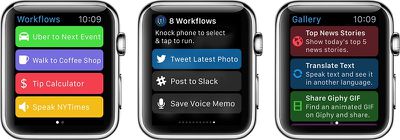
Workflow is an automation tool that enables you to drag and drop any combination of actions to create custom workflows for completing various tasks. You can, for example, use the app to get directions to nearby coffee shops within a preset radius directly on your Apple Watch. Workflows are created using a paired iPhone and automatically appear on the Apple Watch for one-tap use.
Workflow 3
Workflow features over 200 actions, including those for Contacts, Calendar, Maps, Music, Photos, Camera, Reminders, Safari, AirDrop, Twitter, Facebook, Dropbox, Evernote and iCloud Documents. The app, created by DeskConnect co-founders Ari Weinstein, Nick Frey and Conrad Kramer, is currently $2.99 on the App Store for iPhone and Apple Watch as part of a limited time 40% off sale.

Philips Hue

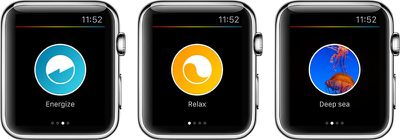
Philips Hue for Apple Watch displays up to 10 different lighting configurations for Hue lights that can be activated by pressing a circular button -- there's one button per screen, and you swipe between them. One minor inconvenience is that Hue has no Glance, so you have to actually open the app to turn on your lights, although it's a simple issue that could easily be addressed in a future update.
Philips Hue Apple Watch
You choose your desired scenes in the Hue for iPhone app in settings, where available scenes to choose from are listed under Widget & Apple Watch. Scenes you pick will be available on the Apple Watch and in Notification Center on iPhone if you have the widget turned on. The scenes will be the same in both places -- you can't pick different ones for the iOS widget and for the Apple Watch.

If you don't have a Hue Tap, quick selecting scenes on the Apple Watch is easily the fastest way to control your lights since the device is right on your wrist. With 10 scenes, there are a lot of options for controlling lighting all over the house. You can get more scenes by creating them on the iPhone or downloading them from the Meet Hue website.

Philips Hue for Apple Watch is free on the App Store.

Things

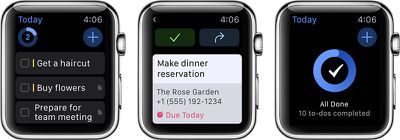
Things is one of several to-do apps available for the Apple Watch, displaying a list of day-to-day tasks and long-term goals on your wrist that can be assigned to categories, marked as completed or added to larger projects related to, for example, planning a vacation, preparing for a presentation or filing taxes.
Things-Apple-Watch
To-dos can be added directly from the Apple Watch using Siri dictation, and categorized under Inbox or Today with a single tap. Things for Apple Watch can also provide notifications to remind you about scheduled to-dos for a specified date so that you don't forget, and all tasks automatically sync to a paired iPhone.

Things for Apple Watch is $9.99 on the App Store.

Calcbot

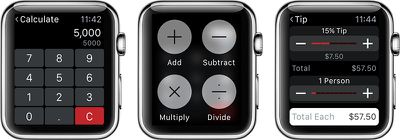
Calcbot by Tapbots makes up for the lack of a stock calculator app on the Apple Watch, enabling you to perform basic calculations and conversions, calculate tips and split bills right on your wrist. The regular calculator mode features a basic numeric keypad, and a firm press using Force Touch brings up a menu with add, subtract, multiply and divide options.

The conversion mode brings up a similar looking number pad with options to convert US dollars to euros, pounds to kilograms, miles to kilometers and Fahrenheit to Celsius using Force Touch. Calcbot Pro, $2.29, enables users to customize the four conversion options using the Calcbot app for iPhone, with over 500 units across 22 different categories to choose from.
Calcbot-Apple-Watch
Perhaps the most useful functionality of Calcbot for Apple Watch is the tip calculator, which allows you to enter the total cost of your bill, calculate a 10% to 30% tip and divide the amount between up to 10 people if necessary. Apple Pay and Calcbot combined make the Apple Watch a more convenient option than fumbling with your iPhone and wallet when the check comes.

Calcbot for Apple Watch is free on the App Store.

Clear

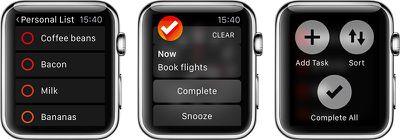
The Apple Watch's small screen size is ideal for displaying bite-sized information, making Clear a perfect match for the wrist-worn device. Clear for Apple Watch brings tasks, reminders and to-do lists to your wrist, featuring a Glance that shows you how many items are on your list and displays upcoming reminders. Adding new tasks can be done using Siri dictation.
Clear-Apple-Watch
Tapping on the Glance brings you to the full Clear app, where you can view all of your lists on the Apple Watch. If you create your own list, such as a grocery list or task list, you can check off items directly on the watch. If you press firmly on a list using Force Touch, you can sort the list, add new tasks or mark all tasks completed.

Clear for Apple Watch is $4.99 on the App Store.

These are by no means the only useful Apple Watch apps available so far, and we encourage readers to share some of their other favorites in the discussion thread associated with this post. It is clear, however, that many developers have struggled to find the right balance and user experience for the new platform.

With the Apple Watch now available and users and developers able to figure out the best way for apps on the wrist to fit into their daily lives, there will no doubt be improvements to the user experience and we'll continue to watch for interesting and novel apps making their way to the Apple Watch.


Related Roundup: Apple Watch 12
Buyer's Guide: Apple Watch (Buy Now)
Related Forum: Apple Watch

Popular Stories

apple watch series 3 design

Apple Offers Steps to Fix Daylight Saving Time Bug on Apple Watch

Sunday November 1, 2026 3:34 am PST by
Apple has published a support document describing what to do if your Apple Watch continues to show time that's off by one hour after daylight savings time changes. "This incorrect time appears only on the Always On display when your wrist is down," says Apple. "When you activate the display by tapping it or raising your wrist, the time changes to the correct hour." To fix the issue, Apple says ...
muse apple watch app

Meta's Muse AI Agent Comes to Apple Watch

Monday November 9, 2026 1:55 pm PST by
Meta today updated the Muse app for iOS to add Apple Watch support, which means Muse users can access the proactive AI agent from the watch. The app adds the Muse character to the watch with an option to text it, dictate text to it, or call it. There's also a Muse complication for quick access. Muse is Meta's personal AI agent that can complete tasks for users. It is available as a...
siri recap live rewind

watchOS 27.3 Brings Live Rewind and Siri Recap to Apple Watch

Tuesday November 3, 2026 10:35 am PST by
With the first beta of watchOS 27.3, Apple is introducing new Audio Intelligence features it previewed for the Apple Watch Series 12 and Ultra 4 earlier this year. Powered by the S11 chip, Audio Intelligence includes Live Rewind, Siri Recap, Sound Recognition, and Shazam Music Recognition. Sound Recognition and Shazam are already on the watch, but Live Rewind and Siri Recap are now available ...

Top Rated Comments

151 months ago
Revolutionary! LOL. I still don't quite get it. I have a Smartwatch (Asus Zenwatch) and at first - I was having fun with apps like these, then I slowly started pulling my phone out because the UX is simply better and I have to have it on me at all times anyway.

There's this weird schism between what we want to do on the watches and what we want to do with our phones. I don't think this is a case of Google Wear being inferior, I just haven't seen the killer app for these things yet.
Score: 29 Votes (Like | Disagree)
151 months ago
I feel like when ever someone talks about what the watch can do, they need to always (yes, ALWAYS) put it in the context of why it's better to do it on the watch instead of the phone. Both devices are mobile. Both devices use apps. One screen is small on your wrist, the other is about 4-6 times larger in your pocket. Your pocket is about 10 inches from your watch.

So instead of saying "with the Apple Watch, you can use a calculator" you should say "using a calculator app on the watch is better than the one on your phone because...".

Right. There are really very, very few reasons doing an "app" on the wrist is better than the phone.
Score: 20 Votes (Like | Disagree)
BruceEBonus Avatar
151 months ago
Top Tip: while AppleWatch is charging-you won't be able to use certain Apps. However don't despair. Simply buy a small notepad. You can write down stuff that the other apps will do like:
Remind you to have a haircut
When to eat your next meal
Scribe some basic mathematical calculations
When your next important meeting is
Friends birthday dates
When to exercise and where
Contact phone numbers
Note down passwords etc
The list goes on.
This alternative utility does not need batteries or linking- to an iPhone of course so this could be a real boon a proper money saver?

Apple Stores do not sell them. But most newsagents do. And not too expensive either. A great standby utility when you're iPhone or Watch is inaccessible.
Score: 19 Votes (Like | Disagree)
151 months ago
When a calculator is the most useful app, you know you have problems justifying a multi hundred dollar device.
Score: 15 Votes (Like | Disagree)
Joe Rossignol Avatar
151 months ago
I'm glad we're starting to see screenshots with the bezel. It is a little thing, but it's more attractive and easier to see the scale of the interface on the watch.

I added the bezels to the screenshot myself, glad you like them!
Score: 15 Votes (Like | Disagree)
sampaul Avatar
151 months ago
I still haven't got my Apple Watch. FML.:mad:

Score: 14 Votes (Like | Disagree)
Latest Stories
The 50+ Best Apple Black Friday Deals Still Available on AirPods, iPads, and More
3 hours ago
Here Are the Best Apple Black Friday Leftover Deals You Can Get Today
1 hour ago
HomePod Mini 2 in (RED) Seemingly Spotted Ahead of Announcement
13 hours ago
Apple's M6 and PROLED MacBook Pro Reach New Low Prices for Black Friday
23 hours ago
The MacRumors Show: iPhone Air 2 and iPhone 18 Are Coming
23 hours ago
Apple Store in Brisbane Reopening Next Month With New Design
1 day ago
The 60+ Best Black Friday Accessory Deals on iPhone Chargers, TVs, Headphones, and More
1 hour ago
GTA VI Now (Barely) Running on Apple Silicon Macs
1 day ago
The Best Black Friday Streaming Deals on Apple TV, Disney+, and More
1 day ago
Apple TV's 'Carême' Wins International Emmy for Best Drama
1 day ago
iPhone 18 Production Delay Leaves Apple Little Time Before Launch
1 day ago
The Best Black Friday AirPods Deals Still Available
19 hours ago
The Best Black Friday Deals on Apple Home Products
1 day ago
The Best Black Friday iPhone Deals Still Available
19 hours ago
The Best Black Friday iPad Deals Still Available
19 hours ago
The Best Black Friday Apple Watch Deals Still Available
19 hours ago
The Best Black Friday AirTag Deals Still Available
19 hours ago
The Best Black Friday Mac Deals Still Available
19 hours ago
iPhone Share of US Smartphone Market Hits 57% as Rivals Slip
1 day ago
iPhone 20 Pro Rumored to Feature 3D-Printed Titanium Frame
1 day ago
Apple's Official 2026 Black Friday Offer Starts Rolling Out
2 days ago
Halide Adds Fill Light Feature for iPhone Duo
2 days ago
MacBook Air Black Friday Deals Now Live With Massive $399 Savings
2 days ago
Amazon Discounts All MacBook Neo Models by $99 for Black Friday
2 days ago
Kodak Launches Unique AirTag Rival With E-Ink Display
2 days ago
Here's Why the Apple Store is Going Down
2 days ago
Apple Still Working on Giant Foldable iPad That Could Cost $5,000
2 days ago
iPhones Dominate China's Weak Singles' Day Smartphone Sales
2 days ago
iPhone 20 Pro Could Feature Ceramic in Limited-Edition Model
2 days ago
Apple Faces Korean Regulator Review Over iPhone 16 AI Advertising
2 days ago
Related Apple News: Ipad | Iphone | South Africa | Business | Culture





























