Skip to Content

'Workflow' for Apple Watch Brings Automated Tasks to Your Wrist

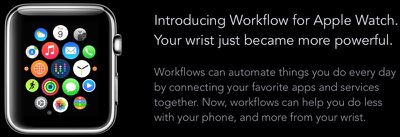
Popular iOS app Workflow was today updated with support for the upcoming Apple Watch, bringing its highly useful task automation capabilities to the wrist-worn device.

For those of you unfamiliar with Workflow, it's a powerful automation app that was first launched on iOS last December. Workflow lets users create actions and connect apps to automatically perform a huge range of tasks on the iPad or the iPhone.
workflowapplewatch
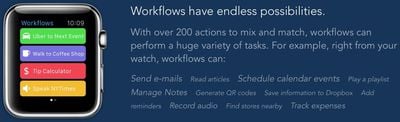
Workflows can be built from a series of actions to perform tasks like making GIFs from a series of photos, creating PDFs from websites, appending content or recordings to Evernote, seeing older versions of websites, getting images from websites, and translating text on the clipboard. There are hundreds of actions that can be combined for an endless number of different workflows.

On the Apple Watch, Workflow will work in the same way, giving users one-tap access to a wide range of different timesaving actions. For example, it'll be possible to pull up a map to the nearest coffee shop or call an Uber using Workflow. These type of quick-access actions may be particularly valuable on the Apple Watch, given its limited input methods.
workflowactions
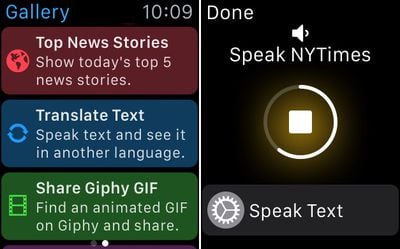
One of the best features about Workflow for iOS is its included Workflow Gallery, which makes it easy for even those new to the app to download actions that are immediately useful. The same gallery feature will be available on the Apple Watch for fast access to workflows.
workflowgallery

Workflow's Gallery and a workflow in action

Workflows can be executed by raising the Apple Watch on the wrist to turn it on and swiping up at the bottom of the screen to get to the Workflow Glance. Workflows can be run directly from the Glance portion of the Apple Watch, so accessing them will be similar to accessing an app in the Notification Center on iOS. As a reminder, Glances are quick snippets of information that are meant to be easy to access.

Third-party Glances on the Apple Watch are not interactive and do not support buttons or scrolling, so launching a workflow through the Apple Watch's Glance view is done in a unique way. The Glance automatically scrolls through the different workflows that are available and selecting one is done by tapping on the screen.

Scrolling through workflows can be sped up with a rather unique interaction -- knocking the Apple Watch against the iPhone in a pants pocket. This causes the built-in scrolling mechanism to shift to the next available workflow in the list.

Workflows from the iPhone are automatically available on the Apple Watch, including all custom-created workflows constructed from the available actions in the Workflow app. Many Apple Watch apps are somewhat limited in function due to the restricted access developers have to Apple APIs, and the same goes for Workflow.

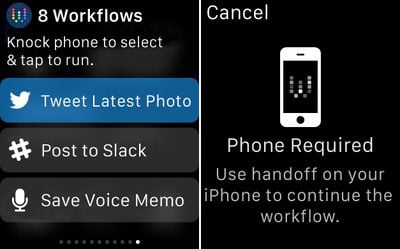
Apple Watch workflows aren't as full-featured as those on the iPhone -- it's not possible to run workflows that open other apps -- but Handoff is supported to allow users to transfer a workflow on the Apple Watch to the iPhone.
workflowhandoffandglanceview

Workflow's Glance menu and Handoff message

Workflows that involve opening apps, sending messages, or placing phone calls will all require the iPhone because developers cannot use these functions. Workflows that are not supported on the Apple Watch will direct users to use Handoff to swap over to the iPhone.

Though Apple Watch workflows can't open apps (aside from getting directions within Maps) they can still take advantage of the same data available to many iOS apps, like calendar info, contacts, Twitter, Facebook, and more. Currently, 163 out of 226 of available actions within the Workflow app are able to run natively on the Apple Watch, so there's still quite a lot that can be done directly on the device.

Workflow for the Apple Watch is available through an update to the Workflow app as of today, so it'll be accessible on the Apple Watch as soon as the first devices arrive in customers' hands.

Workflow can be downloaded from the App Store for the sale price of $2.99. [Direct Link]

Popular Stories

apple design award 2025

Apple Announces 2025 Design Award Winners Ahead of WWDC 2025

Tuesday June 3, 2025 10:14 am PDT by
As we wait for WWDC to kick off next Monday, Apple today announced the winners of its annual Apple Design Awards, recognizing apps and games for their innovation, ingenuity, and technical achievement. The 2025 Apple Design Award winners are listed below, with one app and one game selected per category: Delight and Fun - CapWords (App) and Balatro (Game) Innovation - Play (App) and PBJ -...
1password deal blue

1Password Security Breach: What Was Accessed and What Wasn't

Wednesday November 25, 2026 1:09 pm PST by
Popular password management app 1Password today said it experienced a security breach earlier this month. 1Password says some customer names and email addresses were accessed, but no customer vault contents were compromised. On November 19, 1Password saw indications that an employee's GitHub account had been breached and began investigating. The company says the breached GitHub account was...
apple store down feature

Here's Why the Apple Store is Going Down

Thursday November 26, 2026 5:49 am PST by
Apple's online store is going down for a few hours on a rolling country-by-country basis right now, but do not get your hopes up for new products. Apple takes its online store down for a few hours ahead of Black Friday every year to tease its annual gift card offer with the purchase of select products. The store is down in Australia, New Zealand, and Thailand, right now, and it will...

Top Rated Comments

jacobj Avatar
152 months ago
Can't wait!

I'll definetely use this app.

The saddest thing I have seen today: either you ordered this and then cancelled it just so you could do a screen grab, or you have the money, but are empty inside and therefore need people to validate your worth through their equally shallow admiration, or you want to annoy people like me for fun which has no satircal value and is equally sad.

Then to post it first just wreaks of a "look at me, look at me" complex.

Let's just hope it's a phase. Good luck in the future. I hope you resolve it all to your benefit.
Score: 20 Votes (Like | Disagree)
152 months ago
"Scrolling through workflows can be sped up with a rather unique interaction -- knocking the Apple Watch against the iPhone in a pants pocket"

Wait what? So if the watch is on my left hand, and my phone is in my right pocket, I have to do some kind of Macarena dance move to speed up the scrolling? I have read this sentence 10 times.... Nothing about it makes sense.
Score: 13 Votes (Like | Disagree)
152 months ago
Thanks to xhamster, my wrist is already powerful enough thanks.
Score: 12 Votes (Like | Disagree)
152 months ago
Every time I come across this app, I think about grabbing it but none of the examples given seem useful or relevant to me. I'm either not looking at enough examples, or perhaps I am a boring person. People seem to swear by this app and think it would make a good Apple purchase. :cool:
Score: 7 Votes (Like | Disagree)
DrJohnnyN Avatar
152 months ago
Can't wait!

I'll definetely use this app.
Score: 6 Votes (Like | Disagree)
152 months ago
Can't wait!

I'll definetely use this app.

Opulence You has it
Score: 5 Votes (Like | Disagree)
Latest Stories
The 50+ Best Apple Black Friday Deals Still Available on AirPods, iPads, and More
3 hours ago
HomePod Mini 2 in (RED) Seemingly Spotted Ahead of Announcement
25 minutes ago
Apple's M6 and PROLED MacBook Pro Reach New Low Prices for Black Friday
11 hours ago
The MacRumors Show: iPhone Air 2 and iPhone 18 Are Coming
11 hours ago
Apple Store in Brisbane Reopening Next Month With New Design
11 hours ago
The 60+ Best Black Friday Accessory Deals on iPhone Chargers, TVs, Headphones, and More
12 hours ago
GTA VI Now (Barely) Running on Apple Silicon Macs
13 hours ago
The Best Black Friday Streaming Deals on Apple TV, Disney+, and More
13 hours ago
Apple TV's 'Carême' Wins International Emmy for Best Drama
14 hours ago
iPhone 18 Production Delay Leaves Apple Little Time Before Launch
14 hours ago
The Best Black Friday AirPods Deals Still Available
7 hours ago
The Best Black Friday Deals on Apple Home Products
15 hours ago
The Best Black Friday iPhone Deals Still Available
7 hours ago
The Best Black Friday iPad Deals Still Available
7 hours ago
The Best Black Friday Apple Watch Deals Still Available
7 hours ago
The Best Black Friday AirTag Deals Still Available
7 hours ago
The Best Black Friday Mac Deals Still Available
7 hours ago
iPhone Share of US Smartphone Market Hits 57% as Rivals Slip
16 hours ago
iPhone 20 Pro Rumored to Feature 3D-Printed Titanium Frame
18 hours ago
Apple's Official 2026 Black Friday Offer Starts Rolling Out
2 days ago
Halide Adds Fill Light Feature for iPhone Duo
2 days ago
MacBook Air Black Friday Deals Now Live With Massive $399 Savings
2 days ago
Amazon Discounts All MacBook Neo Models by $99 for Black Friday
2 days ago
Kodak Launches Unique AirTag Rival With E-Ink Display
2 days ago
Here's Why the Apple Store is Going Down
2 days ago
Apple Still Working on Giant Foldable iPad That Could Cost $5,000
2 days ago
iPhones Dominate China's Weak Singles' Day Smartphone Sales
2 days ago
iPhone 20 Pro Could Feature Ceramic in Limited-Edition Model
2 days ago
Apple Faces Korean Regulator Review Over iPhone 16 AI Advertising
2 days ago
Apple Watch Ultra 4 Hits New Best-Ever Price of $649.99 for Black Friday
2 days ago
Related Apple News: Mac | Culture | Opinion | South Africa | Reviews































