Skip to Content

Popular 'Ulysses' Writing App for Mac Expands to the iPad, Gets Major Update

by

Soulmen's popular Markdown text editor designed for writers, Ulysses, has long been available on the Mac and is one of the more popular Mac-based writing apps due to its clean, text-focused distraction-free interface and it's organizational system. As of today, Ulysses for Mac is getting a major update and it's also expanding to the iPad.

For those of you unfamiliar with the app, Ulysses sets itself apart from other similar writing apps with a three-paned sidebar that lets users see all of their files in one place and its ability to organize files using groups and filters. Writing takes place on sheets, and files are stored locally on the Mac or in iCloud. Markdown text written in Ulysses can be exported in several different file formats, including PDF, ePub, and HTML.

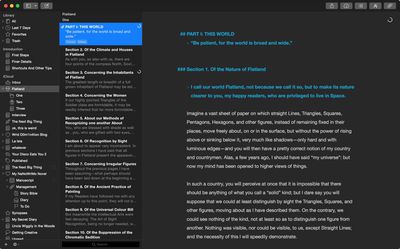
The newest version of Ulysses for Mac includes a new name (dropping the former III) and a new icon -- a butterfly. It's been updated with a Yosemite-style redesign that includes an attachment bar, Favorites on the sidebar, and a new Dark Mode. Quick Export and Preview have been updated, adding TXT and ePub previews, plus export optimizations.
ulyssesformac

Ulysses for Mac

The biggest change to Ulysses for Mac, aside from the redesign, is its integration with the new Ulysses app for iPad. The Mac app fully syncs with the iPad app via iCloud, making it easy to begin work on one device and pick up on another. Handoff support is also built in.
ulyssesforipad

"Our ideal conception has always been to make Ulysses a universal tool that authors can use for any writing task, at any time and everywhere. Bringing it to iPad means a great leap forward towards turning this into reality", explains Max Seelemann, head of development and co-founder of The Soulmen.

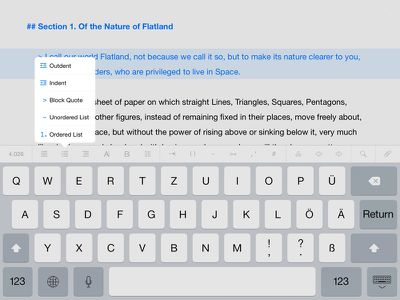
Ulysses for the iPad will be immediately familiar to anyone who has used Ulysses for Mac, as the interface and feature set are nearly identical. The iPad app uses a three-paned setup, and panes can be open or closed with swipes. A button row above the keyboard has been added to make it easier to format text, with access to special characters and shortcuts for creating headings, lists, paragraph blocks, and more. An info bar displays word count, sentences, characters, lines, and pages.

Ulysses for iPad supports filters much like the Mac version, and attachments like notes and images can be added. It also exports to all of the standard file formats the Mac app exports to, including Plain Text, HTML, ePub, PDF, and RTF. When an external keyboard is attached, Ulysses for iPad supports all standard shortcuts, and the look of the app can be customized with Themes, found in the Settings menu.


Both of the new apps are available for download today. Those who already own a copy of Ulysses for Mac can upgrade at no cost. The new Mac app is, however, exclusive to Yosemite -- it won't run on older versions of OS X.

Ulysses for iPad can be downloaded from the App Store for $19.99. [Direct Link]

Ulysses for Mac can be downloaded from the Mac App Store for $44.99. [Direct Link]

Top Rated Comments

153 months ago
Yuck. That app looks horrible. All that black.
Don't comment if you have no idea.

This is just DARK MODE. You can customise EVERY aspect of Ulysses... fonts, colors, background and so on and even save them as themes.

You can also create your own export styles and get a PDF or HTML formatted exactly the way you want with just 1 click.

It also stores all you text files in a library and syncs them to all your devices PLUS you can write different chapters as separate files and just select them and export them combined as an ebook or ibook.

Ulysses is awesome, but you can't tell that by looking at a screenshot.
Score: 10 Votes (Like | Disagree)
153 months ago
I use this app on my Mac in quite an unorthodox way: lecture notes.

The course I'm doing, matched with my general learning style, prefers a linear note taking process. Lecturers can talk so fast that writing by hand is not very viable, and there's a few reasons why Ulysses wins over Word or Pages:

On the fly formatting: I'm a bit of a cheat here in that I don't use Markup for its intended purposes. I modify the markup templates so that they look good and colourful just as they are (i.e. pre-export). For example, _Homicide Act 1957_ is what I type, but what I get is a bold, red text with a yellow highlight. This lets me quickly identify the cases and statutes that I write when I am in lectures. **Lord Denning** gives me that name in a bold font, and so on. It's also much faster than highlighting text and manually changing the fonts and colours each new line.

Everything in one place: Opening multiple word files to find what I want is a pain, right? With Ulysses I can click a folder on the sidebar in the app, enter a search term and it instantly finds me all the lectures where that word is written, and clicking on each result takes me straight there. And you can organise multiple projects into multiple layers... check out my screenshot below.

No distractions and no clutter: A lot of people I know open Word for Mac 2011, with its ugly UI and huge header / menu bars, to type their notes. In order for this to be viable on a laptop screen with the lecture slides snapped to half the screen, they have to zoom out to the point where font is barely legible. My process is simple: Snap the lecture notes left, Ulysses' 'editor only' view right, and I can see the slides and my notes clearly and neatly.

It's also super easy to print out my notes and annotate them with revision questions on the left and summaries at the footer, like the Cornell note system.

Furthermore their support are incredibly helpful: fast response times and you can tell they know exactly how to help you.

Example below;
Score: 5 Votes (Like | Disagree)
153 months ago
Never underestimate how much hipsters are willing to pay for yet another minimal markdown text editor or yet another GTD app.
Wow, there's just so much ignorance in this thread it hurts my brain.

This is neither a Markdown editor or a GTD app. -2

It can *do* Markdown, but it's one of only a few professional-grade writing apps that have made the move to iOS.

Scrivener for iOS, the one I'm personally waiting for has been in development since 2011 or 2012 I think. We'll be lucky if it comes out this year.

If you're not a writer, or you have no interest in writing, find another thread to troll.
Score: 5 Votes (Like | Disagree)
153 months ago
Never underestimate how much hipsters are willing to pay for yet another minimal markdown text editor or yet another GTD app.

Try writing a 100,000 word book in Pages or Word and let me know how you get on.
Score: 4 Votes (Like | Disagree)
153 months ago
I use this app on my Mac in quite an unorthodox way: lecture notes.

The course I'm doing, matched with my general learning style, prefers a linear note taking process. Lecturers can talk so fast that writing by hand is not very viable, and there's a few reasons why Ulysses wins over Word or Pages:

On the fly formatting: I'm a bit of a cheat here in that I don't use Markup for its intended purposes. I modify the markup templates so that they look good and colourful just as they are (i.e. pre-export). For example, _Homicide Act 1957_ is what I type, but what I get is a bold, red text with a yellow highlight. This lets me quickly identify the cases and statutes that I write when I am in lectures. **Lord Denning** gives me that name in a bold font, and so on. It's also much faster than highlighting text and manually changing the fonts and colours each new line.

Everything in one place: Opening multiple word files to find what I want is a pain, right? With Ulysses I can click a folder on the sidebar in the app, enter a search term and it instantly finds me all the lectures where that word is written, and clicking on each result takes me straight there. And you can organise multiple projects into multiple layers... check out my screenshot below.

No distractions and no clutter: A lot of people I know open Word for Mac 2011, with its ugly UI and huge header / menu bars, to type their notes. In order for this to be viable on a laptop screen with the lecture slides snapped to half the screen, they have to zoom out to the point where font is barely legible. My process is simple: Snap the lecture notes left, Ulysses' 'editor only' view right, and I can see the slides and my notes clearly and neatly.

It's also super easy to print out my notes and annotate them with revision questions on the left and summaries at the footer, like the Cornell note system.

Furthermore their support are incredibly helpful: fast response times and you can tell they know exactly how to help you.

Example below;
Image (http://i.imgur.com/4h6LB7H.png)

I use this app, and I love it! Thank you for showing a detailed use for Ulysses because a lot of people complaining about this app have never used it nor understand what it can do along with how it's built to manage your data.
Score: 3 Votes (Like | Disagree)
mw360 Avatar
153 months ago
Apple's Pages is free and even Microsoft Word is now free on the ipad. i dont know this app, but does it have anything over the other two that woulld justify the cost?
Pages can't be trusted to be the same app from year to year, and Word's complexity can be off-putting to some writers. Both use proprietary formats that don't integrate neatly into some writers' workflows e.g. syncing with Scrivener.

I'm happy to see prices go up on these things because although there's lots of choice a lot of those apps are pretty much dead through lack of money and I still haven't found the one that has the four things I need.
Score: 3 Votes (Like | Disagree)

Popular Stories

apple design award 2025

Apple Announces 2025 Design Award Winners Ahead of WWDC 2025

Tuesday June 3, 2025 10:14 am PDT by
As we wait for WWDC to kick off next Monday, Apple today announced the winners of its annual Apple Design Awards, recognizing apps and games for their innovation, ingenuity, and technical achievement. The 2025 Apple Design Award winners are listed below, with one app and one game selected per category: Delight and Fun - CapWords (App) and Balatro (Game) Innovation - Play (App) and PBJ -...
1password deal blue

1Password Security Breach: What Was Accessed and What Wasn't

Wednesday November 25, 2026 1:09 pm PST by
Popular password management app 1Password today said it experienced a security breach earlier this month. 1Password says some customer names and email addresses were accessed, but no customer vault contents were compromised. On November 19, 1Password saw indications that an employee's GitHub account had been breached and began investigating. The company says the breached GitHub account was...
apple store down feature

Here's Why the Apple Store is Going Down

Thursday November 26, 2026 5:49 am PST by
Apple's online store is going down for a few hours on a rolling country-by-country basis right now, but do not get your hopes up for new products. Apple takes its online store down for a few hours ahead of Black Friday every year to tease its annual gift card offer with the purchase of select products. The store is down in Australia, New Zealand, and Thailand, right now, and it will...
Latest Stories
The 50+ Best Apple Black Friday Deals Still Available on AirPods, iPads, and More
3 hours ago
HomePod Mini 2 in (RED) Seemingly Spotted Ahead of Announcement
27 minutes ago
Apple's M6 and PROLED MacBook Pro Reach New Low Prices for Black Friday
11 hours ago
The MacRumors Show: iPhone Air 2 and iPhone 18 Are Coming
11 hours ago
Apple Store in Brisbane Reopening Next Month With New Design
11 hours ago
The 60+ Best Black Friday Accessory Deals on iPhone Chargers, TVs, Headphones, and More
12 hours ago
GTA VI Now (Barely) Running on Apple Silicon Macs
13 hours ago
The Best Black Friday Streaming Deals on Apple TV, Disney+, and More
13 hours ago
Apple TV's 'Carême' Wins International Emmy for Best Drama
14 hours ago
iPhone 18 Production Delay Leaves Apple Little Time Before Launch
15 hours ago
The Best Black Friday AirPods Deals Still Available
7 hours ago
The Best Black Friday Deals on Apple Home Products
15 hours ago
The Best Black Friday iPhone Deals Still Available
7 hours ago
The Best Black Friday iPad Deals Still Available
7 hours ago
The Best Black Friday Apple Watch Deals Still Available
7 hours ago
The Best Black Friday AirTag Deals Still Available
7 hours ago
The Best Black Friday Mac Deals Still Available
7 hours ago
iPhone Share of US Smartphone Market Hits 57% as Rivals Slip
16 hours ago
iPhone 20 Pro Rumored to Feature 3D-Printed Titanium Frame
18 hours ago
Apple's Official 2026 Black Friday Offer Starts Rolling Out
2 days ago
Halide Adds Fill Light Feature for iPhone Duo
2 days ago
MacBook Air Black Friday Deals Now Live With Massive $399 Savings
2 days ago
Amazon Discounts All MacBook Neo Models by $99 for Black Friday
2 days ago
Kodak Launches Unique AirTag Rival With E-Ink Display
2 days ago
Here's Why the Apple Store is Going Down
2 days ago
Apple Still Working on Giant Foldable iPad That Could Cost $5,000
2 days ago
iPhones Dominate China's Weak Singles' Day Smartphone Sales
2 days ago
iPhone 20 Pro Could Feature Ceramic in Limited-Edition Model
2 days ago
Apple Faces Korean Regulator Review Over iPhone 16 AI Advertising
2 days ago
Apple Watch Ultra 4 Hits New Best-Ever Price of $649.99 for Black Friday
2 days ago
Related Apple News: Local News | Business | Ipad | Motoring | Iphone































