Skip to Content

How to Get 'Handoff' Working in OS X Yosemite and iOS 8

by

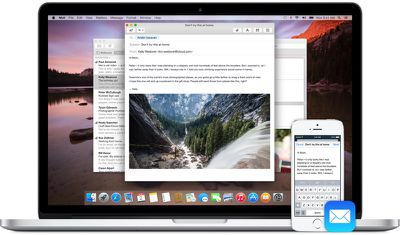
Apple is heavily pushing its new "Continuity" features in OS X Yosemite that improve cross-platform integration between iOS and the Mac. The most significant of the Continuity features is Handoff, which allows OS X and iOS users to start a task on one device and swap to another one nearby to continue work.
handoffiosyosemite
Handoff can be used for a number of different activities, including email, web browsing, messaging, and more. Users can begin composing an email on their iPhone and finish it on their Mac. Maps and websites work in a similar fashion, as users can load up content on one device and look at it on another. Currently, Handoff works with Mail, Safari, Pages, Numbers, Keynote, Maps, Messages, Reminders, Calendar, and Contacts. A number of third-party apps including Pixelmator, Wunderlist, PCalc, and Things also contain support for Handoff.

Requirements

You will need iOS 8.1 and OS X Yosemite in order to use Handoff. You also need to make sure that both your Mac and iPhone are logged into the same iCloud account, and check that your Mac supports Handoff. You can check if your Mac is compatible with Handoff by clicking the  symbol in the top left-hand side of the Menu bar, going to About This Mac, clicking on System Report and clicking on the "Bluetooth" section. You should then see information about whether your system is compatible with Handoff.

Handoff is compatible with a select number of devices running iOS 8, including the iPhone 5 and later, the iPad Air, the iPad Air 2, the iPad 4, all models of the iPad mini, and the fifth-generation iPod Touch.

instanthotspot1
Handoff is limited to Macs with Bluetooth 4.0, which leaves many older Macs unable to access the new features. Additionally, even though the 2011 MacBook Air and 2011 Mac mini include Bluetooth 4.0, Apple has chosen to make both devices incompatible with OS X Yosemite's Continuity features. To solve this issue, a number of talented members of the MacRumors forums have come up with a set of instructions and a Continuity Activation Tool that should get Continuity working on Macs unable to support the feature.

Setting Up Handoff

1. Turn on Wi-Fi on your iPhone (Settings -> Wi-Fi) and Mac (Menu Bar -> Wi-Fi -> Turn Wi-Fi On.

2. Turn on Bluetooth on your iPhone (Settings -> Bluetooth) and Mac (Menu Bar -> Apple -> System Preferences -> Bluetooth -> Turn Bluetooth On).

3. Turn on Handoff on your iPhone (Settings -> General -> Handoff & Suggested Apps -> Turn Handoff On) and Mac (Menu Bar -> Apple -> System Preferences -> General -> Recent Items - > Turn On "Allow Handoff Between this Mac and your iCloud devices")

4. You may now begin using Handoff by launching a compatible app on your Mac or iOS device and swapping to another to see your content. For example, try launching Safari on your Mac and then switch to your iPhone. On your iPhone's lock screen, you should see a small Safari icon in the lower left corner. Slide up to launch Safari, and the iOS app will display the same website as seen on your Mac.

ioshandoffsafari
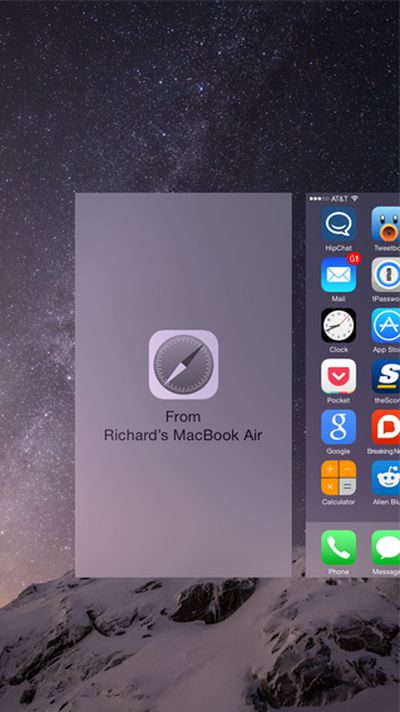
You can also see a Handoff-enabled app through the multitasking switcher by double-pressing your home button and scrolling to the left.
handoffiosmswitcher
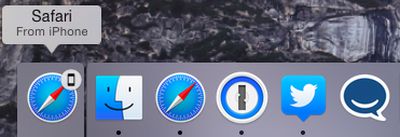
Handoff works in a similar fashion when transitioning from an iOS device to a Mac. On the Mac, a Handoff-compatible app will be displayed on the left-most side of the dock. Clicking on the app in the Mac's dock will load the same content as seen on an iOS device.
machandoffsafari

Walkthrough Video


Troubleshooting

Since the launch of OS X Yosemite and iOS 8 earlier this month, many users have had issues getting Handoff to work with their devices.

Users on our forums seem to have found that the most common solution is a combination of logging out and back into iCloud on their devices, disabling and enabling Handoff, disabling and enabling Bluetooth, and restarting devices. But even amongst those who found success, it may not last forever. Handoff clearly remains buggy in this early release.

If those steps don't work for you, members on Apple's own support forums have also suggested that deleting Bluetooth preferences in OS X and then restarting Bluetooth can also solve problems with Handoff, but we haven't been able to get that to work on our end.

Any of these steps may help if you are having trouble with activating Handoff on your devices, but ultimately, Apple may have to release an update to allow Handoff to work consistently for everyone.


Top Rated Comments

158 months ago
Step number one - Buy a brand new mac.
Score: 15 Votes (Like | Disagree)
158 months ago
Step number one - Buy a brand new mac.

Or... take off the tinfoil hat and simply wait for 10.10.1.

This is the reason people wait until at least the first update before upgrading. That's not a slight on Apple - it's simply the way things go in software (and other businesses). "I'd love to release a new version, but there are no bugs for me to fix" said no developer ever. It's a trade-off between having everything perfect, and needing to ship soon. If you wait until it's 100% perfect, you'll never ship.

I deploy OS X for a living, and I've never deployed a 1.0 (10.x.0) version.

So, how about everybody calm the F down and give them a chance to actually fix these glitches? One of the most annoying things I ever run across - more so than the person who bitches and moans about everything to me - is when they just bitch and moan behind my back but never tell me about an issue they've run into and never give me the chance to fix it, provide a workaround, or escalate to the vendor. They just nail themselves up on the cross and refuse to come down. Report it, and make sure they know about it, but then back off and give them a chance to investigate and fix it.
Score: 4 Votes (Like | Disagree)
Garsun Avatar
158 months ago
Ok, most short sighted stupid Apple decision ever made. Why for the love of anything would they use Bluetooth when Wifi is everywhere and forward and backward compatible?
.

I could be wrong, but I think the Bluetooth LE component of handoff exist to keep the power drain to a minimum. Remember a single Bluetooth LE device can last for over year on a single small coin battery. If Apple implemented it correctly then any device waiting for handoff will pull basically no power until the handoff happens. This power saving ability would more than justify the inclusion of Bluetooth LE into the procedure.
Score: 2 Votes (Like | Disagree)
cjmillsnun Avatar
158 months ago
Or... take off the tinfoil hat and simply wait for 10.10.1.

This is the reason people wait until at least the first update before upgrading. That's not a slight on Apple - it's simply the way things go in software (and other businesses). "I'd love to release a new version, but there are no bugs for me to fix" said no developer ever. It's a trade-off between having everything perfect, and needing to ship soon. If you wait until it's 100% perfect, you'll never ship.

I deploy OS X for a living, and I've never deployed a 1.0 (10.x.0) version.

So, how about everybody calm the F down and give them a chance to actually fix these glitches? One of the most annoying things I ever run across - more so than the person who bitches and moans about everything to me - is when they just bitch and moan behind my back but never tell me about an issue they've run into and never give me the chance to fix it, provide a workaround, or escalate to the vendor. They just nail themselves up on the cross and refuse to come down. Report it, and make sure they know about it, but then back off and give them a chance to investigate and fix it.
No, I think he was referring to the fact that it is only the more modern Macs that support Handoff.

Personally I am not surprised that Apple have done this, but whiners will whine that they aren't getting a feature that they didn't have before.
Score: 1 Votes (Like | Disagree)
158 months ago
I live in the States with a 2012 mac mini and an iphone 6 and I'm in the same boat. I can only handoff one way.

I have one way handoff on one login/account on my mid2011MBA (from iDevice to MBA) but it works perfectly in both directions, including calling, instant hotspot, etc., on a different account. Both have the same iCloud login.

I suggest anyone having problems set up a new account with administrative privileges and see if you can get everything to work with a "fresh" account on your Mac. You can try using the same iCloud login.

Probably over the years on my "main" account I hacked some file for some reason, and now it's unhappy. If this doesn't get sorted eventually I'll probably just move everything over to the new account.

----------

Ok, most short sighted stupid Apple decision ever made. Why for the love of anything would they use Bluetooth when Wifi is everywhere and forward and backward compatible?

Did not the Notes app sync between devices over any network connection before Handoff was made a thing?

Just another intentional planned obsolesces to make you buy a new Mac.

Siri could have worked on iPhone 4, all the processing was done in the cloud!

My fanboy status has died and I'm trapped in an ecosystem I can't leave. I feel like Tom Cruise on South Park stuck in the closet.

Someone smart should make a slim profile Bluetooth 4.0 USB adapter for $10 that solves the problem and beats Apple at their stupid game.

Actually Siri is awful at voice recognition on the iPhone4 because it has a junk microphone. They put a better mic in the 4s. That is also, incidentally, around the time that people on iPhones became intelligible to the party on the other end. Never underestimate the ability of apple to use the cheapest possible components, and charge the highest possible premium, if they think they can get away with it.
Score: 1 Votes (Like | Disagree)
158 months ago
Bluetooth!????

Ok, most short sighted stupid Apple decision ever made. Why for the love of anything would they use Bluetooth when Wifi is everywhere and forward and backward compatible?

Did not the Notes app sync between devices over any network connection before Handoff was made a thing?

Just another intentional planned obsolesces to make you buy a new Mac.

Siri could have worked on iPhone 4, all the processing was done in the cloud!

My fanboy status has died and I'm trapped in an ecosystem I can't leave. I feel like Tom Cruise on South Park stuck in the closet.

Someone smart should make a slim profile Bluetooth 4.0 USB adapter for $10 that solves the problem and beats Apple at their stupid game.
Score: 1 Votes (Like | Disagree)

Popular Stories

apple design award 2025

Apple Announces 2025 Design Award Winners Ahead of WWDC 2025

Tuesday June 3, 2025 10:14 am PDT by
As we wait for WWDC to kick off next Monday, Apple today announced the winners of its annual Apple Design Awards, recognizing apps and games for their innovation, ingenuity, and technical achievement. The 2025 Apple Design Award winners are listed below, with one app and one game selected per category: Delight and Fun - CapWords (App) and Balatro (Game) Innovation - Play (App) and PBJ -...
Apple 2026 Black Friday Event Hero

Apple's Official 2026 Black Friday Offer Starts Rolling Out

Thursday November 26, 2026 8:37 am PST by
Apple's annual four-day Black Friday through Cyber Monday shopping event is now live in Australia, New Zealand, and Thailand, and it will continue to roll out across Europe, the U.S., and Canada as the calendar turns to Friday, November 27 around the world. In the U.S., Apple's terms and conditions say the promotion begins on November 27 at 12 a.m. Pacific Time and ends on November 30 at...
1password deal blue

1Password Security Breach: What Was Accessed and What Wasn't

Wednesday November 25, 2026 1:09 pm PST by
Popular password management app 1Password today said it experienced a security breach earlier this month. 1Password says some customer names and email addresses were accessed, but no customer vault contents were compromised. On November 19, 1Password saw indications that an employee's GitHub account had been breached and began investigating. The company says the breached GitHub account was...
Latest Stories
The 50+ Best Apple Black Friday Deals Still Available on AirPods, iPads, and More
3 hours ago
Here Are the Best Apple Black Friday Leftover Deals You Can Get Today
2 hours ago
HomePod Mini 2 in (RED) Seemingly Spotted Ahead of Announcement
13 hours ago
Apple's M6 and PROLED MacBook Pro Reach New Low Prices for Black Friday
23 hours ago
The MacRumors Show: iPhone Air 2 and iPhone 18 Are Coming
23 hours ago
Apple Store in Brisbane Reopening Next Month With New Design
1 day ago
The 60+ Best Black Friday Accessory Deals on iPhone Chargers, TVs, Headphones, and More
1 hour ago
GTA VI Now (Barely) Running on Apple Silicon Macs
1 day ago
The Best Black Friday Streaming Deals on Apple TV, Disney+, and More
1 day ago
Apple TV's 'Carême' Wins International Emmy for Best Drama
1 day ago
iPhone 18 Production Delay Leaves Apple Little Time Before Launch
1 day ago
The Best Black Friday AirPods Deals Still Available
19 hours ago
The Best Black Friday Deals on Apple Home Products
1 day ago
The Best Black Friday iPhone Deals Still Available
19 hours ago
The Best Black Friday iPad Deals Still Available
19 hours ago
The Best Black Friday Apple Watch Deals Still Available
19 hours ago
The Best Black Friday AirTag Deals Still Available
19 hours ago
The Best Black Friday Mac Deals Still Available
19 hours ago
iPhone Share of US Smartphone Market Hits 57% as Rivals Slip
1 day ago
iPhone 20 Pro Rumored to Feature 3D-Printed Titanium Frame
1 day ago
Apple's Official 2026 Black Friday Offer Starts Rolling Out
2 days ago
Halide Adds Fill Light Feature for iPhone Duo
2 days ago
MacBook Air Black Friday Deals Now Live With Massive $399 Savings
2 days ago
Amazon Discounts All MacBook Neo Models by $99 for Black Friday
2 days ago
Kodak Launches Unique AirTag Rival With E-Ink Display
2 days ago
Here's Why the Apple Store is Going Down
2 days ago
Apple Still Working on Giant Foldable iPad That Could Cost $5,000
2 days ago
iPhones Dominate China's Weak Singles' Day Smartphone Sales
2 days ago
iPhone 20 Pro Could Feature Ceramic in Limited-Edition Model
2 days ago
Apple Faces Korean Regulator Review Over iPhone 16 AI Advertising
2 days ago
Related Apple News: News | South Africa | Health | Ipad | Iphone






























