Skip to Content

How to Use 'Instant Hotspot' On a Mac with OS X Yosemite

by

With OS X Yosemite, Apple has included a number of Continuity features that improve the integration between iOS and Mac devices. OS X Yosemite includes a feature called Instant Hotspot which allows users to more easily use their iPhone's wireless cellular data connection from their Mac or iPad.
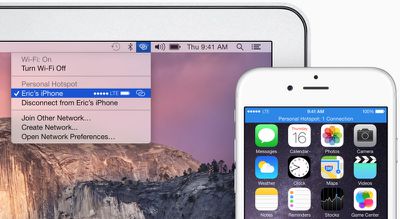
instanthotspot
With Instant Hotspot, there is no longer a need to enter a password to connect as security is handled through a common iCloud account. An iPhone can even be in sleep mode and allow your Mac to initiate Instant Hotspot, with no additional settings needing to be enabled aside from Wi-Fi and Bluetooth.

Before you Start

You need iOS 8.1 and OS X Yosemite in order to use Instant Hotspot. You also need to ensure that your data plan with your wireless carrier allows for internet hotspot capabilities. In the United States, AT&T, Verizon, and T-Mobile, allow phones to be used as hotspots with select data plans. Sprint offers mobile hotspot capabilities with a monthly add-on plan.

Also, make sure both your Mac and iPhone are logged into the same iCloud account, and check that your Mac supports Instant Hotspot. This can be done by clicking the  symbol in the top left-hand side of the Menu bar, navigating to About This Mac, clicking on System Report and clicking on the Bluetooth listing. You should see information about whether your system is compatible with Instant Hotspot and Handoff.

instanthotspot1
After you ensure that you have a compatible Mac and data plan, follow the instructions below to turn on Instant Hotspot:

Steps

1. Turn on Wi-Fi on your iPhone (Settings -> Wi-Fi) and Mac (Menu Bar -> wifi -> Turn Wi-Fi On.

2. Turn on Bluetooth on your iPhone (Settings -> Bluetooth) and Mac (Menu Bar -> Apple -> System Preferences -> Bluetooth -> Turn Bluetooth On).
wifi
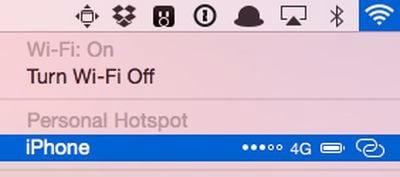
3. On your Mac, click the Wi-Fi symbol wifi in the menu bar. A new "Personal Hotspot" heading now appears near the top, and will be followed by the name of your iPhone. On the right side of your iPhone's name, signal strength, network type, and available battery life are displayed. Click on your device's name to begin using it as an Instant Hotspot for your Mac.

personalhotspot5
4. You may now begin using the Internet on your Mac with your iPhone acting as an Instant Hotspot. On the Mac, the Instant Hotspot connection between both devices is represented by a special icon that shows a link over the traditional Wi-Fi symbol. On the iPhone, the connection is represented by a blinking blue bar that shows that a Personal Hotspot is active.

When a tethered Mac or iPad switches to a Wi-Fi connection or is no longer connected to an iPhone, Instant Hotspot automatically turns off. This feature is designed to save battery on the iPhone, because tethering can use a significant amount of battery life.

Troubleshooting

While we had few issues with Instant Hotspot, several members of our forum have had more inconsistent results. Several people have had to try logging out and back into iCloud on their devices, turning Wi-Fi off and then back on, or even rebooting their devices. These steps may help if you are having trouble turning using Instant Hotspot.


Related Forums: iOS 8, OS X Yosemite

Top Rated Comments

158 months ago
how to run out of cellular bandwidth on a mac with OS X Yosemite
Score: 8 Votes (Like | Disagree)
158 months ago
I think a necessary step is missing from this guide.

On iPhone: Settings > Personal Hotspot > On

No.
Score: 6 Votes (Like | Disagree)
158 months ago
I dont understand why cover the name of the phone and network?
Because it's my real name (ok part of) and my real nickname. :o Kind of personal.
Score: 5 Votes (Like | Disagree)
158 months ago
Well this is just stupid and pointless if I have to pay extra just to use this feature with my carrier. If it eats up my bandwidth, so be it because that is my decision, but it should not cost extra to use it.
Score: 5 Votes (Like | Disagree)
158 months ago
It works as reliably as al the Handoff features, which is, not at all - probably 30% of the time.

I've seen it appear. It doesn't appear right now though.

I'll usually get Handoff working between iPhone and Macbook and not the other way around. Then i'll reboot the Macbook and it'll work from Macbook to iPhone and not the other round.

It's one of the buggiest features Apple has have made...a theme of the times lately unfortunately.

When's the Yosemite update coming?
I agree, I was pulling my hair out trying to get this to work consistently last night. At first my mac found the iPhone hotspot and tethered with no problems. Then I tried with my iPad and it would find the hotspot but not connect. Then it wouldn't find it at all. Then the mac couldn't connect to it anymore either, but still find it. Then the iPad could connect but the mac still couldn't. Tried resetting all 3 devices and resetting network settings. It just doesn't work consistently.

The big irony is of course that it was supposed to replace the old hotspot method and make it less clunckly and more streamlined, yet it's done the exact opposite, for me anyway.
Score: 2 Votes (Like | Disagree)
PowerBook-G5 Avatar
158 months ago
not live in sovjet USA where you get shafted by the cell carriers...

seriously, needing to pay the carrier to allow hot spots is something totally unheard of in europe...

Welcome to 'Merica, the land of liberals, infinite taxes, and idiocracy. If I have a 4GB data plan, then I should not have to pay extra to use it for a hotspot.


EDIT: After trying what was stated in the above article, I got it to work when trying the "Troubleshooting" tips. I first connected to the same WiFi network, turned on Bluetooth, then I signed out of iCloud on both my iPhone and my MBP. Then I restarted each device, and then signed back into iCloud and it "just work[ed]." If you click on the WiFi icon in the menu bar and don't see it at first, wait a few seconds and it will appear (If everything else is done correctly).

Score: 2 Votes (Like | Disagree)

Popular Stories

apple design award 2025

Apple Announces 2025 Design Award Winners Ahead of WWDC 2025

Tuesday June 3, 2025 10:14 am PDT by
As we wait for WWDC to kick off next Monday, Apple today announced the winners of its annual Apple Design Awards, recognizing apps and games for their innovation, ingenuity, and technical achievement. The 2025 Apple Design Award winners are listed below, with one app and one game selected per category: Delight and Fun - CapWords (App) and Balatro (Game) Innovation - Play (App) and PBJ -...
1password deal blue

1Password Security Breach: What Was Accessed and What Wasn't

Wednesday November 25, 2026 1:09 pm PST by
Popular password management app 1Password today said it experienced a security breach earlier this month. 1Password says some customer names and email addresses were accessed, but no customer vault contents were compromised. On November 19, 1Password saw indications that an employee's GitHub account had been breached and began investigating. The company says the breached GitHub account was...
apple store down feature

Here's Why the Apple Store is Going Down

Thursday November 26, 2026 5:49 am PST by
Apple's online store is going down for a few hours on a rolling country-by-country basis right now, but do not get your hopes up for new products. Apple takes its online store down for a few hours ahead of Black Friday every year to tease its annual gift card offer with the purchase of select products. The store is down in Australia, New Zealand, and Thailand, right now, and it will...
Latest Stories
The 50+ Best Apple Black Friday Deals Still Available on AirPods, iPads, and More
4 hours ago
HomePod Mini 2 in (RED) Seemingly Spotted Ahead of Announcement
39 minutes ago
Apple's M6 and PROLED MacBook Pro Reach New Low Prices for Black Friday
11 hours ago
The MacRumors Show: iPhone Air 2 and iPhone 18 Are Coming
11 hours ago
Apple Store in Brisbane Reopening Next Month With New Design
12 hours ago
The 60+ Best Black Friday Accessory Deals on iPhone Chargers, TVs, Headphones, and More
12 hours ago
GTA VI Now (Barely) Running on Apple Silicon Macs
13 hours ago
The Best Black Friday Streaming Deals on Apple TV, Disney+, and More
13 hours ago
Apple TV's 'Carême' Wins International Emmy for Best Drama
14 hours ago
iPhone 18 Production Delay Leaves Apple Little Time Before Launch
15 hours ago
The Best Black Friday AirPods Deals Still Available
7 hours ago
The Best Black Friday Deals on Apple Home Products
15 hours ago
The Best Black Friday iPhone Deals Still Available
7 hours ago
The Best Black Friday iPad Deals Still Available
7 hours ago
The Best Black Friday Apple Watch Deals Still Available
7 hours ago
The Best Black Friday AirTag Deals Still Available
7 hours ago
The Best Black Friday Mac Deals Still Available
7 hours ago
iPhone Share of US Smartphone Market Hits 57% as Rivals Slip
17 hours ago
iPhone 20 Pro Rumored to Feature 3D-Printed Titanium Frame
18 hours ago
Apple's Official 2026 Black Friday Offer Starts Rolling Out
2 days ago
Halide Adds Fill Light Feature for iPhone Duo
2 days ago
MacBook Air Black Friday Deals Now Live With Massive $399 Savings
2 days ago
Amazon Discounts All MacBook Neo Models by $99 for Black Friday
2 days ago
Kodak Launches Unique AirTag Rival With E-Ink Display
2 days ago
Here's Why the Apple Store is Going Down
2 days ago
Apple Still Working on Giant Foldable iPad That Could Cost $5,000
2 days ago
iPhones Dominate China's Weak Singles' Day Smartphone Sales
2 days ago
iPhone 20 Pro Could Feature Ceramic in Limited-Edition Model
2 days ago
Apple Faces Korean Regulator Review Over iPhone 16 AI Advertising
2 days ago
Apple Watch Ultra 4 Hits New Best-Ever Price of $649.99 for Black Friday
2 days ago
Related Apple News: Iphone Duo Separate Lock Screen Rotation | Apple Vision Pro Review | Macbook Pro Air Deals | Mac Gaming | Reviews





























