Skip to Content

Hands On With QuickBoard, a Quick Text Insertion Keyboard Coming to iOS 8

When iOS 8 is released to the public in the fall, iOS users will be able to take advantage of several new operating system features, including system wide third-party keyboards, which will bring fresh functionality to the default iOS keyboard.

Third-party keyboards are available on Android devices and have been long-desired on iOS, so several popular keyboard developers announced plans to bring their software to iOS shortly after third-party keyboard integration was announced at WWDC. After iOS 8 launches, we'll be seeing new keyboards from well-known developers like Fleksy, Swype, SwiftKey, and TouchPal.

iOS 8's third-party keyboard support will also allow new entrants into the customized keyboard arena, with developers bringing us apps that offer all kinds of different functions to improve the way we use our keyboards. One such developer, Kevin Wolkober, has created a quick text insertion keyboard that offers a unique function we haven't seen with previously previewed keyboards.

While keyboards like Swype and Fleksy focus on improving the typing experience through gestures and predictive text, Wolkober's QuickBoard is designed to give users a quicker way to enter the snippets of text that they type repeatedly into their iOS devices, including addresses, credit card information, email signatures, and more.

QuickBoard is actually split by function into three separate keyboard elements, including TextBoard, MeBoard, and LocationBoard. Each of these three keyboard functions lets users to tap to insert often-repeated text elements in any app to save time and effort.

TextBoard allows users to store snippets of text, accommodating any text from a one line signature to a lengthy paragraph. MeBoard stores all of a user's contact info, such as name, email, and home address, and is handy when filling out forms. LocationBoard will automatically determine a user's current location, allowing them to paste in a Google Maps URL or coordinates, or an approximate address, which is useful when a location needs to be shared outside of Messages.

Like any other customized keyboard, QuickBoard operates through an app that's installed on the iOS device and set up in iOS 8's Settings, as described in our hands-on TouchPal installation guide. The personal information and pre-written snippets of text available in the QuickBoard keyboard are created using the installed QuickBoard app.
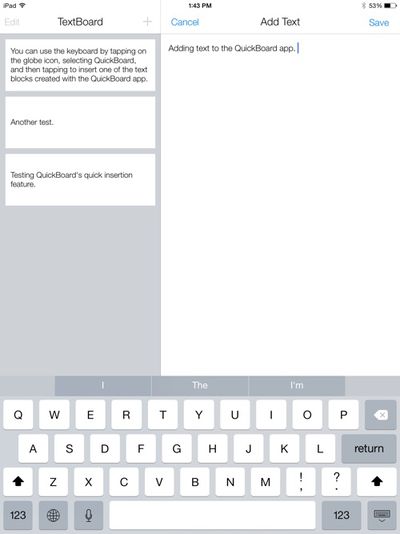
quickboard4

Inserting text into the QuickBoard app

Chunks of text can be entered into TextBoard section of the app, for example, while the MeBoard pulls in information like name, address, and phone number. Though MeBoard is currently limited to information pulled from the Contacts app, custom information will be added before the app's official launch. Location data isn't inserted in the app itself, since it is pulled from the phone's current location whenever it's used.

The text elements saved in the QuickBoard app can be used in any other app, including Mail, Safari, Messages, Notes, iWork, and more. Inserting saved text into one of these apps is as simple as tapping on the globe icon on the keyboard to activate QuickBoard and then tapping on the relevant block of text.

Personal information, such as name and address, can be inserted by tapping on the person icon, and the arrow will determine a user's approximate location, allowing it to be quickly inserted into a text message, email, or other app. Location information is especially useful, as it cuts out several steps that would normally be necessary when sharing a location an email or other app.
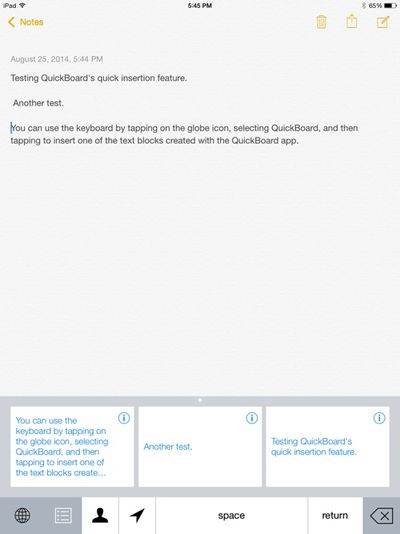
quickboard3

QuickBoard demonstrated in the Notes app

QuickBoard includes access to a space bar, return key, and delete key for formatting purposes, but the rest of the typing is left to another keyboard app or iOS 8's default predictive text function. QuickBoard works seamlessly with any other keyboards installed, and switching between them is as simple as tapping on the globe icon.

Though simpler than most of the other keyboards we've seen before, QuickBoard hints at some of the innovative ways developers will take advantage of third-party keyboard integration in iOS 8. At the current time, QuickBoard is still in the beta testing phases, but Wolkober tells MacRumors that the app will be ready for download shortly after iOS 8 officially launches in the fall, with pricing yet to be determined.


Popular Stories

1password deal blue

1Password Security Breach: What Was Accessed and What Wasn't

Wednesday November 25, 2026 1:09 pm PST by
Popular password management app 1Password today said it experienced a security breach earlier this month. 1Password says some customer names and email addresses were accessed, but no customer vault contents were compromised. On November 19, 1Password saw indications that an employee's GitHub account had been breached and began investigating. The company says the breached GitHub account was...
apple design award 2025

Apple Announces 2025 Design Award Winners Ahead of WWDC 2025

Tuesday June 3, 2025 10:14 am PDT by
As we wait for WWDC to kick off next Monday, Apple today announced the winners of its annual Apple Design Awards, recognizing apps and games for their innovation, ingenuity, and technical achievement. The 2025 Apple Design Award winners are listed below, with one app and one game selected per category: Delight and Fun - CapWords (App) and Balatro (Game) Innovation - Play (App) and PBJ -...
ipad pro prime

Apple Has iPads Running macOS Internally, Says Gurman

Wednesday November 25, 2026 4:55 am PST by
Apple has iPads running macOS internally and has had them "for some time," according to Bloomberg's Mark Gurman, although he says no work is currently being done to bring the Mac operating system to iPads. Speaking on his latest Power On podcast, Gurman said there is "no work being done to consumerize macOS on the iPad." Rather, Apple will continue to bring Mac features and apps like Final Cut ...

Top Rated Comments

cambookpro Avatar
160 months ago
It may be useful for some people, but I never really type enough of the same blocks of text for this to ever be used.

In any case, every message necessitates a slightly different tone which can't be achieved using this keyboard. If I was sending lots of the same message, I'd just use copy and paste as it's unlikely that'd you'd ever need to send it again after.

And weren't Autofill and iCloud Keychain invented so you didn't have to resort to manually typing in your address and billing information??
Score: 19 Votes (Like | Disagree)
160 months ago
I just use Keyboard Shortcuts to do this. I type 2 letters for my email address, for instance.
Score: 8 Votes (Like | Disagree)
penajmz Avatar
160 months ago
I can definitely see myself using this. Great idea!
Score: 6 Votes (Like | Disagree)
160 months ago
Hi everyone! This is Kevin, the creator of QuickBoard. If you have any questions, I'll answer them the best I can as quickly as possible. And thanks for reading about QuickBoard!
Score: 3 Votes (Like | Disagree)
miamialley Avatar
160 months ago
Cool idea, but skeptical about 3rd party keyboards.
Lol, wow. Ever heard of Android?
Score: 3 Votes (Like | Disagree)
160 months ago
Why not just use short cuts?

http://youtu.be/kupaKfm0UUU
iOS Keyboard Shortcuts are definitely awesome. However, my objective with the TextBoard feature of QuickBoard is to make managing and inserting multi-line text much simpler (e.g. letter templates, signatures, directions, etc.).

Also, as mentioned in the article, TextBoard is just one of three main features. MeBoard helps insert and fill out contact/billing info where autofill is not present. LocationBoard gets your current location and allows you to insert it in quickly as a Google Maps URL, approximate address, or coordinates.
Score: 2 Votes (Like | Disagree)
Latest Stories
The 50+ Best Apple Black Friday Deals on AirPods, iPads, MacBooks, and More
4 hours ago
The 60+ Best Black Friday Accessory Deals on iPhone Chargers, TVs, Headphones, and More
20 minutes ago
GTA VI Now (Barely) Running on Apple Silicon Macs
40 minutes ago
The Best Black Friday Streaming Deals on Apple TV, Disney+, and More
1 hour ago
Apple TV's 'Carême' Wins International Emmy for Best Drama
2 hours ago
iPhone 18 Production Delay Leaves Apple Little Time Before Launch
3 hours ago
The Best Black Friday AirPods Deals
3 hours ago
The Best Black Friday Deals on Apple Home Products
3 hours ago
The Best Black Friday iPhone Deals
3 hours ago
The Best Black Friday iPad Deals
4 hours ago
The Best Black Friday Apple Watch Deals
4 hours ago
The Best Black Friday AirTag Deals
4 hours ago
The Best Black Friday Mac Deals
4 hours ago
iPhone Share of US Smartphone Market Hits 57% as Rivals Slip
5 hours ago
iPhone 20 Pro Rumored to Feature 3D-Printed Titanium Frame
6 hours ago
Apple's Official 2026 Black Friday Offer Starts Rolling Out
1 day ago
Halide Adds Fill Light Feature for iPhone Duo
1 day ago
MacBook Air Black Friday Deals Now Live With Massive $399 Savings
1 day ago
Amazon Discounts All MacBook Neo Models by $99 for Black Friday
1 day ago
Kodak Launches Unique AirTag Rival With E-Ink Display
1 day ago
Here's Why the Apple Store is Going Down
1 day ago
Apple Still Working on Giant Foldable iPad That Could Cost $5,000
1 day ago
iPhones Dominate China's Weak Singles' Day Smartphone Sales
1 day ago
iPhone 20 Pro Could Feature Ceramic in Limited-Edition Model
1 day ago
Apple Faces Korean Regulator Review Over iPhone 16 AI Advertising
1 day ago
Apple Watch Ultra 4 Hits New Best-Ever Price of $649.99 for Black Friday
1 day ago
New Apple Store Opening in India, Download the Special Wallpaper Now
2 days ago
Redesigned OLED MacBook Air Could Launch in 2027 or 2028
2 days ago
AirPods Pro 3 for $149 is One of The Best Black Friday Deals This Year
2 days ago
1Password Security Breach: What Was Accessed and What Wasn't
2 days ago
Related Apple News: Opinion | Health | South Africa | Reviews | Politics






























