Skip to Content

Belkin's Ultra-Slim QODE Thin Type Keyboard Now Available for iPad Air

by

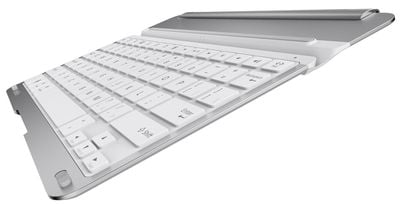
Belkin today announced the availability of the QODE Thin Type for iPad Air, adding an ultra-slim keyboard option to its popular QODE line of tablet keyboards. QODE Thin Type for iPad Air features an anodized aluminum design, 79 hours of battery life and iOS specific keys that pair nicely with the iPad. The keyboard's main selling point is its 4mm thin profile that barely adds any heft to the already slender iPad Air.
Belkin-QODE-Thin-Type
An early review of the device from ZDNet's James Kendrick is favorable, noting that the keyboard is "different in a good way" from competing iPad tablets from Logitech, Kensington and Annker.

The Belkin is a simple cover with a keyboard on one side. The metal cover is not flat like the competitors' models. There is a hump toward the back of the cover that gives the Belkin three advantages over the competition. The hump houses a large battery that Belkin claims gives six months of use on a charge. This is double that of other iPad keyboards. Having this hump on the cover provides an ergonomic tilt to the keyboard, perfect for typing. Last but not least, the protrusion provides a secure grip for handling the tablet in the cover.

The QODE Thin Type keyboard for iPad Air is available now for $99.99 at Belkin.com and will land soon at select retailers worldwide.


Top Rated Comments

oneMadRssn Avatar
164 months ago
It seems to me that an iPad + keyboard would weigh about as much as a Macbook Air 11", would be about as thick, if not thicker in some cases, than a Macbook Air, and would cost about as much total as a Macbook Air. Yet, it won't be able to run 2 or more apps side by side.

I like iPads; but I don't understand why anyone would prefer this keyboard + iPad route over a proper laptop.
Score: 7 Votes (Like | Disagree)
c0ppo Avatar
164 months ago
Nice keyboard. But 100$ is way to much. By the time this thing hits EU countries, it will cost about 150€. For that kinda of money I can pay someone to write things for me :D
Score: 7 Votes (Like | Disagree)
164 months ago
$100 for a keyboard for iPad? I'll pass.

Even the $70 one from Apple is too much money. It's a freakin basic keyboard.
Score: 6 Votes (Like | Disagree)
nagromme Avatar
164 months ago
If it didn't have those goofy / and ? key locations I'd ditch my backlit ZAGGkeys Cover Keyboard (http://www.zagg.com/ipad-air-keyboard/8534) for this. But those non-standard locations would drive me insane.

A new video from Belkin shows the keys are indeed re-arranged badly, including number-row keys being just a bit narrow, placing the "1" and "=" keys a little oddly. But mainly the punctuation keys are all messed up. Too bad.

Logitech's new unit's layout still looks fully standard—and now with full-height number keys that earlier Ultrathins lacked..
Score: 1 Votes (Like | Disagree)
nagromme Avatar
164 months ago
It seems to me that an iPad + keyboard would weigh about as much as a Macbook Air 11", would be about as thick, if not thicker in some cases, than a Macbook Air, and would cost about as much total as a Macbook Air. Yet, it won't be able to run 2 or more apps side by side.

I like iPads; but I don't understand why anyone would prefer this keyboard + iPad route over a proper laptop.
I love my 11" MB Air, but an iPad keyboard is worth the money to me too:

- It is WAY thinner, lighter, and smaller in both flat dimensions than the MBA. I don't need that--I could survive with a bulky MB Pro even--but I very much like it. Plus, I can draw on the iPad (when keyboard is detached) better than on the laptop. And I'm a fan of touch gaming (though I haven't abandoned AAA Mac shooters).

- Not a factor for me, clearly, but an iPad plus keyboard usually comes to much less cost than a low-end MBA.

- MacBooks don't currently have an internal, nothing-to-carry cell modem. A niche option maybe, but one available on iPad for cheaper (pay only you when you need) than I can get tethering.

- OS X has many strengths, and multiple-app workflows are one, as you say (for those like you and I who need that). But iOS has other strengths. It's quicker, easier, simpler, and even downright fun to do a lot of very common and useful computing functions. My Mac and my iPad are usually both in reach, but it's the iPad I find myself grabbing much of the time. For many people, the difference is even more stark: Windows/OS X was never the best tool for them, and iOS opens up more computing and productivity--including text creation--than traditional laptops ever did.

- The top reason: the keyboard detaches. Most of the time I do NOT want it, and it just makes a handy video stand next to my couch. The Air alone is super light and has direct touch, and this style of keyboard doesn't clamp on annoyingly: one hand can grab the tablet and go. But when I do want to type a long email or an endless droning forum post or a text document, the keyboard is there to make an "iOS laptop" at the times I want that.

Keyboards are not for everyone, but they have their place.

The Tab and Q key are combined on the Ultrathin Folio case for the iPad Air. So to use the tab key you have to do Fn+Tab. I use the tab key a lot and it's a PITA when switching between a desktop/laptop and the iPad. A piece of the case also broke off, but I was happy to return it for the keyboard issue alone.
I see--I only looked at the Ultrathin Cover which is akin to this Belkin. I had forgotten Logitech even used the Ultrathin brand for their folios. Those folios also have different/worse key feel than the cover does, apparently. I'd have returned it too.

To clarify, then: Logitech's Ultrathin Cover for iPad Air (old Ultrathin models and the new one just coming out) appears to use a fully standard layout with a real Tab key, similar to this Belkin. I had one of the 2013 Air Ultrathin Keyboard Covers and although the construction was flawed, the keys were great!
Score: 1 Votes (Like | Disagree)
164 months ago

Logitech's Ultrathin keyboards for Air (not Mini) have a standard layout, don't they? What keys are different?

The Tab and Q key are combined on the Ultrathin Folio case for the iPad Air. So to use the tab key you have to do Fn+Tab. I use the tab key a lot and it's a PITA when switching between a desktop/laptop and the iPad. A piece of the case also broke off, but I was happy to return it for the keyboard issue alone.
Score: 1 Votes (Like | Disagree)

Popular Stories

apple design award 2025

Apple Announces 2025 Design Award Winners Ahead of WWDC 2025

Tuesday June 3, 2025 10:14 am PDT by
As we wait for WWDC to kick off next Monday, Apple today announced the winners of its annual Apple Design Awards, recognizing apps and games for their innovation, ingenuity, and technical achievement. The 2025 Apple Design Award winners are listed below, with one app and one game selected per category: Delight and Fun - CapWords (App) and Balatro (Game) Innovation - Play (App) and PBJ -...
1password deal blue

1Password Security Breach: What Was Accessed and What Wasn't

Wednesday November 25, 2026 1:09 pm PST by
Popular password management app 1Password today said it experienced a security breach earlier this month. 1Password says some customer names and email addresses were accessed, but no customer vault contents were compromised. On November 19, 1Password saw indications that an employee's GitHub account had been breached and began investigating. The company says the breached GitHub account was...
apple store down feature

Here's Why the Apple Store is Going Down

Thursday November 26, 2026 5:49 am PST by
Apple's online store is going down for a few hours on a rolling country-by-country basis right now, but do not get your hopes up for new products. Apple takes its online store down for a few hours ahead of Black Friday every year to tease its annual gift card offer with the purchase of select products. The store is down in Australia, New Zealand, and Thailand, right now, and it will...
Latest Stories
The 50+ Best Apple Black Friday Deals Still Available on AirPods, iPads, and More
4 hours ago
HomePod Mini 2 in (RED) Seemingly Spotted Ahead of Announcement
53 minutes ago
Apple's M6 and PROLED MacBook Pro Reach New Low Prices for Black Friday
11 hours ago
The MacRumors Show: iPhone Air 2 and iPhone 18 Are Coming
11 hours ago
Apple Store in Brisbane Reopening Next Month With New Design
12 hours ago
The 60+ Best Black Friday Accessory Deals on iPhone Chargers, TVs, Headphones, and More
13 hours ago
GTA VI Now (Barely) Running on Apple Silicon Macs
13 hours ago
The Best Black Friday Streaming Deals on Apple TV, Disney+, and More
14 hours ago
Apple TV's 'Carême' Wins International Emmy for Best Drama
14 hours ago
iPhone 18 Production Delay Leaves Apple Little Time Before Launch
15 hours ago
The Best Black Friday AirPods Deals Still Available
7 hours ago
The Best Black Friday Deals on Apple Home Products
16 hours ago
The Best Black Friday iPhone Deals Still Available
7 hours ago
The Best Black Friday iPad Deals Still Available
7 hours ago
The Best Black Friday Apple Watch Deals Still Available
7 hours ago
The Best Black Friday AirTag Deals Still Available
7 hours ago
The Best Black Friday Mac Deals Still Available
7 hours ago
iPhone Share of US Smartphone Market Hits 57% as Rivals Slip
17 hours ago
iPhone 20 Pro Rumored to Feature 3D-Printed Titanium Frame
18 hours ago
Apple's Official 2026 Black Friday Offer Starts Rolling Out
2 days ago
Halide Adds Fill Light Feature for iPhone Duo
2 days ago
MacBook Air Black Friday Deals Now Live With Massive $399 Savings
2 days ago
Amazon Discounts All MacBook Neo Models by $99 for Black Friday
2 days ago
Kodak Launches Unique AirTag Rival With E-Ink Display
2 days ago
Here's Why the Apple Store is Going Down
2 days ago
Apple Still Working on Giant Foldable iPad That Could Cost $5,000
2 days ago
iPhones Dominate China's Weak Singles' Day Smartphone Sales
2 days ago
iPhone 20 Pro Could Feature Ceramic in Limited-Edition Model
2 days ago
Apple Faces Korean Regulator Review Over iPhone 16 AI Advertising
2 days ago
Apple Watch Ultra 4 Hits New Best-Ever Price of $649.99 for Black Friday
2 days ago
Related Apple News: Politics | China | Iphone 18 Pro How To Use New Features | App Store | Ipad






























