Skip to Content

Adobe Announces 'Lightroom Mobile' for iPad, Enabling Editing On-the-Go

Adobe's professional photo editing software Lightroom has finally made its way to iOS devices with Adobe's new Lightroom mobile app for the iPad, allowing photographers who use the desktop version of Lightroom to edit and organize photos from anywhere. Lightroom mobile is not a standalone app, requiring both a subscription to Adobe's Creative Cloud and Lightroom 5 to function.

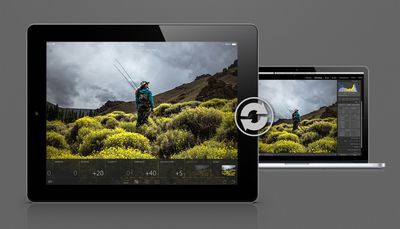
Integrating seamlessly with the full version of Lightroom 5 for PCs and Macs, Lightroom mobile allows users to log in to the app with an Adobe ID to access the library of content stored in a desktop version of Lightroom. The app downloads Smart Previews of files from the desktop app, allowing for very fast content transfers between the desktop and the mobile app.

The new Lightroom mobile app brings powerful Lightroom tools to the iPad, delivering photography essentials – such as non-destructive processing of files – and utilizing new Smart Preview technologies to free professional-class photo editing from the confines of the desktop. Lightroom mobile is built on a powerful synchronization architecture, designed specifically for photos, and provides the most efficient way to manage and edit images across desktops, mobile devices and the Web.

Smart Previews do require an ongoing Internet connection to sync back and forth between Adobe's servers to prevent iPad users from having to download huge files, but files can also be downloaded in full for offline editing if preferred.
lightroomdesktopsync
Lightroom mobile supports much of the same functionality as the desktop version of Lightroom, offering users access to metadata and a basic editing toolbar that contains desktop presets (except for custom presets) and adjustment tools for altering shadows, clarity, contrast, and more. There are also crop and rotate tools for manipulating photos, and a simple three finger tap on the screen displays the before and after when editing.

All of the adjustments made within Lightroom mobile are automatic and sync to Lightroom on the desktop, with history states saved as well, making all iterations of a final image visible at a glance.

Adobe's new app has been designed with mobile productivity in mind and it is not, at this time, designed to replace the desktop version of Lightroom for editing. Adobe envisions it as more of a quick-use tool, allowing users to sort through images and make quick edits on files to determine what might need further editing via the desktop.

Swiping through a huge number of images and using quick touch gestures to mark favorites can be done somewhat more quickly on a tablet, for example. Adobe's Lightroom mobile has intuitive gestures that include a two-finger tap as an app-wide gesture that controls a number of different functions, including toggling metadata, turning on the histogram, and more.


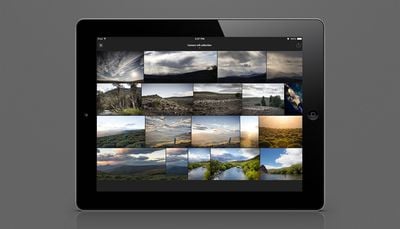
Images are grouped by folders specified in Lightroom and displayed in a grid gallery. Tapping an image allows it to be viewed full screen and a simple swipe up or down allows it to be flagged for editing or rejected. Lightroom mobile also has some powerful organizational capabilities, letting users sort images by different aspects like capture time, file name, modification time, and more.

Photos in Lightroom mobile can be saved to the camera roll or shared via social networking sites and images taken with the iPad can also be set to import directly into the app – and the desktop version of Lightroom via syncing. The app also contains built-in slideshow functionality, allowing users to use their Lightroom photos in presentations.
lightroomcameraroll
Adobe purposefully left some features out of Lightroom mobile so the simple touch experience wouldn't be overwhelmed with a glut of unnecessary functions. Custom created presets are not available, for example, nor are star labels. The company did make it clear, however, that it is open to adding additional features that its customers want in Lightroom mobile in the future.

With Lightroom mobile, photos will also be viewable and shareable on Lightroom.Adobe.com. While Lightroom mobile is limited to the iPad 2 or later at this time, Adobe does has plans for an iPhone version later this year.

Lightroom mobile for the iPad is available as a free download [Direct Link] but using it will require an Adobe Creative Cloud subscription. Access to the app is included with following plans: Creative Cloud Complete ($49.99/month), the Photoshop Photography Program ($9.99/month), which includes access to both Photoshop and Lightroom, Creative Cloud Student and Teacher Edition ($29.99/month) and Creative Cloud for teams ($69.99/month/user).


Popular Stories

apple design award 2025

Apple Announces 2025 Design Award Winners Ahead of WWDC 2025

Tuesday June 3, 2025 10:14 am PDT by
As we wait for WWDC to kick off next Monday, Apple today announced the winners of its annual Apple Design Awards, recognizing apps and games for their innovation, ingenuity, and technical achievement. The 2025 Apple Design Award winners are listed below, with one app and one game selected per category: Delight and Fun - CapWords (App) and Balatro (Game) Innovation - Play (App) and PBJ -...
1password deal blue

1Password Security Breach: What Was Accessed and What Wasn't

Wednesday November 25, 2026 1:09 pm PST by
Popular password management app 1Password today said it experienced a security breach earlier this month. 1Password says some customer names and email addresses were accessed, but no customer vault contents were compromised. On November 19, 1Password saw indications that an employee's GitHub account had been breached and began investigating. The company says the breached GitHub account was...
apple store down feature

Here's Why the Apple Store is Going Down

Thursday November 26, 2026 5:49 am PST by
Apple's online store is going down for a few hours on a rolling country-by-country basis right now, but do not get your hopes up for new products. Apple takes its online store down for a few hours ahead of Black Friday every year to tease its annual gift card offer with the purchase of select products. The store is down in Australia, New Zealand, and Thailand, right now, and it will...

Top Rated Comments

165 months ago
Finally! Been waiting for this so long, it's fantastic. And thank god that earlier report was false that it would require a separate subscription from Creative Cloud.

Umm...the bottom of the article said that it would be a free download but requires CC to work.

Yet another way for Adobe to suck customers' money.
Score: 11 Votes (Like | Disagree)
165 months ago
Sooo im confused. Why is this good? The ipad takes terrible photos in comparison to a DSLR. So there is no reason to use anything other than instagram to edit photos that are taken with the ipad lol .. Then your telling me I should plug my camera into the computer and unload all of my photos (RAW and JPEGS) and separate them to upload them on to my ipad. Then edit it with possible limited features and access.. Then I am supposed to re load them back on to my computer?

Wait, where do I plug my full frame nikon into the ipad again?


Just another reason for me to see people calling themselves photographers while editing stuff on an ipad lol

Wow. You completely missed...everything.

The iPad has been able to accept DSLR files since iPad first launched.

You can use the Camera connection get to get the photos from your DSLR to your iPad. You can also use the Mac/iOS app called Photo Transfer to do it wirelessly, which is what I do. The best thing is you can transfer CHOICE photos from your DSLR. You DON'T have to transfer all of them.

Know what you're talking about first before resorting to saracsm. Adobe's bread and butter is image processing software, hence why they do everything they can do be the first thing you think about when processing images on your desktop or iOS device.

More than I can say for Apple, who's probably scrambling to add features back to the release of Aperture 4, which I'm sure they stripped beyond reason, before they feel the heat of user feedback. Pro software is no longer Apple's bread and butter. Accept it.
Score: 10 Votes (Like | Disagree)
Singin Hobo Avatar
165 months ago
I'll go ahead and jump in with the necessary meat of the discussion.

Screw Adobe and their software rental programs.
Score: 9 Votes (Like | Disagree)
165 months ago
Sweet!

...and the Aperture 4 people are still waiting on their updates.
Score: 7 Votes (Like | Disagree)
John.B Avatar
165 months ago
I already own Lr5, I'm sure as hell not buying an extra Creative Cloud subscription in order to get Lr for iPad.

I think I need a Lr replacement. Too bad Apple has all but abandoned Aperture...

:mad:
Score: 6 Votes (Like | Disagree)
165 months ago
I'm not sure apple will come up with a workable alternative:
- they messed up iPhoto for Mac with a heavy skeuomorphism focused GUI while basic functions to group, manage and edit photos require more work. The app crashes a lot and is unresponsive. Photo streams are not synced in the background when the app is not running. And sharing libraries is gone too.
- iPhoto for iOS does not sync albums and photo edits seamlessly with iCloud or Mac. You have to deal with exports and streams.
- the whole photo stream paradigm is broken. You get copies of photos that are synced, but not all of them because there are quota, the originals remain in your camera roll, ... For instance: take a picture on iOS and you want to delete it? Hurry because once it syncs you have to delete it in two places on your device: the camera roll and the photo stream.
- aperture: is it still alive?

It's all just a big mess. Hopefully they come up with something that allows you to edit and organize your photos on your iOS device and seamlessly sync those as albums to iPhoto or aperture. It sounds so trivial, but today it's impossible unless you have way too much time on your hands.
Score: 5 Votes (Like | Disagree)
Latest Stories
The 50+ Best Apple Black Friday Deals Still Available on AirPods, iPads, and More
4 hours ago
HomePod Mini 2 in (RED) Seemingly Spotted Ahead of Announcement
55 minutes ago
Apple's M6 and PROLED MacBook Pro Reach New Low Prices for Black Friday
11 hours ago
The MacRumors Show: iPhone Air 2 and iPhone 18 Are Coming
11 hours ago
Apple Store in Brisbane Reopening Next Month With New Design
12 hours ago
The 60+ Best Black Friday Accessory Deals on iPhone Chargers, TVs, Headphones, and More
13 hours ago
GTA VI Now (Barely) Running on Apple Silicon Macs
13 hours ago
The Best Black Friday Streaming Deals on Apple TV, Disney+, and More
14 hours ago
Apple TV's 'Carême' Wins International Emmy for Best Drama
14 hours ago
iPhone 18 Production Delay Leaves Apple Little Time Before Launch
15 hours ago
The Best Black Friday AirPods Deals Still Available
7 hours ago
The Best Black Friday Deals on Apple Home Products
16 hours ago
The Best Black Friday iPhone Deals Still Available
7 hours ago
The Best Black Friday iPad Deals Still Available
7 hours ago
The Best Black Friday Apple Watch Deals Still Available
7 hours ago
The Best Black Friday AirTag Deals Still Available
7 hours ago
The Best Black Friday Mac Deals Still Available
7 hours ago
iPhone Share of US Smartphone Market Hits 57% as Rivals Slip
17 hours ago
iPhone 20 Pro Rumored to Feature 3D-Printed Titanium Frame
18 hours ago
Apple's Official 2026 Black Friday Offer Starts Rolling Out
2 days ago
Halide Adds Fill Light Feature for iPhone Duo
2 days ago
MacBook Air Black Friday Deals Now Live With Massive $399 Savings
2 days ago
Amazon Discounts All MacBook Neo Models by $99 for Black Friday
2 days ago
Kodak Launches Unique AirTag Rival With E-Ink Display
2 days ago
Here's Why the Apple Store is Going Down
2 days ago
Apple Still Working on Giant Foldable iPad That Could Cost $5,000
2 days ago
iPhones Dominate China's Weak Singles' Day Smartphone Sales
2 days ago
iPhone 20 Pro Could Feature Ceramic in Limited-Edition Model
2 days ago
Apple Faces Korean Regulator Review Over iPhone 16 AI Advertising
2 days ago
Apple Watch Ultra 4 Hits New Best-Ever Price of $649.99 for Black Friday
2 days ago
Related Apple News: Education | Motoring | Travel | Buyers Guide | Lifestyle






























