Skip to Content

Apple Releases iOS 5 Beta 2 to Developers, Now with Wi-Fi Sync

Screen Shot 2011 06 24 at 6
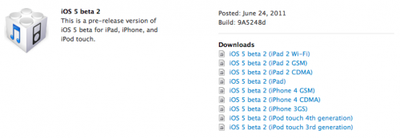
As noted by ItsAllTech, Apple has released the first followup beta release to iOS developers. iOS 5 Build 9A5248d was just released this evening. The first changes noted include:

- Wireless syncing has been enabled for Mac OS X computers

WiFi Syncing

In iOS 5.0 beta 2, wireless syncing is now available for the Mac. It requires iTunes 10.5 beta 2 and OS X 10.6.8 or Lion. You will see an option to enable wireless syncing when you connect your device to iTunes with the USB cable. It is recommended you perform your initial sync with a cable after restoring your device.

Wireless syncing is triggered automatically when the device is connected to power and on the same network as the paired computer. Or, you can manually trigger a sync from iTunes or from Settings -> General -> iTunes Sync (same network as paired computer required). Be sure your device is plugged into a power source when performing Wireless syncs.
If you find issues with apps, media and/or photos synced to your device, you can reset then resync. From Settings -> General -> Reset, choose Erase all Content and Settings. Then reconnect to iTunes and sync again.

In this beta, iTunes may incorrectly report Photos as "Other" in the capacity bar. Photo syncing otherwise works as expected.

iTunes 10.5 beta 2 and Apple TV Software beta 2 has also been released.

iFans has release notes. Summarized here:

- iTunes 10.5b2 can’t sync iOS 5 Beta 1 devices
- iOS5 Beta 1 devices can’t iMessage iOS5 Beta 2 devices and vice-versa
- WiFi sync now works with OS X computers; it has to be enabled in iTunes 10.5 beta 2 first
- OTA updates have been released, though none are currently available
- iCloud has a new logo in the Settings.app
- You can now backup to iCloud or the computer when setting the device up
- If no notifications are available, Notification Center shows the text “No New Notifications”
- Stock widget in the Notification Center is now off by default
- Stock wallpapers are back, but are the same that were in iOS 4
- General speed improvements, kills bugs that were present in iOS 5 beta 1

Video of Wi-Fi Sync from iPhoneDownloadBlog:


We'll post updates as we hear more.

Popular Stories

apple design award 2025

Apple Announces 2025 Design Award Winners Ahead of WWDC 2025

Tuesday June 3, 2025 10:14 am PDT by
As we wait for WWDC to kick off next Monday, Apple today announced the winners of its annual Apple Design Awards, recognizing apps and games for their innovation, ingenuity, and technical achievement. The 2025 Apple Design Award winners are listed below, with one app and one game selected per category: Delight and Fun - CapWords (App) and Balatro (Game) Innovation - Play (App) and PBJ -...
1password deal blue

1Password Security Breach: What Was Accessed and What Wasn't

Wednesday November 25, 2026 1:09 pm PST by
Popular password management app 1Password today said it experienced a security breach earlier this month. 1Password says some customer names and email addresses were accessed, but no customer vault contents were compromised. On November 19, 1Password saw indications that an employee's GitHub account had been breached and began investigating. The company says the breached GitHub account was...
apple store down feature

Here's Why the Apple Store is Going Down

Thursday November 26, 2026 5:49 am PST by
Apple's online store is going down for a few hours on a rolling country-by-country basis right now, but do not get your hopes up for new products. Apple takes its online store down for a few hours ahead of Black Friday every year to tease its annual gift card offer with the purchase of select products. The store is down in Australia, New Zealand, and Thailand, right now, and it will...

Top Rated Comments

aristotle Avatar
201 months ago
Your point of view has absolutely no testing needed on PC's.
Argument aside, no I will not relax, I need to know whether or not iOS 5 plays nice with Windows, and that's not possible until the next beta is released, which should be 3 weeks from now.
Dude. Stop it before you start looking like a troll. You obviously are not a software developer so let me explain how software development works.

Apple has a QA department (quality assurance) with QA engineers who are obviously testing each build of iTunes for windows and OS X long before the beta build even reaches the developers.

As others have explained, because the iOS SDK is OS X only, there is no need to release a beta to the general iOS developer community and the primary feature set for this release of iTunes is to support iOS 5 so if it works with windows right now then it should work with windows in the future.

Basic functionality and integration with windows is going to be tested by the QA engineers at Apple so you can rest assured.
Score: 10 Votes (Like | Disagree)
201 months ago
Why the HELL does the device need to be plugged into a power source? The only advantage of wireless syncing is that you can sync even if you're not charging it, i.e. wirelessly, when your device is already charged! I hate having to plug in an already charged device just to sync it, if it could do all of that wirelessly! What a useless feature. Disappointing and lame!

Um, it doesn't.
Score: 7 Votes (Like | Disagree)
201 months ago
Why? The entire point of wireless syncing is to do it without a cable, which is why it's called "wireless". If you have to charge it to plug it in, you might as well sync it on USB while you're at it.

I think the great thing with wireless syncing is that you have your device on your desk and all you need to do is press a button. No fiddling with cables, chargers and whatever.

A lot of people, myself included, charge their iPhone at night with the wall charger. In that case, it'll sync at night even though the iPhone and charger is in my bedroom, and the computer it syncs against is somewhere else in the house. I charge it nightly, but almost never bother to sync it.

And from what's reported, you can still press a button and sync it if it's not plugged in; plugging it in triggers it automatically.
Score: 6 Votes (Like | Disagree)
HiRez Avatar
201 months ago
You will see an option to enable wireless syncing when you connect your device to iTunes with the USB cable.
OK, am I the only one seeing the irony here? :)
Score: 6 Votes (Like | Disagree)
201 months ago
I hope I'm not breaking the NDA by posting this:

WiFi Syncing
In iOS 5.0 beta 2, wireless syncing is now available for the Mac. It requires iTunes 10.5 beta 2 and OS X 10.6.8 or Lion. You will see an option to enable wireless syncing when you connect your device to iTunes with the USB cable. It is recommended you perform your initial sync with a cable after restoring your device.
Wireless syncing is triggered automatically when the device is connected to power and on the same network as the paired computer. Or, you can manually trigger a sync from iTunes or from Settings -> General -> iTunes Sync (same network as paired computer required). Be sure your device is plugged into a power source when performing Wireless syncs.
If you find issues with apps, media and/or photos synced to your device, you can reset then resync. From Settings -> General -> Reset, choose Erase all Content and Settings. Then reconnect to iTunes and sync again.
In this beta, iTunes may incorrectly report Photos as "Other" in the capacity bar. Photo syncing otherwise works as expected.
Score: 6 Votes (Like | Disagree)
201 months ago
You kind of lost me there, did you mean to say "If you have to plug it in to charge it"? If so, I get your point, wireless syncing isn't a great advantage if you still have to connect the wire once every couple of days to charge. However, for some people it's easier just to connect to a power outlet rather than have to connect to their Mac/PC.

Of course, when inductive charging is incorporated into the iPhone at some point down the line...

You guys wouldn't be having these discussions if you read the release notes.

YOU DONT HAVE TO PLUG IT IN TO WIFI SYNC!
Score: 5 Votes (Like | Disagree)
Latest Stories
The 50+ Best Apple Black Friday Deals Still Available on AirPods, iPads, and More
5 hours ago
HomePod Mini 2 in (RED) Seemingly Spotted Ahead of Announcement
2 hours ago
Apple's M6 and PROLED MacBook Pro Reach New Low Prices for Black Friday
13 hours ago
The MacRumors Show: iPhone Air 2 and iPhone 18 Are Coming
13 hours ago
Apple Store in Brisbane Reopening Next Month With New Design
13 hours ago
The 60+ Best Black Friday Accessory Deals on iPhone Chargers, TVs, Headphones, and More
14 hours ago
GTA VI Now (Barely) Running on Apple Silicon Macs
14 hours ago
The Best Black Friday Streaming Deals on Apple TV, Disney+, and More
15 hours ago
Apple TV's 'Carême' Wins International Emmy for Best Drama
16 hours ago
iPhone 18 Production Delay Leaves Apple Little Time Before Launch
16 hours ago
The Best Black Friday AirPods Deals Still Available
8 hours ago
The Best Black Friday Deals on Apple Home Products
17 hours ago
The Best Black Friday iPhone Deals Still Available
8 hours ago
The Best Black Friday iPad Deals Still Available
8 hours ago
The Best Black Friday Apple Watch Deals Still Available
8 hours ago
The Best Black Friday AirTag Deals Still Available
8 hours ago
The Best Black Friday Mac Deals Still Available
8 hours ago
iPhone Share of US Smartphone Market Hits 57% as Rivals Slip
18 hours ago
iPhone 20 Pro Rumored to Feature 3D-Printed Titanium Frame
20 hours ago
Apple's Official 2026 Black Friday Offer Starts Rolling Out
2 days ago
Halide Adds Fill Light Feature for iPhone Duo
2 days ago
MacBook Air Black Friday Deals Now Live With Massive $399 Savings
2 days ago
Amazon Discounts All MacBook Neo Models by $99 for Black Friday
2 days ago
Kodak Launches Unique AirTag Rival With E-Ink Display
2 days ago
Here's Why the Apple Store is Going Down
2 days ago
Apple Still Working on Giant Foldable iPad That Could Cost $5,000
2 days ago
iPhones Dominate China's Weak Singles' Day Smartphone Sales
2 days ago
iPhone 20 Pro Could Feature Ceramic in Limited-Edition Model
2 days ago
Apple Faces Korean Regulator Review Over iPhone 16 AI Advertising
2 days ago
Apple Watch Ultra 4 Hits New Best-Ever Price of $649.99 for Black Friday
2 days ago
Related Apple News: Lifestyle | Iphone | Ipad | Sport | Iphone































