Skip to Content

Apple Investigating 'MACDefender' Malware, Support Staff Barred From Assisting Customers

macdefender support note
Earlier this month, a new malware threat known as "MACDefender" popped up, targeting Mac OS X users with requests to install an application claiming to be an antivirus program. The malware has continued to be a problem for many users, showing up with regularity under several different variants.

ZDNet's Ed Bott has been looking into the issue, and while some may dismiss his claims due to his position covering Microsoft for the publication, he has uncovered some interesting information in speaking with an anonymous AppleCare representative about the situation. According to the representative, Apple has been dealing with significant call volumes about the issue, claiming that over 50% of calls last week were about the malware.

There's usually about 600 or so of us spread around 14 centers for CPU support. Before this started happening, we had 7-12 minutes between calls generally. Now we're lucky to have any time between calls.

We started getting a trickle of calls a couple weeks ago. However, this last week over 50% of our calls have been about it. In two days last week I personally took 60 calls that referred to Mac Defender.

The representative noted that AppleCare's official policies prevent them from assisting customers with malware issues, as the company does not wish to set expectations that they will be able to do so consistently going forward, instead recommending that customers look into antivirus software. Some representatives have, however, reportedly been quietly helping out customers as their superiors look the other way.

In a follow-up article responding to claims that his initial report was fabricated and the issue overblown, Bott documents his examination of Apple's support forums, where he found over 200 threads from users trying to remove the malware from their systems, far higher than any previous incident. And while the malware requires that users grant explicit authorization for the software to be installed, Bott argues that there are clearly significant numbers of relatively less savvy users who are taking the bait.

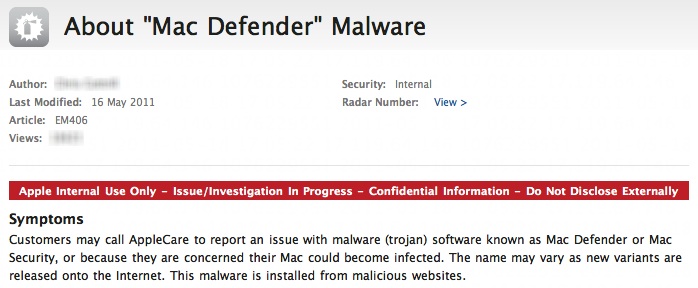
Finally, Bott today published the actual AppleCare internal support document about MACDefender, where it is revealed that the issue has been categorized as "Issue/Investigation In Progress" and outlining the procedures to be used by support representatives when dealing with customers calling in about the issue. Essentially, users who have not yet installed the malware are instructed to quit the installer and delete the download, while those who have installed the software should be directed to Apple resources to learn more about malware and left to find their own antivirus solution.


Popular Stories

apple design award 2025

Apple Announces 2025 Design Award Winners Ahead of WWDC 2025

Tuesday June 3, 2025 10:14 am PDT by
As we wait for WWDC to kick off next Monday, Apple today announced the winners of its annual Apple Design Awards, recognizing apps and games for their innovation, ingenuity, and technical achievement. The 2025 Apple Design Award winners are listed below, with one app and one game selected per category: Delight and Fun - CapWords (App) and Balatro (Game) Innovation - Play (App) and PBJ -...
Apple 2026 Black Friday Event Hero

Apple's Official 2026 Black Friday Offer Starts Rolling Out

Thursday November 26, 2026 8:37 am PST by
Apple's annual four-day Black Friday through Cyber Monday shopping event is now live in Australia, New Zealand, and Thailand, and it will continue to roll out across Europe, the U.S., and Canada as the calendar turns to Friday, November 27 around the world. In the U.S., Apple's terms and conditions say the promotion begins on November 27 at 12 a.m. Pacific Time and ends on November 30 at...
1password deal blue

1Password Security Breach: What Was Accessed and What Wasn't

Wednesday November 25, 2026 1:09 pm PST by
Popular password management app 1Password today said it experienced a security breach earlier this month. 1Password says some customer names and email addresses were accessed, but no customer vault contents were compromised. On November 19, 1Password saw indications that an employee's GitHub account had been breached and began investigating. The company says the breached GitHub account was...

Top Rated Comments

Aduntu Avatar
203 months ago


Stupid people like this shouldn't even use a computer.
Yes, that's it. Because educating people is never the answer.
Score: 20 Votes (Like | Disagree)
Aduntu Avatar
203 months ago

What happened to the average Mac user being educated?

I agree, unfortunately the rash of 'switchers' has lowered the average tech IQ of the userbase.

Macs have appealed to less than tech savvy users for quite some time. "It just works" isn't a tagline for those with exceptional tech skills.
Score: 19 Votes (Like | Disagree)
203 months ago

Stupid people like this shouldn't even use a computer.

I agree, unfortunately the rash of 'switchers' has lowered the average tech IQ of the userbase.

Call me cold, but I have absolutely 0 "zero" sympathy for people who download anything they hadn't requested, had just popped up unannounced.

What happened to the average Mac user being educated?

That is the minority now.... a lot of people have switched from Windows and brought the collective IQ down. :p

I'm a Mac fan as much as the next guy on here but with comments like those above I can see why it's easy for some people to dislike Apple fans.

All this elitist, 'educated minority' talk is shameful. To essentially say that owning a Mac should be reserved for techies and the highly computer literate is beyond ridiculous. Macs appeal to all kinds of people - and so they should. I've sold many Macs to pensioners who turned away from PC's because they were too complicated - they loved learning to use a Mac though. These are some of the kind of people who install this software, because they don't always know better about malware.

Apple is popular, and it's only becoming more so, the elitist lot need to accept that or move on to something else - I'd suggest Linux.
Score: 17 Votes (Like | Disagree)
203 months ago
The level of elitism going in in this thread is disgusting.
Score: 15 Votes (Like | Disagree)
203 months ago
Call me cold, but I have absolutely 0 "zero" sympathy for people who download anything they hadn't requested, had just popped up unannounced.

What happened to the average Mac user being educated?

I think you aren't aware of what the average "new Mac" users level of education is.
Score: 11 Votes (Like | Disagree)
DeepIn2U Avatar
203 months ago
Possible Solution - Removal (no Tools)

Remove Mac Defender (Uninstall Guide)

Posted by Grinler on May 9, 2011 @ 03:50 AM · Views: 16,019


What this infection does:

Mac Defender is a fake rogue anti-spyware program that for the Mac OS operating system. This infection is spread through the use of advertisements on web sites that pretend to be fake online scanners. When these fake scans are finished, it will state that your computer is infected and then automatically download the Mac Defender program onto your computer. Once the program has finished downloading, the installer will start and prompt you to install the program.

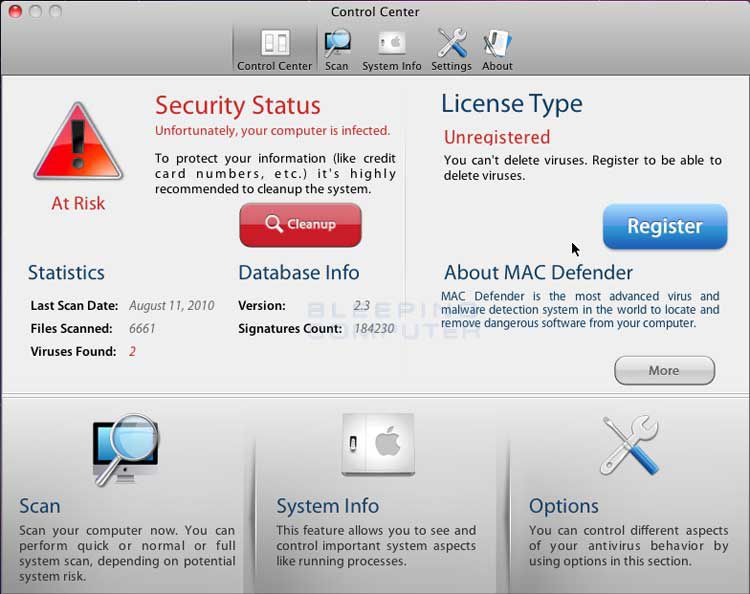
Once the program is installed it will be configured to start up automatically when you login to your Mac. Once running it will pretend to scan your computer and then state that there are numerous files on your computer that are infected. If you attempt to clean these fake infections, though, the program will state that you must first purchase a license before it will allow you to do so. After the scan the Control Center screen for Mac Defender will be updated to state that your computer is infected and at Risk. Regardless of the information presented by this program, you should not purchase this program as all of this information is false.

Unfortunately, when Mac Defender is installed on your computer it will also be added to your accounts Login Items so that the program is launched every time you login to your Mac. As there is no Dock icon for this application, it is also not easily closed and will instead require you to terminate its process through the Activity Monitor before you are able to remove the application from your computer.


While the program is running it will also display fake security alerts that are further used to scare you into thinking that your computer has a serious problem. Some of these alerts include:

The system is infected
Your system is infected. It's highly recommended to cleanup your system to protect critical information like credit card numbers, etc.

Unregistered Copy
Sorry, the copy of your program is unregistered. Register to have an ability to cleanup your system.

Virus Found
Infected file detected:
Virus: Dialer
File: Safari

Virus Found
Infected file detected:
Virus: Worm
File: clri

Virus Found
Infected file detected:
Virus: Worm
File: Software Update

Just like the fake scan results, these alerts are also fake and are only being used to scare you into purchasing the program. Therefore, please ignore them and do not purchase the program. Last, but not least, while the program is running it will also open up web sites to various pornographic sites.

As you can see, Mac Defender was created to scare you into thinking your computer has a severe security problem so that you will then purchase this program. For no reason should you purchase Mac Defender , and if you already have, you should contact your credit card company and dispute the charges stating that the program is a computer infection. Finally, to remove this infection, and any related malware, please use the removal guide below.



Threat Classification:

Information on Rogue Programs & Scareware (http://www.bleepingcomputer.com/virus-removal/rogue-programs)

Advanced information:

View Mac Defender files (http://www.bleepingcomputer.com/virus-removal/remove-mac-defender#files).


Tools Needed for this fix:
No special tools required.


Guide Updates:
05/08/11 - Initial guide creation.


Manual Removal Instructions for Mac Defender:


Print out these instructions so it will be easier to reference it as you follow these steps.

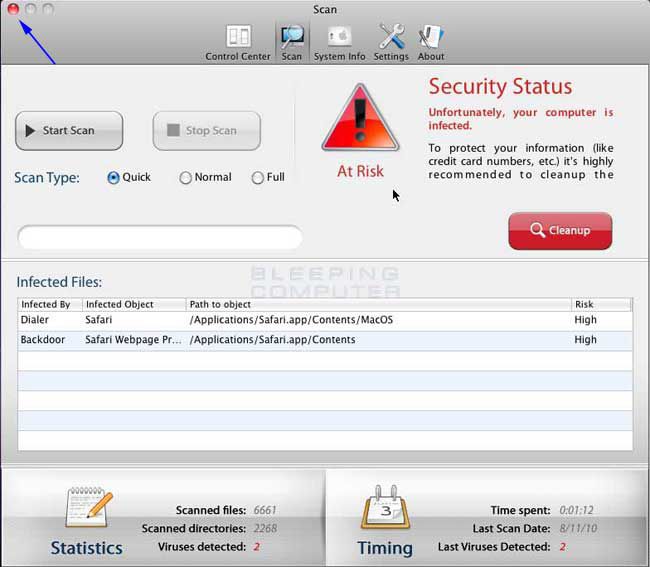
As Mac Defender will stay on top of any other programs that are running, we first want to close the program so that we can see the other screens that we need to open during this cleaning process. Please close this window by clicking on the red close (X) button in the top left of the Mac Defender Windows. The button that you need to click in order to close the window is shown below:


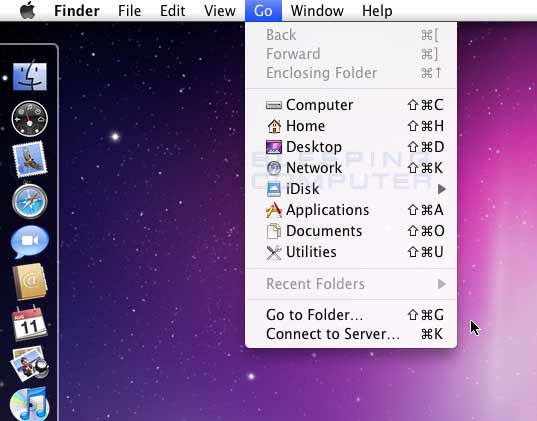
Next you should click on empty portion of your desktop so that the Finder is selected. Once it is selected, click on the Go button and select Utilities as shown in the image below.


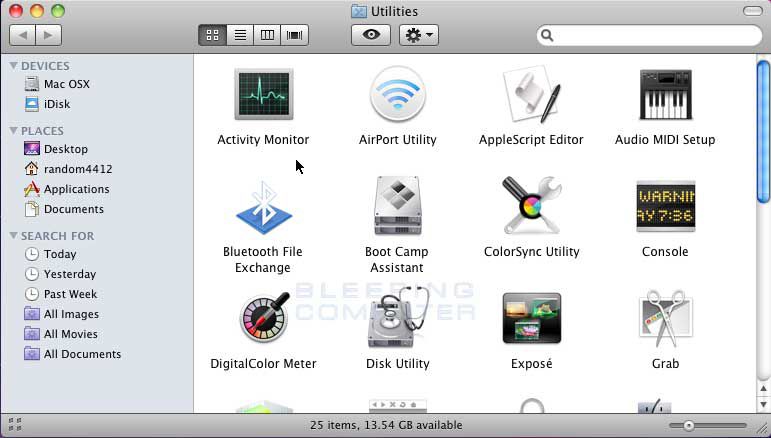
The Utilities folder should now appear as shown in the image below.


Locate the Activity Monitor icon and double-click on it.

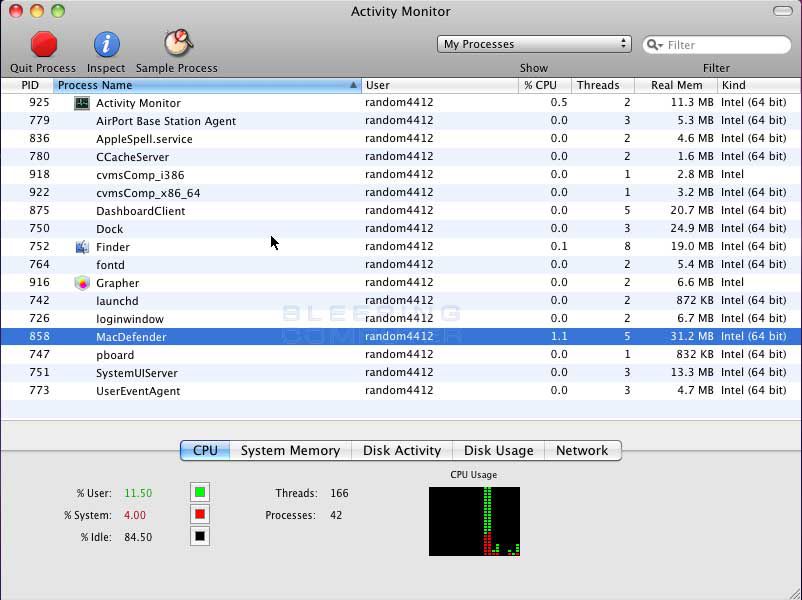
The Activity Monitor should now be displayed on your screen. This program lists all the processes that are currently running on your Mac OS and allows us to terminate specific programs that may be running. Scroll through the list of processes and left click on the process named MacDefender as shown in the image below.


Once the process is selected click on the Quit Process button. When a prompt appears asking if you are sure you want to quit the MacDefender process, please click on the Force Quit button. When you have finished, Mac Defender should no longer be running on your Mac and you can now close the Activity Monitor and the Utilities window.




While still at the Finder, click on the Go button and select the Applications menu option. When the Applications folder is displayed, scroll through the list of programs until you see a program named MacDefender. When you find the program, right-click on it and select the Move to Trash menu option. If MacOS prompts you for your password, please enter it. The MacDefender application will now be removed from the operating system.


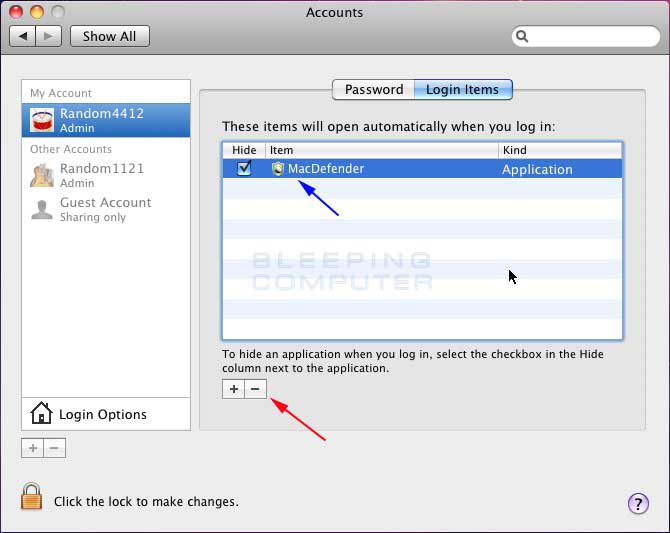
Now click on the Apple Menu () and select the System Preferences menu option. When the System Preferences screen opens, select the Accounts option under the System category. When the Accounts screen opens, click on the Login Items button. This will open a screen, similar to the one below, that displays a list of programs that will automatically start for this particular user when they login to the operating system.


Look through the list of programs that are starting automatically, and single click on the entry named MacDefender. Once it is selected, click on the minus (-) sign button, as indicated by the red arrow in the image above. Once you click on the minus button the Mac Defender entry will be removed and MacOS will no longer attempt to start it when you login.


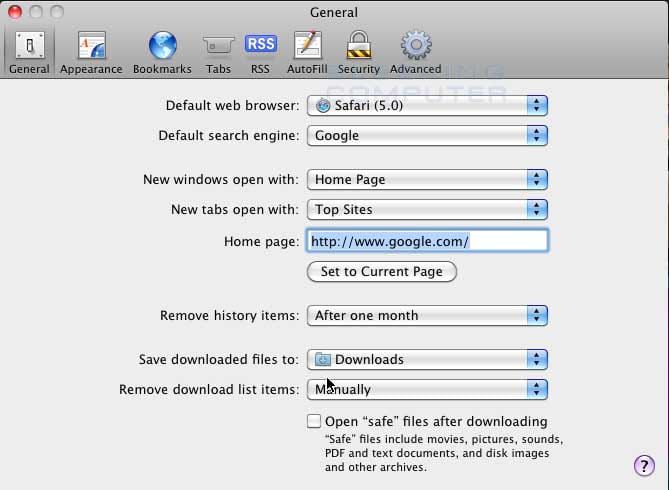
Now that Mac Defender is no longer running, we need to change a setting in Safari so that these types of programs are not automatically run on your computer in the future. By default Safari opens and launches programs that it considers safe to run. These programs include movies, pictures, sounds, PDFs, text documents, archives, and disk images. Due to this, these types of infections are able to be downloaded and automatically run on your Mac. To fix this, start the Safari program and then click on the Safari menu option. From the Safari drop down menu, select Preferences. This will open the Preferences screen as shown below. When the screen opens, if you are not on the General settings screen, please click on the General button.


You should now uncheck the checkbox labeled Open "safe" files after downloading as shown in the image above. After unchecking this box you can close the Preferences screen and Safari.

Your computer should now be free of the MacDefender program and Safari should be secure so that it does not automatically launch these types of programs.

If you are still having problems with your computer after completing these instructions, then please follow the steps outlined in the topic linked below:

Preparation Guide For Use Before Using Malware Removal Tools and Requesting Help (http://www.bleepingcomputer.com/forums/topic34773.html)


Associated Mac Defender Files:

/Applications/MacDefender.app/
/Applications/MacDefender.app/Contents
/Applications/MacDefender.app/Contents/Info.plist
/Applications/MacDefender.app/Contents/MacOS
/Applications/MacDefender.app/Contents/MacOS/MacDefender
/Applications/MacDefender.app/Contents/PkgInfo
/Applications/MacDefender.app/Contents/Resources
/Applications/MacDefender.app/Contents/Resources/About-Back.png
/Applications/MacDefender.app/Contents/Resources/AboutD.nib
/Applications/MacDefender.app/Contents/Resources/AboutMBMI.png
/Applications/MacDefender.app/Contents/Resources/affid.txt
/Applications/MacDefender.app/Contents/Resources/ControlCenterD.nib
/Applications/MacDefender.app/Contents/Resources/Curing_1.png
/Applications/MacDefender.app/Contents/Resources/Curing_2.png
/Applications/MacDefender.app/Contents/Resources/Curing_3.png
/Applications/MacDefender.app/Contents/Resources/Curing_4.png
/Applications/MacDefender.app/Contents/Resources/Curing_5.png
/Applications/MacDefender.app/Contents/Resources/Curing_6.png
/Applications/MacDefender.app/Contents/Resources/Curing_7.png
... <numerous other image and media files>

Disclaimer: This is a self-help guide. Use at your own risk.

Source: RiverdaleMac (Toronto) linked to BleepingComputer
http://www.bleepingcomputer.com/virus-removal/remove-mac-defender
Score: 10 Votes (Like | Disagree)
Latest Stories
The 50+ Best Apple Black Friday Deals Still Available on AirPods, iPads, and More
5 hours ago
Here Are the Best Apple Black Friday Leftover Deals You Can Get Today
3 hours ago
HomePod Mini 2 in (RED) Seemingly Spotted Ahead of Announcement
15 hours ago
Apple's M6 and PROLED MacBook Pro Reach New Low Prices for Black Friday
1 day ago
The MacRumors Show: iPhone Air 2 and iPhone 18 Are Coming
1 day ago
Apple Store in Brisbane Reopening Next Month With New Design
1 day ago
The 60+ Best Black Friday Accessory Deals on iPhone Chargers, TVs, Headphones, and More
3 hours ago
GTA VI Now (Barely) Running on Apple Silicon Macs
1 day ago
The Best Black Friday Streaming Deals on Apple TV, Disney+, and More
1 day ago
Apple TV's 'Carême' Wins International Emmy for Best Drama
1 day ago
iPhone 18 Production Delay Leaves Apple Little Time Before Launch
1 day ago
The Best Black Friday AirPods Deals Still Available
21 hours ago
The Best Black Friday Deals on Apple Home Products
1 day ago
The Best Black Friday iPhone Deals Still Available
21 hours ago
The Best Black Friday iPad Deals Still Available
21 hours ago
The Best Black Friday Apple Watch Deals Still Available
21 hours ago
The Best Black Friday AirTag Deals Still Available
21 hours ago
The Best Black Friday Mac Deals Still Available
21 hours ago
iPhone Share of US Smartphone Market Hits 57% as Rivals Slip
1 day ago
iPhone 20 Pro Rumored to Feature 3D-Printed Titanium Frame
1 day ago
Apple's Official 2026 Black Friday Offer Starts Rolling Out
2 days ago
Halide Adds Fill Light Feature for iPhone Duo
2 days ago
MacBook Air Black Friday Deals Now Live With Massive $399 Savings
2 days ago
Amazon Discounts All MacBook Neo Models by $99 for Black Friday
2 days ago
Kodak Launches Unique AirTag Rival With E-Ink Display
2 days ago
Here's Why the Apple Store is Going Down
2 days ago
Apple Still Working on Giant Foldable iPad That Could Cost $5,000
2 days ago
iPhones Dominate China's Weak Singles' Day Smartphone Sales
2 days ago
iPhone 20 Pro Could Feature Ceramic in Limited-Edition Model
2 days ago
Apple Faces Korean Regulator Review Over iPhone 16 AI Advertising
2 days ago
Related Apple News: Enable Sound Recognition Apple Watch Listen | Iphone | Switchbot S20 And K11 Plus | Iphone Duo 20 Tips Apple Foldable | Iphone Duo Control Center Tap Access