Skip to Content

Mac OS X Lion to Bring iOS-Like Uninstall Process for Mac App Store Apps

171331 lion delete evernote

As noted by Apple iGuide (via TUAW), the latest developer build of Mac OS X Lion seeded last Friday brings a new iOS-like mechanism for deleting applications installed via the Mac App Store.

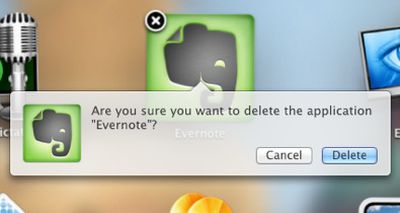
Invoking the new iOS-like "Launchpad" in Mac OS X Lion for managing applications allows users to click and hold on an icon to bring up the "jiggling" icon mode familiar to iOS users as the mechanism for organizing and deleting applications. Mac OS X Lion now allows users to delete Mac App Store application in the same way as in iOS, by clicking on an "X" button at the top left of the application's icon.

In Lion a user simply needs to invoke the Launchpad, click and hold on the icon of the application they wish to delete, and when the icons begin to wiggle a cross appears on icons of apps installed via the Mac App Store. Clicking this cross brings up the message "Are you sure you want to delete the application...?", and clicking 'Delete' confirms and removes the app.

This only works with applications installed from the Mac App Store, but will be a welcome addition to many, and makes removing applications easier for users familiar with iOS devices.

Those familiar with the Lion developer builds note that it is clear than the feature was coming in earlier releases, but is finally functional in the latest build.

Apple has of course stressed the "Back to the Mac" nature of Mac OS X Lion, bringing a number of the user interface aspects of iOS to the Mac OS X platform, offering a more consistent experience with the goal of making it easier for users to move between platforms and making Mac OS X more intuitive.


Popular Stories

apple design award 2025

Apple Announces 2025 Design Award Winners Ahead of WWDC 2025

Tuesday June 3, 2025 10:14 am PDT by
As we wait for WWDC to kick off next Monday, Apple today announced the winners of its annual Apple Design Awards, recognizing apps and games for their innovation, ingenuity, and technical achievement. The 2025 Apple Design Award winners are listed below, with one app and one game selected per category: Delight and Fun - CapWords (App) and Balatro (Game) Innovation - Play (App) and PBJ -...
Apple 2026 Black Friday Event Hero

Apple's Official 2026 Black Friday Offer Starts Rolling Out

Thursday November 26, 2026 8:37 am PST by
Apple's annual four-day Black Friday through Cyber Monday shopping event is now live in Australia, New Zealand, and Thailand, and it will continue to roll out across Europe, the U.S., and Canada as the calendar turns to Friday, November 27 around the world. In the U.S., Apple's terms and conditions say the promotion begins on November 27 at 12 a.m. Pacific Time and ends on November 30 at...
1password deal blue

1Password Security Breach: What Was Accessed and What Wasn't

Wednesday November 25, 2026 1:09 pm PST by
Popular password management app 1Password today said it experienced a security breach earlier this month. 1Password says some customer names and email addresses were accessed, but no customer vault contents were compromised. On November 19, 1Password saw indications that an employee's GitHub account had been breached and began investigating. The company says the breached GitHub account was...

Top Rated Comments

203 months ago
Whatever happened to Command-Delete?

....this is starting to look like Aero in Windows Vista.

SEE ANY SIMILARITIES?

Image (http://thecustomizewindows.com/wp-content/uploads/2011/01/How-to-remove-the-confirmation-prompt-to-delete-any-file-in-Windows-7-2.png)

It's a dialogue box for christ sake. :rolleyes:
Score: 15 Votes (Like | Disagree)
fabian9 Avatar
203 months ago
This concept might seem alien to a lot of MacRumours users, but being a 'switcher', the method of deleting any app on OS X currently seems very ad hoc. I've been a mac user now for about 4 years and yet the idea of having to delete an app by dragging it to the trash seems very... strange. You never know if you've deleted ALL of that program.

Microsoft have managed to get one thing right in Windows. A specific tool (Add/Remove Programs) to delete a program. That's something that I genuinely feel is lacking in OS X and this idea of clicking and holding in LaunchPad makes sense. It's imple enough: most users who own an iPhone will have no trouble in adopting this method. And what's more, it makes it instantly accessible to anyone who uses a mac. In addition, it goes a step further than Microsoft. It avoids making more novice users from having to delve in to a complex window of settings. A step in the right direction? I think so!

So personally, I think this is a very simple yet very effective change to make to OS X and should be a welcome sign of the things to come in Lion!
No, Microsoft have not got it right. There should be no need for a specific tool to uninstall applications. applications should be self-contained and be deletable with the press of a button…

Many applications work this way on Mac, some developers still put related files into various other locations though unfortunately...
Score: 10 Votes (Like | Disagree)
203 months ago
Hmm..that'll feel odd...

Hold down for 2(ish) seconds
click 'X'
click 'ok'.

OR

Drag to trash...

Seems like change for the sake of change. Hardly a groundbreaking new feature.
Score: 10 Votes (Like | Disagree)
203 months ago
This concept might seem alien to a lot of MacRumours users, but being a 'switcher', the method of deleting any app on OS X currently seems very ad hoc. I've been a mac user now for about 4 years and yet the idea of having to delete an app by dragging it to the trash seems very... strange. You never know if you've deleted ALL of that program.

Microsoft have managed to get one thing right in Windows. A specific tool (Add/Remove Programs) to delete a program. That's something that I genuinely feel is lacking in OS X and this idea of clicking and holding in LaunchPad makes sense. It's imple enough: most users who own an iPhone will have no trouble in adopting this method. And what's more, it makes it instantly accessible to anyone who uses a mac. In addition, it goes a step further than Microsoft. It avoids making more novice users from having to delve in to a complex window of settings. A step in the right direction? I think so!

So personally, I think this is a very simple yet very effective change to make to OS X and should be a welcome sign of the things to come in Lion!

When I switched (back in 2002), the hardest thing in this respect was getting it through my head that that one icon sitting in the /Applications folder really is the whole app (*for well-behaved drag-install apps). Yes, you have "tools" like AppCleaner which delete all the prefs and user files for an app as well, obliterating any trace that the app was ver on your system, but those are just prefs. If the app itself is removed, the prefs are just text (or sometimes binary compressed) files sitting on the hard drive. They don't matter.

This is in absolute contrast to Windows where any app worth its salt comes with an installer, which spreads unknowable components throughout the hard drive and changes various settings everywhere in the system. Of course you need another automated tool to (sometimes) undo all those changes.

Since 2002, the trend in Mac software has been a lot of large installers (the majority are well-behaved drag-install apps, but I see installers on apps which really shouldn't need an opaque installer at all). OS X doesn't have a good answer for those kinds of apps, and it is indeed messy.

The App Store, however, essentially moves us back to a compartmentalized app workspace which can be removed as automatically as it is laid down.
Score: 9 Votes (Like | Disagree)
203 months ago
I guess that's way easier than dragging it to the trash?
Score: 8 Votes (Like | Disagree)
203 months ago
They could have simplified the whole process in the following way:


* Hover the mouse pointer over an app in launchpad.
* Right click -> contextual menu OR popup with get info and delete options.

OR

* Hover the mouse pointer over an app in launchpad.
* Delete and info buttons appear below the app. Click to apply.

Both sound more logical and intuitive than this.
Score: 7 Votes (Like | Disagree)
Latest Stories
The 50+ Best Apple Black Friday Deals Still Available on AirPods, iPads, and More
5 hours ago
Here Are the Best Apple Black Friday Leftover Deals You Can Get Today
3 hours ago
HomePod Mini 2 in (RED) Seemingly Spotted Ahead of Announcement
15 hours ago
Apple's M6 and PROLED MacBook Pro Reach New Low Prices for Black Friday
1 day ago
The MacRumors Show: iPhone Air 2 and iPhone 18 Are Coming
1 day ago
Apple Store in Brisbane Reopening Next Month With New Design
1 day ago
The 60+ Best Black Friday Accessory Deals on iPhone Chargers, TVs, Headphones, and More
3 hours ago
GTA VI Now (Barely) Running on Apple Silicon Macs
1 day ago
The Best Black Friday Streaming Deals on Apple TV, Disney+, and More
1 day ago
Apple TV's 'Carême' Wins International Emmy for Best Drama
1 day ago
iPhone 18 Production Delay Leaves Apple Little Time Before Launch
1 day ago
The Best Black Friday AirPods Deals Still Available
21 hours ago
The Best Black Friday Deals on Apple Home Products
1 day ago
The Best Black Friday iPhone Deals Still Available
21 hours ago
The Best Black Friday iPad Deals Still Available
21 hours ago
The Best Black Friday Apple Watch Deals Still Available
21 hours ago
The Best Black Friday AirTag Deals Still Available
21 hours ago
The Best Black Friday Mac Deals Still Available
21 hours ago
iPhone Share of US Smartphone Market Hits 57% as Rivals Slip
1 day ago
iPhone 20 Pro Rumored to Feature 3D-Printed Titanium Frame
1 day ago
Apple's Official 2026 Black Friday Offer Starts Rolling Out
2 days ago
Halide Adds Fill Light Feature for iPhone Duo
2 days ago
MacBook Air Black Friday Deals Now Live With Massive $399 Savings
2 days ago
Amazon Discounts All MacBook Neo Models by $99 for Black Friday
2 days ago
Kodak Launches Unique AirTag Rival With E-Ink Display
2 days ago
Here's Why the Apple Store is Going Down
2 days ago
Apple Still Working on Giant Foldable iPad That Could Cost $5,000
2 days ago
iPhones Dominate China's Weak Singles' Day Smartphone Sales
2 days ago
iPhone 20 Pro Could Feature Ceramic in Limited-Edition Model
2 days ago
Apple Faces Korean Regulator Review Over iPhone 16 AI Advertising
2 days ago
Related Apple News: Sport | Opinion | Business | Health | Technology






























